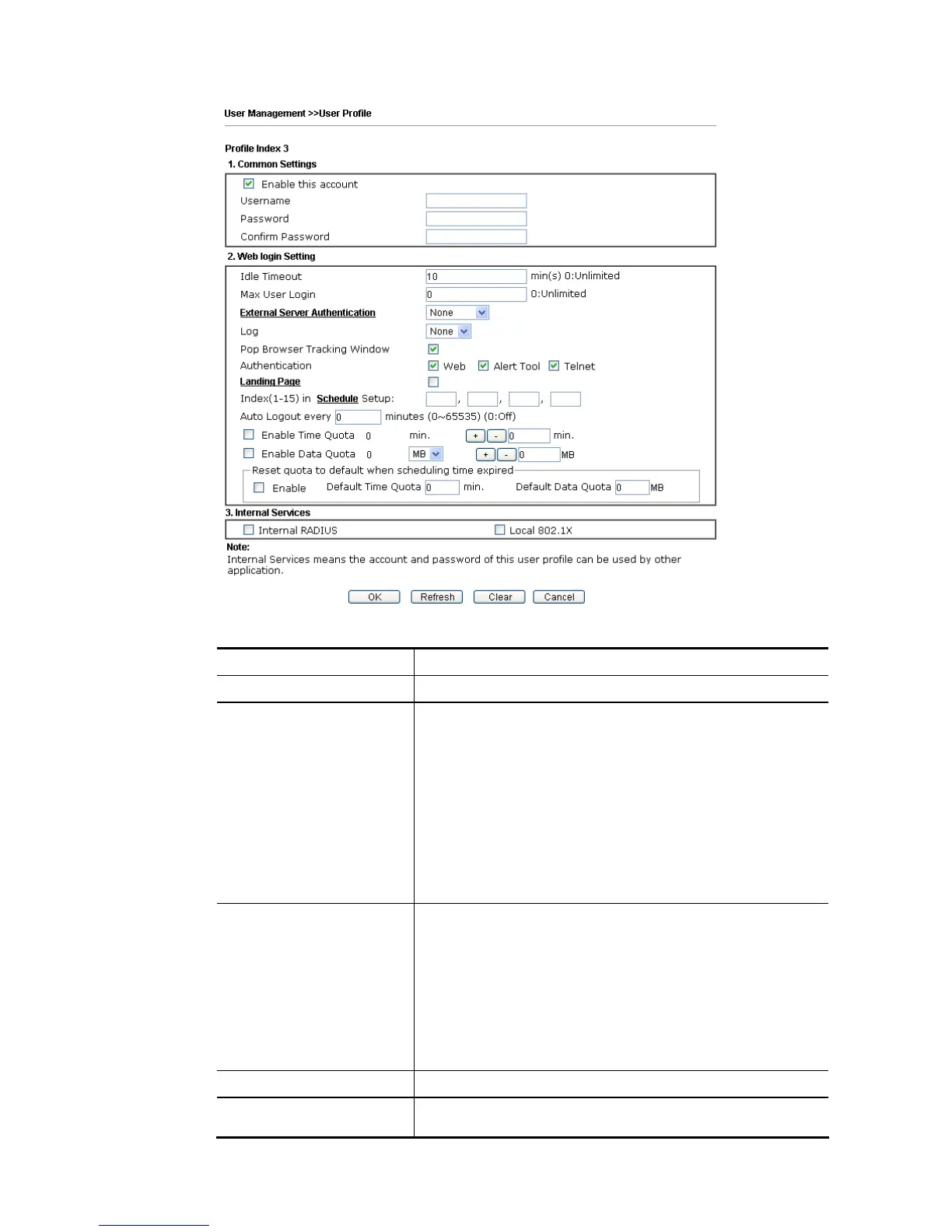
Available settings are explained as follows:
Item Description
Enable this account Check this box to enable such user profile.
User Name Type a name for such user profile (e.g., LAN_User_Group_1,
WLAN_User_Group_A, WLAN_User_Group_B, etc). When a
user tries to access Internet through this router, an
authentication step must be performed first. The user has to
type the User Name specified here to pass the
authentication. When the user passes the authentication,
he/she can access Internet via this router. However the
accessing operation will be restricted with the conditions
configured in this user profile.
The maximum length of the name you can set is 24
characters.
Password Type a password for such profile (e.g., lug123,
wug123,wug456, etc). When a user tries to access Internet
through this router, an authentication step must be
performed first. The user has to type the password specified
here to pass the authentication. When the user passes the
authentication, he/she can access Internet via this router
with the limitation configured in this user profile.
The maximum length of the password you can set is 24
characters.
Confirm Password Type the password again for confirmation.
Idle Timeout If the user is idle over the limitation of the timer, the
network connection will be stopped for such user. By







 To Next Page