Need help?
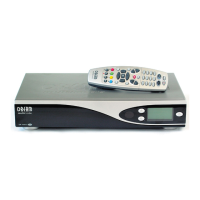
Do you have a question about the Dreambox DM 7000-S and is the answer not in the manual?
Configuring DreamUp software settings, including COM port and IP addresses.
Connecting the PC to the Dreambox via serial and network interfaces.
Installing new operating software (image) onto the Dreambox.
Restoring the Dreambox to its original factory default configuration.
 General
| Model | Dreambox DM 7000-S |
|---|---|
| Category | Set-top box |
| Tuner Type | DVB-S |
| Clock frequency | 252 MHz |
| RAM | 64 MB |
| Flash Memory | 8 MB |
| Operating System | Linux |
| Smartcard Reader | 1 |
| Video decoder | MPEG-2 |
| Audio decoder | MPEG-1 Layer I & II |
| Data port | RS-232 |
| Internal HDD | Optional |
| USB | No |
| LNB power supply | 13V/18V |
| DiSEqC | 1.0 |
| Video Output | Composite, S-Video, RGB |
| Audio Output | Stereo |
| Ethernet | 10/100 Mbit/s |
| CPU | IBM PowerPC 405D4 |

 To Next Page