41
OPERATION & USE
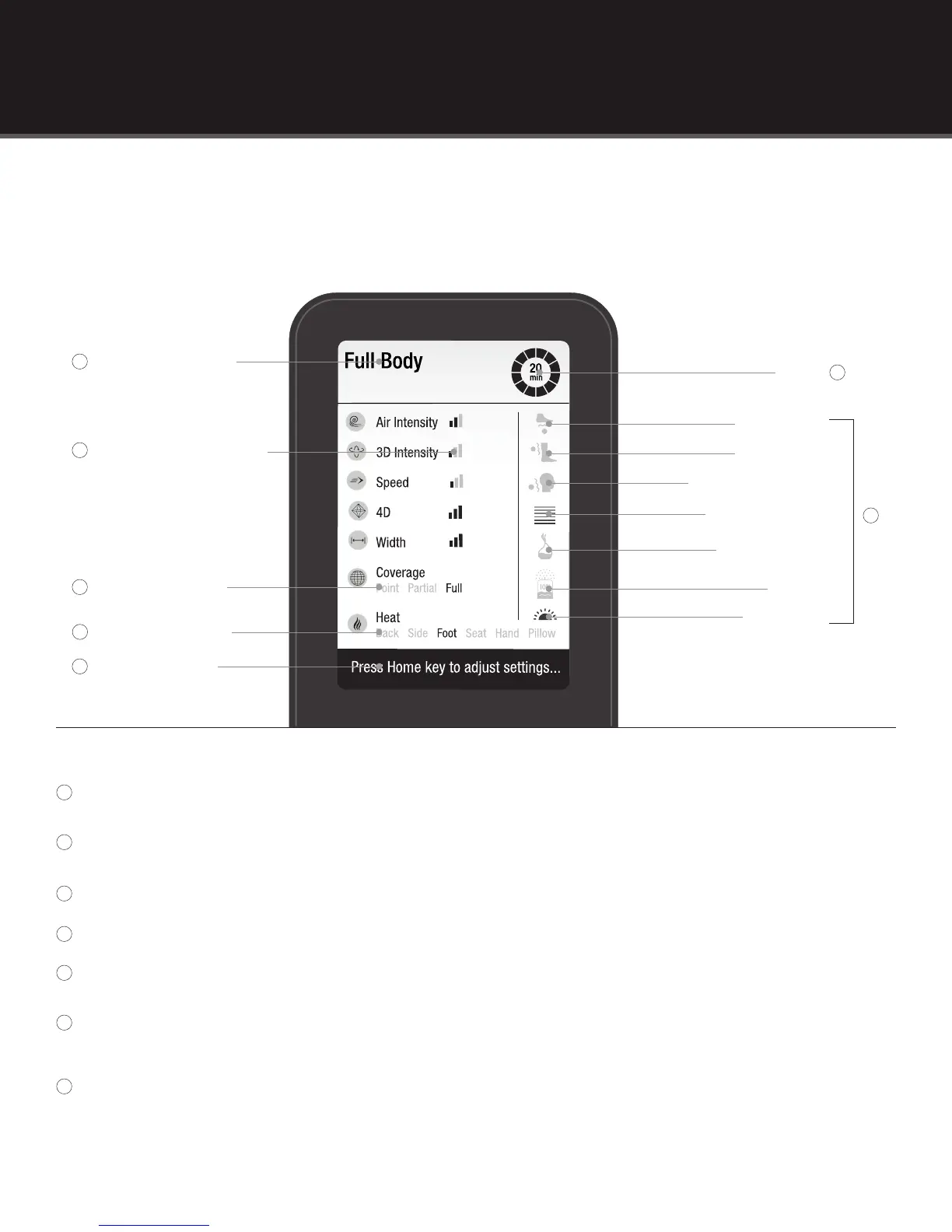
Reading the Remote Home Screen
The selected program(s) names will appear in this place.
The darkened bars indicate your selection.
1 bar = Low, Ultra Slow/Slow, Narrow 2 bars = Medium 3 bars = High, Fast, Wide
The darkened word indicates your selection.
The darkened selection(s) indicated areas of heat that are activated.
Scrolling tip text helps guide you through the massage chair usage.
When a program begins, the length of the program appears in the center. The circle will go from green
to grey as time passes.
When these icons appear in color, the feature is activated. When they appear in grey scale, they are
not activated.
Timer
Selected Program(s)
Coverage Selection
Heat Area Selection
Speed/Intensity Selection
Scrolling Tip Text
Foot Rollers
Calf Rollers
Pillow Neck Knead
Chromotherapy
Aromatherapy
Ionizer
LED Lights
1
1
2
3
4
5
6
7
6
7
2
5
3
4



 To Next Page