The CarDAQ-M J2534-1&2 Module is a comprehensive and upgradeable Pass-Thru device designed for technicians to re-flash modern vehicle controllers and perform dealer-level diagnostics on select manufacturer's vehicles. It is engineered to comply with OBDII protocols, commonly used in 1996 and newer cars and light trucks sold in the USA.
Function Description:
The CarDAQ-M serves as a J2534 Pass-Thru device, enabling technicians to reprogram emissions-related vehicle electronic control units (ECUs), such as engine and transmission controllers. Some automakers also allow for the reprogramming of additional modules and provide factory diagnostics through the J2534 standard. The device is designed to be future-proof, with expansion modules available to support new vehicle technologies as OBDII standards evolve and vehicle computer systems become more complex. By connecting these modules end-to-end, the CarDAQ-M can be updated to maintain its status as a current J2534 tool. The package includes the CarDAQ-M interface, a USB cable, an OBD-II cable, and an installation CD containing PC drivers and the J2534 Toolbox software.
Important Technical Specifications:
The CarDAQ-M J2534-1&2 Modules support a wide range of protocols, ensuring broad vehicle compatibility. These include:
- CAN Bus (capable of ISO 15765, GMLAN, J1939, and ISO14229)
- 2nd CAN (Dual or Single Wire)
- Ford SCP (J1850PWM)
- GM Class2 (J1850VPW)
- KWP2000 (ISO9141/14230)
- Chrysler SCI (J2610)
The device is compliant with SAE J2534 (Feb 2002) and SAE J2534-1 (Dec 2004), as well as ISO 22900-1 MVCI physical layer. It supports programming voltage on J1962 pins 6, 9, 11, 12, 13, 14, or Aux, and includes a ground pin 9.
Physical and Environmental Specifications:
- Input Voltage Range: 7VDC to 26VDC
- Supply Current: 140mA @ 7VDC, 100mA @ 12VDC
- Operating Temperature: +0°C to +60°C ambient
- Storage Temperature: -20°C to +85°C ambient
- Size: 1.25"H x 7.5"D x 3.25"W
Connectors and Status Indicators:
The CarDAQ-M features several ports for connectivity and expansion:
- Expansion A and B: Future PC connection options.
- USB: For direct PC USB connection.
- AUX: External programming voltage supply, used for vehicles with special programming needs.
- PWR: External power option, potentially required for future expansion modules.
- Vehicle: OBDII cable connection point.
- Expansion C: Connection for future expansion modules.
Usage Features:
- Software Installation: Before connecting the CarDAQ-M to a PC, users must install the J2534 ToolBox, Tech2Win Driver, and CarDAQ-M drivers from the provided CD or by downloading them from www.drewtech.com. The installation process involves running
setup.exe and following the Setup Wizard instructions. For Windows Vista and 7, drivers are automatically found and installed upon connecting the device. Windows XP users require additional steps, including selecting "No, not this time" when prompted by the "Found New Hardware Wizard" and then choosing "Install the software automatically (Recommended)."
- Expansion Module Integration: The CarDAQ-M is designed for modular expansion. To add an expansion module, all cables must be unplugged from the CarDAQ-M. Half tabs on the side of the CarDAQ-M (with "Vehicle" and "Expansion-C" connectors) are removed using a 1/16" Allen style wrench. The expansion module is then connected, ensuring the text on the labels reads in the same direction and the USB port on the J2534-1 module is accessible. The modules are fastened together using the provided full tabs and additional screws.
- J2534 ToolBox™: This software, developed by Drew Technologies, provides technicians with up-to-date information on J2534, manufacturer reprogramming issues, links to manufacturer sites, and more. Users need to register and create an account to access all features. The registration process involves providing personal and business information, and registering the CarDAQ-M device.
- General Tab: Displays news and current issues in the J2534 service world.
- Flashing Tab: Offers information needed before performing a re-flash.
- Diagnostics Tab: Provides information for diagnostics through J2534, including manufacturers that support diagnostics with the CarDAQ-M.
- Support Tab: Contains tools for ensuring the Pass-Thru device functions correctly, including software to update drivers and firmware.
- Sales Tab: Information on other Drew Tech products.
- Recalls Tab: Lists recalls for vehicles 1996 and newer.
- Forums Tab: Dedicated forums for discussions on J2534 devices and the J2534 ToolBox.
- Driver Updates: To update CarDAQ-M drivers, users must unplug the device from the PC, visit www.drewtech.com/downloads, determine their computer's Windows version (32 or 64 bit), download the appropriate "Drivers Only" installer, and run the file.
Maintenance Features:
- Troubleshooting:
- Device not working after connection: Ensure drivers are installed using Install Check in the J2534 Toolbox. If not, disconnect the CarDAQ-M, install drivers from the CD, then reconnect.
- Drivers installed but still not working: Connect CarDAQ-M to both the computer and a vehicle (key in "On" position). Open J2534 Toolbox, go to the support tab, and use the Vehicle Check application to see if a protocol is found. If an error occurs, re-install the drivers.
- Re-installing drivers: Run the installer from the CD or website, click "Remove" to uninstall, then run it again to install.
- Problems re-flashing a vehicle: Gather information on the computer's operating system, CarDAQ-M driver and firmware versions, vehicle information, and error messages. Contact the vehicle manufacturer's technical support first, then Drew Technologies for assistance if needed.
- Technical Support: For any issues or concerns, contact Drew Technologies Technical Support at support@drewtech.com. Support is available Monday through Friday, 9:00 a.m. to 5:30 p.m. Eastern Time.
- Returns and Repairs: If a unit needs repair, technical support will provide a Return Merchandise Authorization number (RMA#). This number should be written on the outside of the shipping box. If the repair is not covered by the limited warranty, users will be contacted for payment arrangements.
- Limited Warranty: Drew Technologies, Inc. guarantees the CarDAQ-M is free from physical defects in material and workmanship under normal use for one year from the date of purchase. The company's liability is limited to the product's price, and it is exempt from claims for direct, indirect, special, incidental, or consequential damages resulting from the use of the product, its software, or documentation. Drew Technologies reserves the right to revise or update its products, software, or documentation without individual notification.

 Need help?
 General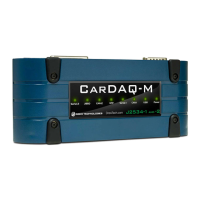

 To Next Page