83
3. Il telecomando si spegnerà
automaticamente se non
rileverà una fotocamera
entro 15s
4. Per caricare, collegare il
telecomando tramite il mini
cavo USB in dotazione a una
porta USB alimentata
UTILIZZO DEL TELECOMANDO
Quando la fotocamera e
il telecomando sono in
modalità Pairing, premendo
ACTION è possibile iniziare la
registrazione video, scattare
una foto, avviare le modalità
time-lapse o foto a raca, a
seconda della modalità della
fotocamera. Premendo STOP
si concluderà il video o la
registrazione time-lapse.
Premendo ACTION durante la
registrazione video permetterà
di scattare una foto o avviare
la Codica Video (se attivata,
vedere p86). Premendo STOP
si terminerà la registrazione.
Il LED lampeggia in blu per
confermare il segnale tra la
telecamera e il telecomando.
Premendo STOP mentre la
fotocamera è in Anteprima si
alterna tra le modalità della
fotocamera, indicate dal colore
del LED (vedi pag 79-80).
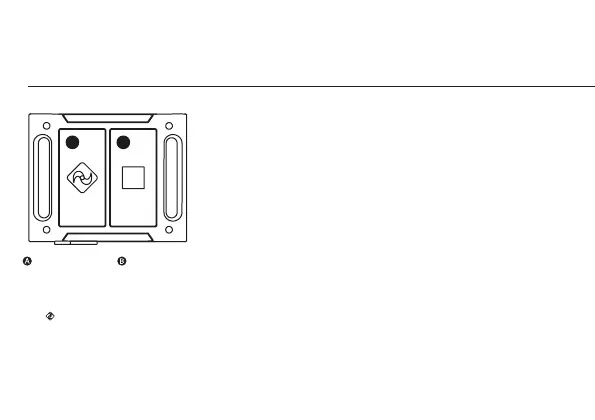
utilizzo del telecomando bidirezionale
A
B
pulsante ACTION pulsante STOP
ACCENSIONE E SPEGNIMENTO
1. Tenere premuto il pulsante
ACTION per accendere
2. Il colore del LED del
telecomando indicherà
la modalità attivata nella
fotocamera


 To Next Page