Need help?
Do you have a question about the DRIFT HD720 and is the answer not in the manual?
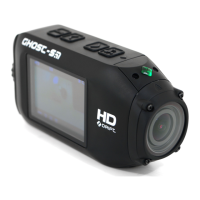
Details the physical components and controls of the Drift HD720 camera, including screen, buttons, and ports.
Guides users through initial setup: opening hatch, inserting Micro SD, inserting battery, charging, and closing hatch.
Instructions on how to turn the camera on and off using the select button and LED indicators.
Explains how to use the Menu, Select, Up, and Down buttons to navigate and select options.
Describes how to capture videos or photos by pressing the Select button or remote record button.
Provides instructions on securely attaching the camera to mounts and aligning the lens correctly.
Lists detailed technical data for the Drift HD720 camera, including resolution, sensor, connectivity, and dimensions.
Details FCC rules, warnings, and notes regarding the device's operation and potential interference.
Highlights safety precautions for battery replacement, disposal, and general product handling.
Information on obtaining firmware updates, customer support, and contacting the support team.
Instructions on how to register the product to obtain warranty service.
 General
| Brand | DRIFT |
|---|---|
| Model | HD720 |
| Category | Action Cameras |
| Language | English |

 To Next Page