
EasyManua.ls Logo

Drill Master 91062 - User Manual

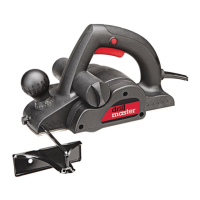
Drill Master 91062
16 pages
Print Icon
To Next Page IconTo Next Page
Loading...
3-1/4” ELECTRIC
PLANER
Model
91062
SET UP AND OPERATING INSTRUCTIONS
Visit our website at: http://www.harborfreight.com
Read this material before using this product.
Failure to do so can result in serious injury.
SAVE THIS MANUAL.
Copyright
©
2003 by Harbor Freight Tools
®
. All rights reserved. No portion of this manual or any artwork
contained herein may be reproduced in any shape or form without the express written consent of
Harbor Freight Tools. Diagrams within this manual may not be drawn proportionally. Due to continuing
improvements, actual product may differ slightly from the product described herein. Tools required for
assembly and service may not be included.
For technical questions or replacement parts, please call 1-800-444-3353.
Manual Revised 12d

Other manuals for Drill Master 91062

Questions and Answers

  • R
    Richard AtkinsonAug 14, 2025
    How to troubleshoot a Drill Master 91062 Planer that will not start?
    • C
      Curtis WardAug 14, 2025
      If your Drill Master Planer isn't starting, first ensure the power cord is properly plugged into the outlet. Then, check if the outlet has power. If not, check the circuit breaker, ensuring it's the correct capacity and not overloaded. Also, if your tool has a thermal reset breaker, turn it off, let it cool, and then press the reset button. If none of these steps work, the tool may have internal damage or wear and will need servicing by a qualified technician.
  • E
    Emily HullAug 17, 2025
    Why is my Drill Master Planer overheating?
    • M
      Mrs. Angelica WhiteAug 17, 2025
      Overheating in your Drill Master Planer can occur if you're forcing the tool to work too fast; allow it to work at its own pace. Check and correct the alignment of the accessory to the fence or table. Ensure cutting accessories are sharp and replace them if dull or damaged. Clear any blockages from the motor housing vents by using compressed air, while wearing ANSI-approved safety goggles and a NIOSH-approved dust mask/respirator. Finally, avoid using long or small diameter extension cords.
  • R
    Robert SmithAug 20, 2025
    What to do if the performance of my Drill Master 91062 decreases over time?
    • S
      Stephanie CalderonAug 21, 2025
      If your Drill Master Planer's performance decreases over time, make sure that cutting accessories are sharp and replace them if needed. Also, the carbon brushes may be worn or damaged, in which case you should have a qualified technician replace them.
  • D
    Dr. Matthew HowardAug 25, 2025
    Why is my Drill Master 91062 making excessive noise or rattling?
    • T
      tayloranthonyAug 25, 2025
      Excessive noise or rattling in your Drill Master Planer usually indicates internal damage or wear, such as with the carbon brushes or bearings. In this case, have a technician service the tool.
  • D
    Donald JohnsonAug 27, 2025
    Why does my Drill Master 91062 operate slowly?
    • G
      Gabriela ReynoldsAug 27, 2025
      If your Drill Master Planer operates slowly, the extension cord may be too long or the wire size too small. Try eliminating the extension cord. If you need an extension cord, use a shorter, heavier gauge cord.
  • D
    deleonreneeAug 30, 2025
    What to do if my Drill Master 91062 will not start?
    • B
      Brenda GregoryAug 30, 2025
      If your Drill Master Planer isn't starting, first, ensure the cord is properly plugged into the outlet. Then, check if the outlet has power. If the tool has a thermal reset breaker, turn it off, let it cool, and press the reset button. If none of these steps work, the tool may have internal damage or wear and should be serviced by a qualified technician.
  • S
    Susan EdwardsSep 3, 2025
    How to fix decreased performance of Drill Master 91062?
    • A
      ahughesSep 3, 2025
      If the performance of your Drill Master Planer decreases over time, it could be due to worn or damaged carbon brushes, which should be replaced by a qualified technician. Another cause could be a dull or damaged blade. Keep the blades sharp and replace them when necessary.
  • V
    vedwardsSep 6, 2025
    Why is my Drill Master 91062 Planer making excessive noise?
    • M
      meghan96Sep 6, 2025
      Excessive noise or rattling in your Drill Master Planer can be caused by internal damage or wear, which requires a technician to service the tool. It can also be due to a worn, stretched, or broken belt, which would need to be replaced.
  • H
    heatherwilsonSep 9, 2025
    What to do if motor runs, but Drill Master 91062 Planer doesn't plane?
    • S
      sullivannormaSep 9, 2025
      If the motor of your Drill Master Planer runs, but the tool does not plane, it is likely that the belt is damaged or broken and needs to be replaced.

Summary

Important Safety Information

General Power Tool Safety Warnings

Comprehensive safety guidelines for power tool operation, including work area and electrical safety.

Planer Specific Safety Warnings

Essential safety precautions tailored for operating the electric planer.

Vibration Safety

Reducing health risks associated with prolonged tool vibration exposure.

Grounding and Extension Cord Guidelines

Grounding and Double Insulation

Understanding tool grounding requirements and the double insulation system.

Extension Cord Selection and Usage

Proper selection and use of extension cords for safe and effective operation.

Product Setup and Operation

Product Specifications

Key technical details, dimensions, and performance metrics of the planer.

Unpacking and Initial Setup

Steps for unpacking, inspecting, and preparing the planer for its first use.

Operating Instructions

Guide to planer functions, controls, and basic operating procedures.

Work Area and Operation Guidance

Setting up the workspace and performing planer operations safely and effectively.

Maintenance, Troubleshooting, and Parts

Maintenance and Servicing

Procedures for cleaning, lubrication, and replacing key components like carbon brushes and blades.

Troubleshooting Common Issues

Diagnosing and resolving typical problems encountered with the planer.

Parts List and Assembly Diagram

Identification of all parts and a visual guide for assembling the planer.

Warranty Information

Details on the limited 90-day warranty, coverage, and claim procedures.

Drill Master 91062 Specifications

General IconGeneral
BrandDrill Master
Model91062
CategoryPlaner
LanguageEnglish