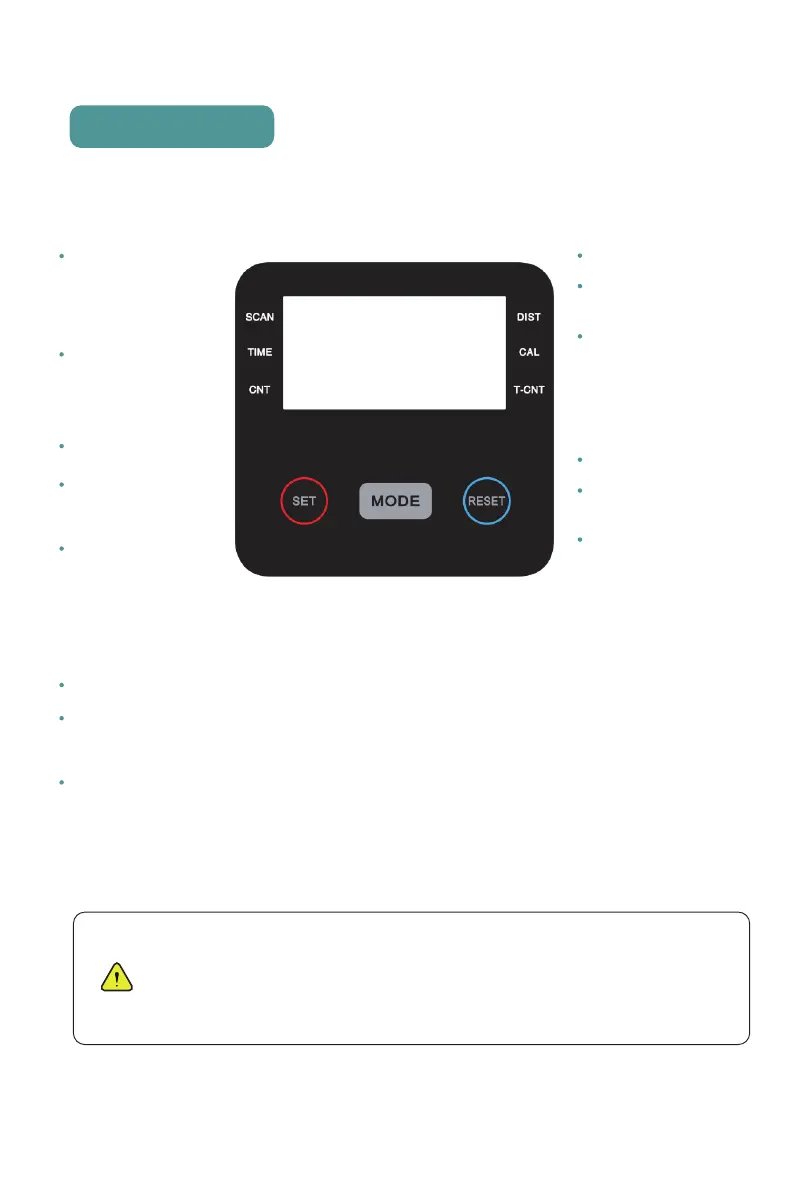
MODE RESET
DIST
CAL
T-CNT
SCAN
TIME
CNT SET
Key Function
NOTE:
1. If the display is faint or shows no figures, please replace the batteries.
2. The monitor will enter into sleep/power saving mode after 4 mins without rowing or pulse input
3. The monitor will turn on when starting to rowing or push button w/signal in.
4. The monitor will start calculating when you start to rowing and will stop when you stop for 4 seconds .
To set the values
of time, count and
calories (when not
in SCAN mode).
Press it to select
and lock on a
separate function
Press and and
hold the MODE
key for 3 seconds
to reset the value
to ZERO.
Count the total stroke number
clear after power off.
Press“MODE” button until
the “SCAN” function appears,
5 functions will be rotated
in the following order:Time
--Dist--Calorie--Count--
T-Count.
Each function will be
hold for 4 seconds.
Count the workout time
display during rowing.
Press “MODE” button until
“TIME” appears, press
“SET” button to set the
workout time.
When the “SET” becomes
ZERO, the computer will
stop for 1 second before
the next counting.
Count the strokes during
rowing.
Press“MODE” button until
“Count” appears, press
“SET” button to set stroke
number.
When the“SET” becomes
ZERO, the computer will
stop for 1 second before
the next counting.
Count the rowing distanceduring
rowing.
Press“MODE” button until“DIST”
appears, press “SET”button to set
the rowing distance.
When the“SET” becomes ZERO,
the computer will stop for 1
second before the next counting.
Count the total burned calories
during rowing.
Press“MODE”button until “CAL”
appears, press “SET” button to
set the calories to be burned.
When the“SET” becomes ZERO,
the computer will stop for 1 second
before the next counting.
dripex.co.uk@outlook.com14


 To Next Page