Need help?
Do you have a question about the Drive DeVilbiss Healthcare AutoFold and is the answer not in the manual?
Describes suitable indoor and outdoor environments for the powerchair.
Defines the weight and capability requirements for powerchair users.
Outlines the primary purpose of the powerchair for mobility.
Specifies the conditions for which the powerchair is indicated.
Details the powerchair's design, classification, and potential design changes.
Explains the meaning of warning and caution symbols in the manual.
Emphasizes the need for user-specific risk assessments before operation.
Lists conditions or factors that make the powerchair unsuitable for a user.
Specifies maximum weight capacity and loading guidelines.
Highlights the importance of user familiarity and training before operation.
Provides critical safety warnings for powerchair operation and use.
Defines warning and caution symbols indicating potential hazards.
Explains symbols related to instructions, classification, and handling.
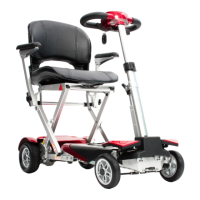
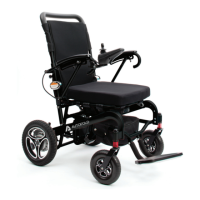
Identifies the main structural components and wheels of the powerchair.
Highlights the joystick, control unit, and handles for operation.
Details the storage areas and battery case.
Provides instructions and warnings for initial powerchair installation.
Details the process and safety precautions for charging the powerchair battery.
Explains the methods and safety warnings for folding and unfolding the powerchair.
Lists essential checks to ensure powerchair safety and functionality before operation.
Defines the ambient temperature and humidity limits for powerchair operation.
Identifies and explains the functions of the powerchair's control panel components.
Provides guidance and safety precautions for operating the powerchair.
Offers advice and warnings for navigating obstacles and uneven terrain.
Details safe practices and warnings for driving on slopes and inclines.
Advises on operating in outdoor conditions and avoiding adverse weather.
Provides post-operation steps for storage and maintenance.
Outlines routine maintenance requirements and when to seek professional help.
Explains the powerchair's fault detection system and error codes.
Directs users on how to handle component replacement and repairs.
Instructions for unpacking and setting up the powerchair.
Guidance on installing and securing the powerchair joystick.
Steps for attaching cable clips to the powerchair frame.
Process for inserting and securing the main battery.
Instructions for using the folding mechanism switches.
Guide for installing the battery in the remote control fob.
Instructions to put motors into 'Electric' mode.
Steps to drop down armrests and pull-down footrest.
Guidance on installing the seat and back cushions.
Information on charging the powerchair battery.
Instructions for switching on the powerchair and starting operation.
How to use the remote fob for unfolding and folding the powerchair.
 General
| Foldable | Yes |
|---|---|
| Legrest Length | Adjustable |
| Frame Material | Aluminum |
| Wheel Type | Solid |
| Brakes | Electromagnetic |
| Armrests | Flip-up |
| Footrests | Swing-away |
| Product Type | Electric Wheelchair |
| Seat Width | 18 inches |
| Seat Depth | 43 cm (17") |
| Overall Height | 93 cm |
| Front Wheel Size | 8 inches |
| Armrest Height | 9 inches |

 To Next Page