EasyManua.ls Logo

Drive DeVilbiss Healthcare iGo 2 - User Manual

Drive DeVilbiss Healthcare iGo 2
36 pages
Go to English
Print Icon
To Next Page IconTo Next Page
Loading...
CS
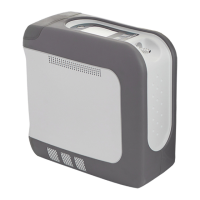
Drive DeVilbiss iGo®2 Přenosný kyslíkový koncentrátor, Model 125
POUZE NEBEZPEČÍ - ZÁKAZ KOUŘENÍ
Schváleno pro komerční použití v letectví
SESTAVENO V USA
Není vyrobeno z přírodního latexu.
EN
Drive DeVilbiss iGo®2 Portable Oxygen Concentrator, Model 125
ONLY DANGER - NO SMOKING
Approved for Commercial Aircraft Use
ASSEMBLED IN USA
Not manufactured with natural rubber latex.
0044

Table of Contents

Questions and Answers

  • B
    Benjamin Hernandez PhDAug 15, 2025
    What to do if Drive DeVilbiss Healthcare iGo 2 Medical Equipment unit does not operate?
    • B
      Breanna WolfAug 15, 2025
      If your Drive DeVilbiss Healthcare Medical Equipment unit does not operate, and the display is not illuminated when you press the power button, try the following: * Ensure you press and hold the power button for 2 seconds. * Verify a battery is installed. * If using external power, check all cord connections. * Check the wall outlet and circuit breaker. If these steps do not resolve the issue, the battery may be depleted, or there may be a unit malfunction. In the first case, install a charged battery. In the second case, or if the battery is defective, contact your Drive DeVilbiss provider.
  • Q
    qdiazAug 18, 2025
    What to do if yellow Low O symbol is on with Drive DeVilbiss Healthcare iGo 2?
    • S
      Steven WrightAug 19, 2025
      If the yellow Low O symbol is on, with or without an audible alert, it means the concentration of the unit is falling. The symbol flashes below 86%, and the audible alert sounds below 85%. In this case, contact your provider and switch to your reserve oxygen system.
  • D
    dsmithAug 21, 2025
    What to do if red service required symbol flashes on Drive DeVilbiss Healthcare iGo 2?
    • P
      posborneAug 21, 2025
      If the red Service Required symbol flashes with an audible alert, it indicates that the unit may be overheated or malfunctioning. First, ensure that the vent holes are not blocked and allow the unit to cool down before trying again. If the issue persists, contact your provider and switch to your reserve oxygen system.
  • D
    davischarlesAug 25, 2025
    What to do if Drive DeVilbiss Healthcare Medical Equipment unit is on but audible alert is sounding?
    • J
      Jennifer MackAug 25, 2025
      If your Drive DeVilbiss Healthcare Medical Equipment is on and an audible alert is sounding but there is no visual alarm, the device may not be detecting your breathing. Here's what to check: * Ensure the cannula is properly applied and you are breathing on the device. * Check all cannula connections to ensure they are tight, and adjust the cannula for a comfortable fit in your nose. Also, make sure the tubing is not kinked. * Verify that the tubing and cannula are not too long (they should not exceed 25 feet). * Ensure you are using a standard cannula, not a low-flow cannula.
  • R
    Ryan BurtonAug 27, 2025
    Why battery status lights never indicate fully charged on Drive DeVilbiss Healthcare Medical Equipment?
    • B
      Bruce HammondAug 27, 2025
      If the battery status lights on your Drive DeVilbiss Healthcare Medical Equipment never indicate fully charged, and you are using the DC auto adapter, it may be due to insufficient power. The battery will not charge if the power source is less than 13.8V, but the device will still function correctly.
  • N
    Natasha PerezAug 30, 2025
    What to do if yellow Low O symbol is flashing on Drive DeVilbiss Healthcare Medical Equipment?
    • M
      Michael GarrettAug 31, 2025
      If the yellow Low O symbol is flashing on your Drive DeVilbiss Healthcare Medical Equipment, it may be during the start-up period. Wait until the start-up period is complete, which usually takes about 10 minutes.
  • M
    Michael JonesSep 2, 2025
    What to do if Drive DeVilbiss Healthcare iGo 2 unit is not triggering properly?
    • B
      Becky WilkinsonSep 2, 2025
      If your Drive DeVilbiss Healthcare Medical Equipment unit is not triggering properly, the sensor may need recalibration. To recalibrate, turn the unit ON but do not use it for 5 minutes. This will allow the sensor to auto-calibrate.
  • A
    Ashley CruzSep 5, 2025
    What to do if Drive DeVilbiss Healthcare iGo 2 battery fuel gauge symbol is flashing?
    • J
      jameswrightSep 5, 2025
      If the Battery Fuel Gauge symbol is flashing on your Drive DeVilbiss Healthcare Medical Equipment, with or without an audible alert, it indicates that the battery is nearing depletion. If the symbol flashes, the battery life is less than 10%. If an audible alert sounds, the battery life is less than 5%. To resolve this, charge the battery by connecting the device to an AC or DC power source. You can also install an optional backup battery.
  • B
    brandigonzalesSep 8, 2025
    What to do if yellow Low O symbol is on and/or red service required light is on Drive DeVilbiss Healthcare Medical Equipment?
    • J
      jhansenSep 8, 2025
      If the yellow Low O symbol is on and/or the red Service Required light is on your Drive DeVilbiss Healthcare Medical Equipment, it may be due to contaminated sieve beds. Try running the unit for at least 15 minutes to recover the sieve beds to their full potential. If that doesn't help, consider replacing the sieve beds.
  • C
    Crystal MathisSep 12, 2025
    What to do if any other problems occur with Drive DeVilbiss Healthcare Medical Equipment iGo2 POC?
    • T
      tina05Sep 12, 2025
      If any other problems occur with your Drive DeVilbiss Healthcare Medical Equipment iGo2 POC, turn your unit off and switch to your reserve oxygen system. Contact your Drive DeVilbiss provider immediately.

Summary

Quick Start Guide

DANGER-NO SMOKING Safety Warning

Crucial safety warning regarding smoking near the oxygen concentrator.

Initial Battery Charging Instruction

Instruction to fully charge the battery before first use.

Operating the iGo2 POC: Step-by-Step

Instructions for installing battery, connecting cannula, and operating the device.

Important Safeguards

General Safety Warnings and Precautions

Covers critical safety advice like avoiding smoking and electrical hazards.

Detailed Safety Precautions

Device Placement and Environmental Hazards

Precautions regarding unit placement, heat, pollutants, and specific operating conditions.

Electrical, EMC, and MR Safety Warnings

Warnings about electrical shock, electromagnetic interference, and MR environments.

System Setup and Operation

Daily Operation Guide

Step-by-step guide for the routine daily use of the iGo2 POC.

Device Operation, Power, and Storage

Battery Management

Battery Charging and Recharge Time

Procedures for charging the battery and typical recharge durations.

Troubleshooting and Alarm System

Troubleshooting Common Issues

Guide to identifying and resolving common device symptoms and malfunctions.

Alarm Conditions and Actions

Explanation of device alarms, their meanings, and recommended responses.

Maintenance, Support, and Disposal

Technical Specifications

Device Operating Specifications

Detailed technical specifications including dimensions, ranges, and power requirements.

Warranty and Ordering Information

Drive DeVilbiss Product Warranty

Details on the warranty terms, coverage, and limitations for the iGo2 POC.

Drive DeVilbiss Healthcare iGo 2 Specifications

General IconGeneral
Operating ModesPulse Dose
Flow Settings1-5
Operating Temperature41°F to 104°F (5°C to 40°C)
Oxygen Flow Rate1-5
Battery LifeUp to 3.5 hours
Sound Level37 dBA
Operating AltitudeUp to 13, 123 feet (4, 000 meters)
Battery TypeRechargeable Lithium Ion Battery
AlarmsLow battery, no breath detected

Related product manuals