To verify the preset time: NOTE: Your centrifuge must be plugged in.
a. Push the OPEN / STOP button to disengage the lock and then
open the lid.
b. Push and hold the START button for approximately three (3) seconds. The Yellow
LATCHED indicator light will begin to ash, indicating program mode.
c. When you release the START button, the RUNNING indicator light will begin to
ash. Each ash represents one minute of run time.
d. Press the START button to verify the brake setting. When you release the START
button, the RUNNING indicator light will begin to ash. Each ash represents the
brake setting, from 1 to 10.
To change the preset time: NOTE: Your centrifuge must be plugged in.
a. Push the OPEN / STOP button to disengage the lock and then
open the lid.
b. Push and hold the START and OPEN buttons for approximately three (3)
seconds. The yellow LATCHED indicator light will begin to ash slowly, indicating
that you can now program run time.
Page 5
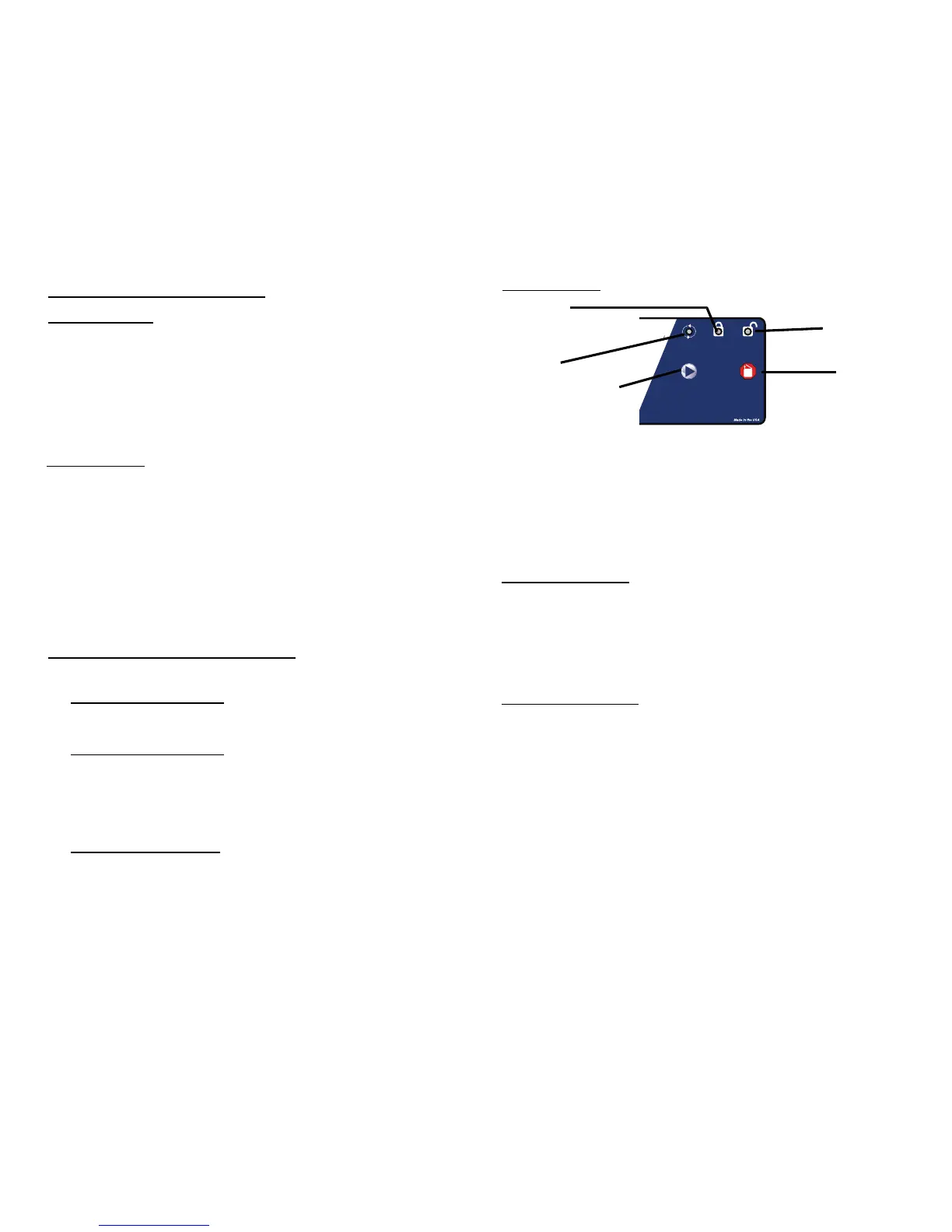
‘RUNNING’ Lights up when the machine
is in operation, (power is
being applied to the motor).
‘LATCHED’ Lights up when the lid has
been closed and latched
properly.
‘UNLOCKED’ Lights up to indicate that the
locking mechanism has been
deactivated, allowing access
to the rotor chamber.
‘START’ Begins a new run, (the lid
must be closed, see pg. 6).
‘OPEN / STOP’Allows for access into the
rotor chamber by disengaging
the locking mechanism. Entry
is only permitted when the
rotor is stopped. Pressing this
button during operation will
terminate the run and unlock
the lid after the rotor has
come to a stop.
Page 8
(cont.)
c. Press START one time for each minute of run time desired, from a minimum of
1 minute to a maximum of 30 minutes. The green START indicator light will ash
each time you press the START button.
d. Press OPEN to enter the run time. You will now begin to adjust the brake setting.
e. Press START to adjust the brake setting, from a minimum of 1 to a maximum
of 10. The green START indicator light will ash each time you press the start button.
f. When you are nished, press the ‘OPEN’ button to exit. Use the above procedure
to verify the run time and brake setting change.
Rotor Removal and Installation:
To remove the rotor:
1. Unlock the centrifuge by pushing the ‘OPEN / STOP’ button and unlatch
and open the lid.
CAUTION: Unplug the centrifuge from the electrical outlet at this time to
eliminate the possibility of electrical shock or other injury.
2. Remove the test tube holders.
3. Remove the nut in the center of the rotor by turning it counterclockwise,
(a tool may be required).
4. The rotor is sitting on a cone-shaped adapter. Pull the rotor up and off of
this adapter.
To install the rotor:
1. Place the rotor back onto the cone-shaped adapter. You may need to turn
the rotor slightly to line it up properly.
2. The rotor should slide onto the rotor cone freely.
3. Once a proper t has been achieved, replace the nut and turn it until it is
hand-tight, (a tool may be required).
4. Replace the tube holders and verify that they are seated properly, (as
shown on page 4).
5. It is recommended that the initial setup procedures be performed to ensure
that the rotor has been installed correctly and that no damage has been
done to the centrifuge during either the rotor installation or possible rotor
chamber cleaning. See page 4 for this procedure.
Care and Preventative Maintenance:
With proper care and maintenance your centrifuge will provide years of laboratory
service. For proper care, the following steps should be taken:
1. Provide Adequate Ventilation: For cooling purposes, the Model 642E draws in
ambient air through the air intake cover on the top of the lid and exhausts
this air in the rear of the base. The centrifuge should be placed on a hard
smooth surface for good air circulation.
2. Always Spin Balanced Loads: Make certain that you are always spinning a
balanced load. The Model 642E has a unique counter balanced motor
mounting design which, along with it’s rubber suction feet, produces
excellent vibration dampening. However, out–of–balance loads may break
glass test tubes and may produce unsatisfactory separation results.
Proper load balancing will improve sample separation and extend the life of
the centrifuge. Refer to page 6 on balanced loads for additional information
on balancing the load.
3. Keep the Tube Holders Clean: NOTE: Always follow the safety guidelines of
your laboratory to properly clean up and/or dispose of materials in the event
that a substance known to be potentially toxic, radioactive or contaminated
with a pathogenic microorganism is spilt in or on the centrifuge. Small
Control Panel:
‘START’
Button
‘OPEN /
STOP’
Button
‘RUNNING’
Indicator
Light
‘LATCHED’
Indicator Light
‘UNLOCKED’
Indicator
Light



 To Next Page
 Loading...