Page 5
Programming memory locations for the model 642VES
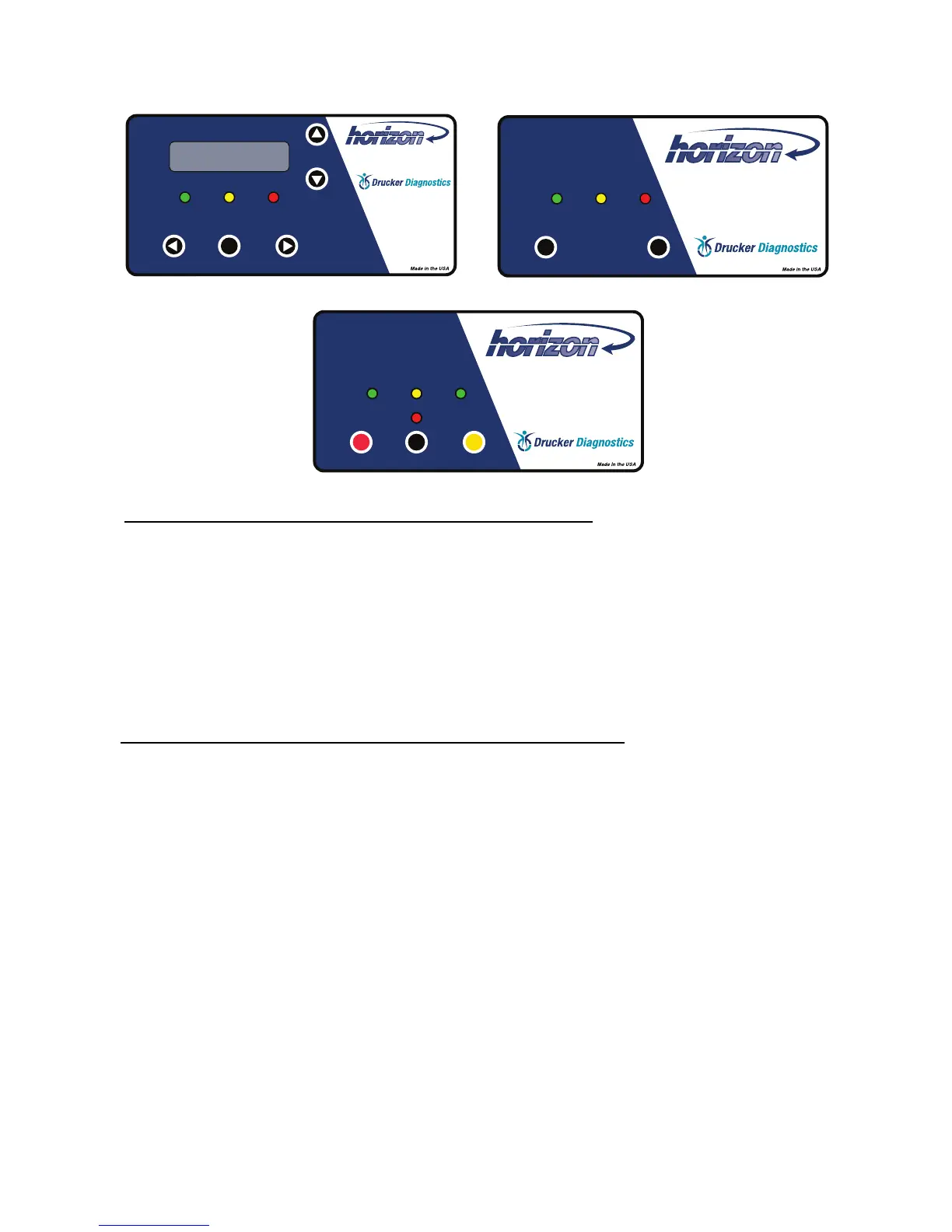
1. To access memory locations, press the MENU button.
2. Select a memory location using the up and down SET buttons.
3. Once the desired memory location has been selected move the cursor to the desired parameter
using the left scroll (START) and right scroll (OPEN/STOP) buttons.
4. Changing the parameter is accomplished by scrolling up and down with the SET buttons.
5. Memory locations can be renamed by scrolling to the name (Default names= Memory 1-9),
moving the cursor to the desired location and selecting a scrolling through the characters with
the SET buttons.
6. Exit the program menu by pressing the MENU button.
7. Any changes are automatically saved upon exiting the program menu.
Verifying settings for the models 642VFD and 642VFD-Plus
1. With the centrifuge powered on, press the OPEN/STOP button to unlock the lid.
2. Open the lid.
3. Press and hold the START (BLOOD) button until the yellow ‘LATCHED’ light begins to ash,
then release.
4. The centrifuge will indicate the settings for the START button you selected with audible beeps.
Count the number of the beeps; they indicate the run time setting. Each beep equals one
minute.
5. Press the START (BLOOD) button again, count the beeps. This time they indicate the RPM
setting (one beep equals 100 RPM).
6. Press the START (BLOOD) button again counting the beeps; they indicate the brake setting
magnitude (1 equals minimum brake level, 10 equals maximum brake level.)
7. Press the START (BLOOD) button again counting the beeps; they indicate the imbalance detec-
tion sensitivity (1 deactivates the detection, 2 equals the lowest sensitivity, 10 equals the maxi-
mum sensitivity).
8. Press the OPEN/STOP to return to the idle state.
9. 642VFD-Plus only: The second preset run time, RPM, and brake level settings can be veried
by following the same procedure but using the URINE button. Note: The imbalance detection
sensitivity can only be veried using the BLOOD button.
642VES 642VFD
642VFD Plus
03-0-0003-0146 642VES Drucker Diagnostics
Revision: B
Tooling: LT-027
Material: 0.010” Polycarbonate
Finish: Velvet
Embossing Height: 0.010"
Adhesive: 3M 9502 or Permanent Equiv.
Black White
Pantone 288 C
Pantone 3135 C
Window: Clear, Non-glare
200 Shady Lane, Suite 170
Philipsburg, PA 16866
(814) 342-6205 Fax: (814) 342-6211
www.druckerdiagnostics.com
03-0-0003-0145 642VFD-PLUS Drucker Diagnostics
Revision: B
Tooling: LT-028
Material: 0.010” Polycarbonate
Finish: Velvet
Embossing Height: 0.010"
Adhesive: 3M 9502 or Permanent Equiv.
Black White
Pantone 288 C
Pantone 3135 C
200 Shady Lane, Suite 170
Philipsburg, PA 16866
(814) 342-6205 Fax: (814) 342-6211
www.druckerdiagnostics.com


 To Next Page