DM - Operating Instructions, Installation Instructions, Wiring diagrams Version 3.1.765 August 2019 5
h. Summer Vent Mode (If ‘Vent Kit’ tted) - The fan can be operated at full speed and the
duct diverting damper set to draw air from outside (cool side of the house) for
2, 4, 8, 12, 24hrs or ‘off’ by pressing the up arrow while controller is in normal
operating mode (not in any menu) (default: not tted**).
i. Time-clock - adjustment is accessed by pressing and holding the down arrow
until ‘Set Clock’ appears, after a moment the time appears, which can be adjusted
up or down using the up arrow to wind back and the down arrow to move
forwards. Press the Mode button to ‘enter’ the new setting.
* Reference Temperature (default 20°C) is set in the commissioning menu
** Default Setting – can be adjusted in the commissioning menu.
Please note: the above modes need to be set by the installing contractor.
Dry-Matic User Operating Instructions (continued)
T
A
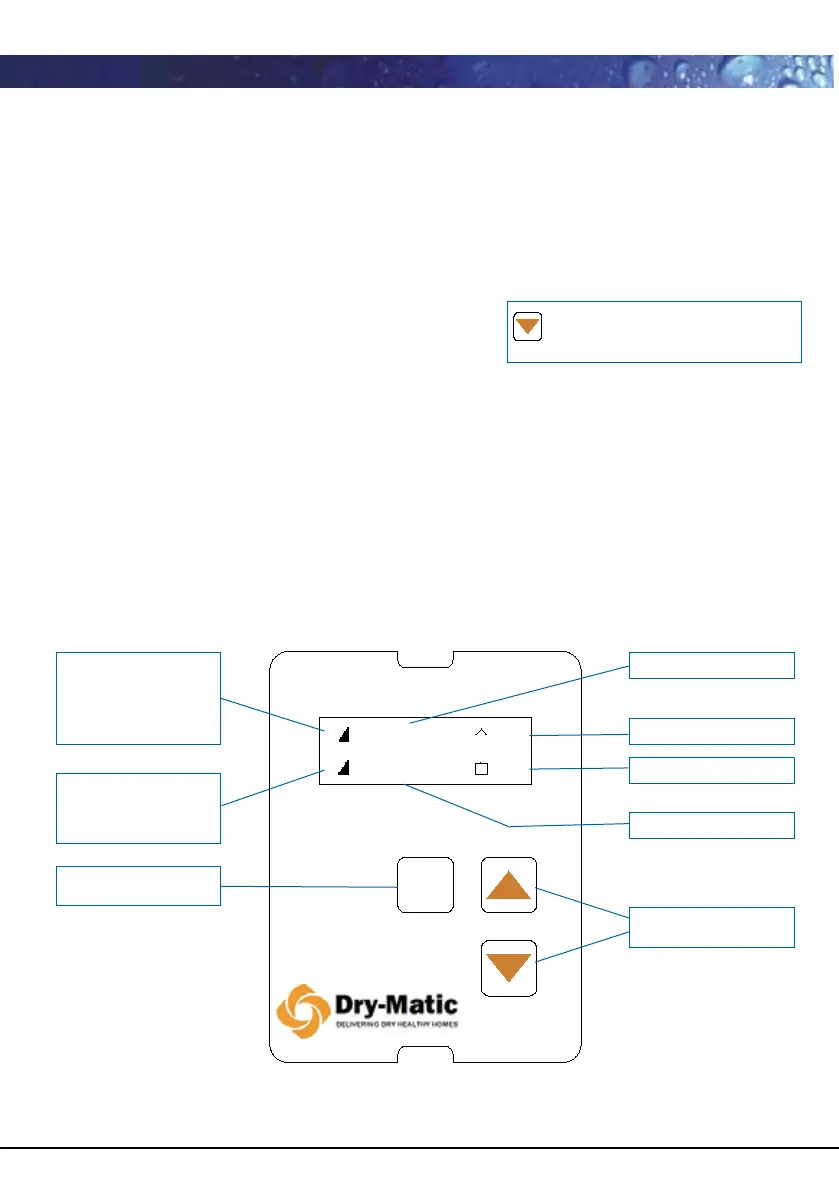
- Attic temperature ( ^ shown in operating display)
T
R
- Inside reference temperature
T
H
- House temperature ( □ shown in operating display)
Mode
H
F
Heat Rec C
C
11
1618:30
Press and hold down arrow for 5
seconds until “Set Clock” appears
Mode
H
F
Heat Rec C
C
11
1618:30
Operating Mode
Attic Temperature T
A
House Temperature T
H
Time
Adjustment buttons
H displays when
heater operating
Bars indicate % of
heat capacity
F- Fan
Bars indicate fan
speed
Programming
Mode button
Dry-Matic digital controller shown in normal operating mode
†
note: previous versions of the digital hall controller require you to
press and hold the mode button and up arrow together to get to
the user menu.


 To Next Page
 Loading...