DM - Operating Instructions, Installation Instructions, Wiring diagrams Version 3.1.765 August 20194
Your Dry-Matic is essentially fully automatic in operation once set up/commissioned
to suit your home. The commissioning set up process ne tunes your Dry-Matic in
all or some of the following Modes:
a. Anti Condensation Mode - when the attic temperature is cooler than the house
temperature, the Fan operates at trickle speed to provide background ventilation
24/7.
b. Heat Recovery Mode - when attic temperature is warmer than house temperature
and house temp is less than “Inside reference temperature” of 20°C*, the fan
speed increases to warm the house (speed increases incrementally as the
temperature difference between house and attic increases to maximum fan
speed at 3°C** difference).
c. Heater Mode (heated models only) - if the attic is cold, <15°C** and the house temp is
below the reference temp of 20°C*, then the heater can operate to temper the
incoming fresh air (heat is proportional to the temperature difference over 3°C**).
The heater mode has the following features:
c1. A time clock feature (heated models only) accessible from the User Menu, that allows
the heater to be turned off / run (as required by thermostat) for programmed
hours** (eg. 7pm to 7am), / or continuously, or off. This allows the user to
operate the heater overnight, or all the time, or to shut heater down while away
for holidays, thereby providing a control of energy usage.
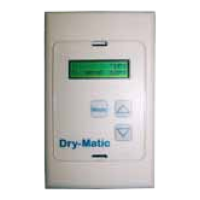
c2.To get to User Menu: press and hold mode button
†
, continue holding while
“Enterin
g
Menus” appears & hold until “User Setu
p
” shows. Use the up arrow to
change the options, Mode button to select.
• Heater enabled Y/N - if N, Heater will not operate
• Heater enabled Y/N - if Y, Options will show next:
• HeaterConnuous - if Y, Heater always enabled
• HeaterConnuous - if N,
Heater enabled at night
• Reset Timer Y/N - if Y, Timer & display reset
NB. Night operating times can be changed in the
‘Set up Menu” on pp10-13
d. Cool Recovery Mode ** (default: disabled) - when house is hot (above ref temp)
and attic temp is less than 20°C* , the fan speed increases (speed is proportional
over the temperature difference to 3°C**) to cool the house down. This will not
operate if attic temp is below 15°C.
e. Auto Summer Shutdown - when house is hot and attic is very hot >27°C**, the
system shuts down until the attic temp decreases again.
f. Auto Winter Shutdown ** (default: disabled) - If attic temp is less than 2°C**, the
system shuts down until attic temp increases again.
g. FilterTimer- This provides an alarm (ashing display) when fan has operated for
240 days**, indicating that the lter should be cleaned and/or replaced (default:
enabled). Can be reset in User Menu (see c2 above).
Dry-Matic User Operating Instructions
Mode
H
F
Heat Rec C
C
11
1618:30
Press and hold Mode button
†
for approx 5 seconds until
“User Setu
p
” appears
Mode
H
F
Heat Rec C
C
11
1618:30
Mode
H
F
Heat Rec C
C
11
1618:30
Use up arrow to change options
Use Mode button to select option
†
note: previous versions of the digital hall controller require you to
press and hold the mode button and up arrow together to get to
the user menu.
†
note: previous versions of the digital hall controller require you to press and
hold the mode button and up arrow together to get to the user menu.


 To Next Page
 Loading...