
 Need help?
Do you have a question about the Dsoon H8WIFI and is the answer not in the manual?
Lists all items provided in the package, such as the camera, SD card, cables, and mounting hardware.
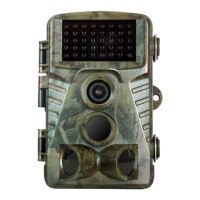
Provides a detailed diagram and labels for all external buttons, ports, lens, sensors, and other physical parts of the camera.
Outlines the critical initial steps for getting the camera operational, including battery and memory card setup.
Covers the necessary steps for installing batteries, connecting external power, and inserting the micro SD card.
Explains the different operating modes (OFF, TEST, ON) and basic camera functions like turning on/off.
Details how to operate the camera in TEST mode for settings adjustments, taking photos, and recording videos manually.
Describes how to review photos and videos on the camera's LCD screen, including playback menus and zoom features.
Configures camera behavior, including photo/video modes, resolution, photo series, and video length settings.
Adjusts sensitivity, shot lag, and side motion sensor parameters for optimal motion detection.
Configures specialized recording features like Target Recording Time, Time Lapse, and Endless Capture.
Manages system preferences such as Time & Date, Language, Password Protection, and WiFi settings.
Provides instructions and required tools for mounting the camera using the included wall bracket and hardware.
Explains how to connect the camera to a mobile device via WiFi using the dedicated app for remote control.
Describes the main sections of the mobile app, including TF Card access, camera settings, and information display.
Details how to review captured photos and videos directly on the camera's LCD screen, including playback menu options.
Explains methods for transferring photos and videos from the camera to a computer for viewing and backup.
Addresses frequent problems like photos not capturing, camera not taking images, or issues at night.
Solves problems related to photo/video quality, such as images appearing too dark, too bright, or streaked.
Provides solutions for issues like LCD screen malfunctions, camera not retaining settings, or WiFi connectivity failures.
Lists key technical details of the camera, including resolutions, file formats, lens, memory, and environmental ratings.
Details the FCC compliance statement for the device, ensuring it meets regulatory standards for digital devices.
Outlines the terms of the 12-month warranty and lifetime technical support provided for the camera.
 General
| Photo Resolution | 12MP |
|---|---|
| Video Resolution | 1080p |
| IR Flash Range | 65ft |
| Waterproof | IP66 |
| Connectivity | WiFi |
| Trigger Speed | 0.3 seconds |

 To Next Page