Need help?
Do you have a question about the DT Research DT135BT and is the answer not in the manual?
The DT135BT is an embedded controller/system designed for a wide range of computing needs, offering a compact, robust, and versatile solution. It is powered by a high-performance and energy-efficient Intel Celeron quad-core processor, making it suitable for various deployments. The system supports major embedded operating systems as well as Microsoft Windows operating systems, providing a complete solution for diverse applications.
The DT135BT serves as a core computing unit, capable of running a variety of software solutions. Its primary function is to provide a stable and efficient platform for embedded applications, multimedia tasks, and general computing. The device is designed for reliable operation in various environments, thanks to its robust construction.
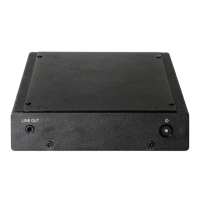
Powering On and Off: The DT135BT features a power button located on the front bezel. To turn the device on, simply push and release the power button. The power LED will illuminate blue, and the corresponding interface will be displayed on the connected monitor. The power button's function can be configured differently depending on the power options of the operating system.
To turn off the device, you can either push and release the power button (again, depending on the software operating system) or use a software shutdown interface. In the event of a system lockup, the power button can be used to perform a reset. This is achieved by pushing and holding the power button for at least 4 seconds, which will shut down the system. Be aware that any unsaved work will be lost during a hard reset. Pushing the power button again after a shutdown will restart the device.
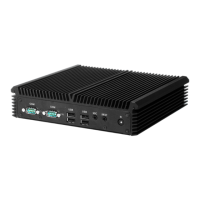
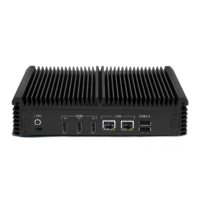
Connectivity and Ports: The DT135BT is equipped with an optimal set of I/O ports while maintaining its compact size. On the front, it includes an audio jack (A) and the power button (B). The rear panel offers a comprehensive array of ports:
Storage and Memory: The DT135BT offers flexible storage configurations, allowing users to utilize the internal memory for installed software and data. Additionally, users can supplement storage space with USB-based peripherals such as flash disks, providing ample room for various applications and files. The system's RAM capacity is designed to support smooth multitasking and efficient operation.
Software Solutions: The DT135BT is designed to provide complete solutions for a variety of computing needs. Users are offered a choice of software solutions on a platform characterized by high-integration and energy-efficient processor technology, expanded graphics capabilities for multimedia applications, robust construction for reliable operation, and cost-effective computing in compact and versatile packaging.
Options and Expandability: The DT135BT is designed to work with a range of custom and off-the-shelf options to enhance its applicability for various deployments. This includes a built-in wireless LAN with an external antenna, providing flexible network connectivity without the need for additional adapters.
Robust Construction: The DT135BT features robust construction, ensuring reliable operation and longevity. This design choice contributes to its suitability for demanding environments and continuous use.
Ease of Integration: The device's compact size and optimal set of I/O ports make it easy to integrate into various setups and systems. Its design prioritizes versatility, allowing it to fit into different deployment scenarios.
Troubleshooting and Support: In the unlikely event of issues such as smoke, abnormal noise, or strange odors, users are advised to immediately power down the DT135BT, disconnect all power sources, and report the problem to their device provider. This ensures safety and proper resolution of any potential malfunctions.
Precautions for Handling: To ensure the longevity and proper functioning of the DT135BT, users should always exercise care when operating and handling the device. It is crucial not to disassemble any portion of the enclosure, as this will void the product warranty. Furthermore, only the AC/DC adapter provided with the DT135BT or acquired from the manufacturer or its partners should be used to power the device. These precautions help maintain the integrity of the device and ensure continued reliable performance.
 General
| Category | Controller |
|---|---|
| Manufacturer | DT Research |
| RAM | 8GB |
| Operating System | Windows 10 IoT Enterprise |
| Connectivity | Wi-Fi, Bluetooth |
| Ports | HDMI |
| Display | 1920 x 1080 resolution |
| Wireless Connectivity | Wi-Fi 802.11 a/b/g/n/ac, Bluetooth 4.2 |
| Battery | Lithium-Ion |
| Operating Temperature | 0°C to 40°C |
| Memory | DDR4 |
| Processor | Intel Core i5 |

 To Next Page