THIS
FUNCW
ALLOWS
TO
ACTIVATE
A
CHASE
AND
CHANGE
THE
PARAME-
TERS
OF
THE
SAME,
W
'CHASE
[S
A
HAY
OF
LIGHTS,
IT
IS
W
SEQUENCE
OF
SKPS
(FROM
TO
48
MAX).
Press
CHASE
key to activate CHASEfunction (Fig. 18)
The
CHASE
key led will light up to indicate the activation of this
function, and the display changes as shown in [Fig.
18).
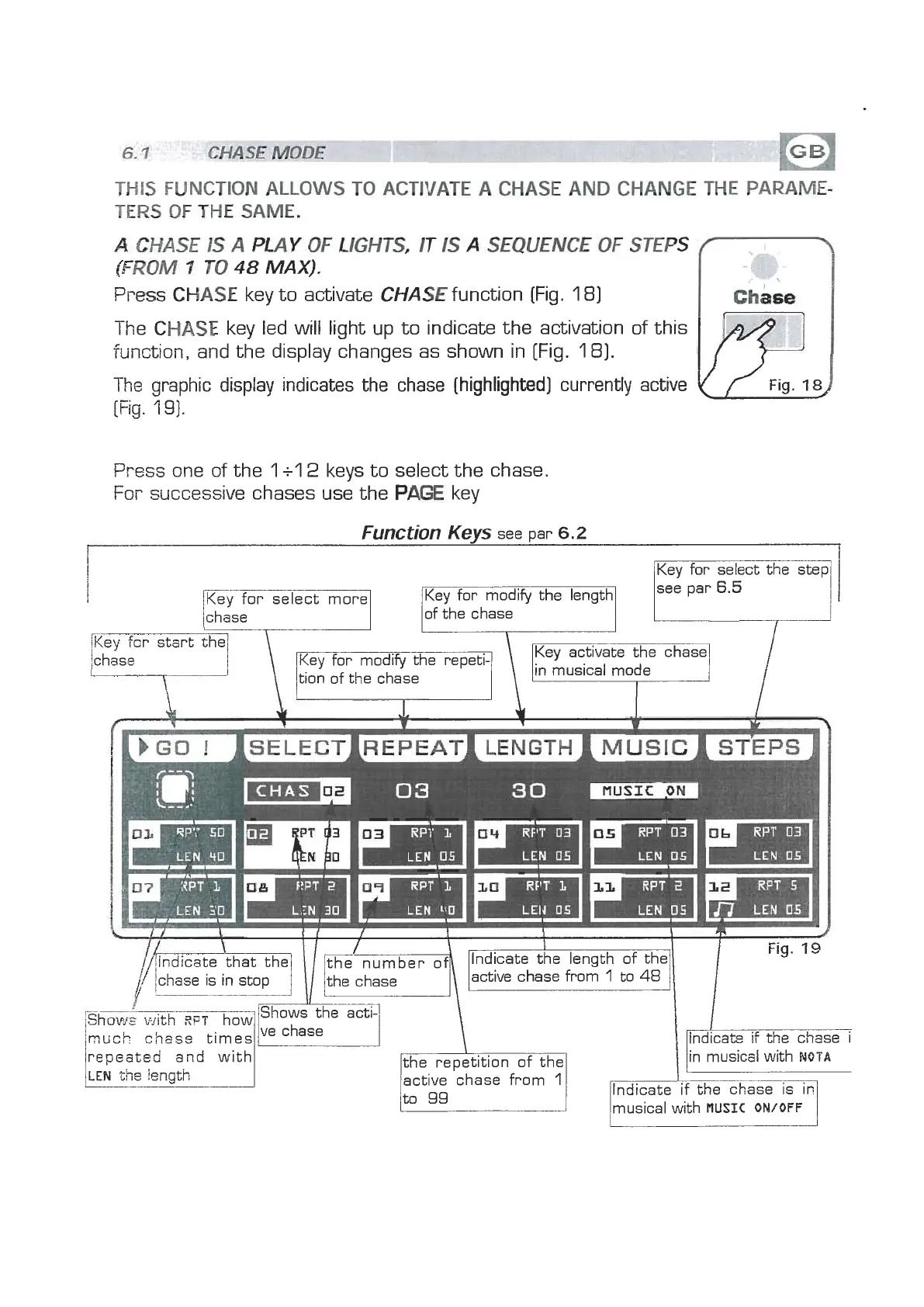
The graphic display indicates the chase (highlighted) currently active
[
,/
Fig.
14
[Fig.
1
9).
Press one of the
1
+l
2
keys to select the chase.
For successive chases use the
PAGE
key
Function
Keys
see par
6.2
I
l
see par
6.5
Key for select more
of the chase
/Key f~r start the
ichase
Key for modify the repeti-
Key activate the chase
l.
7--
in musical mode
/much
chess
times
lVe
repeated and with
LEN
the !enath
the repetition of the
active chase from
1
\
-ifthe
chase i
I
/in musical with
NUTA
/Indicate 'if the chase
4


 To Next Page
 Loading...