THE
FUNCTION
AU-OWS
TO
SELECT
A
SERIES
OF
CHASE
For
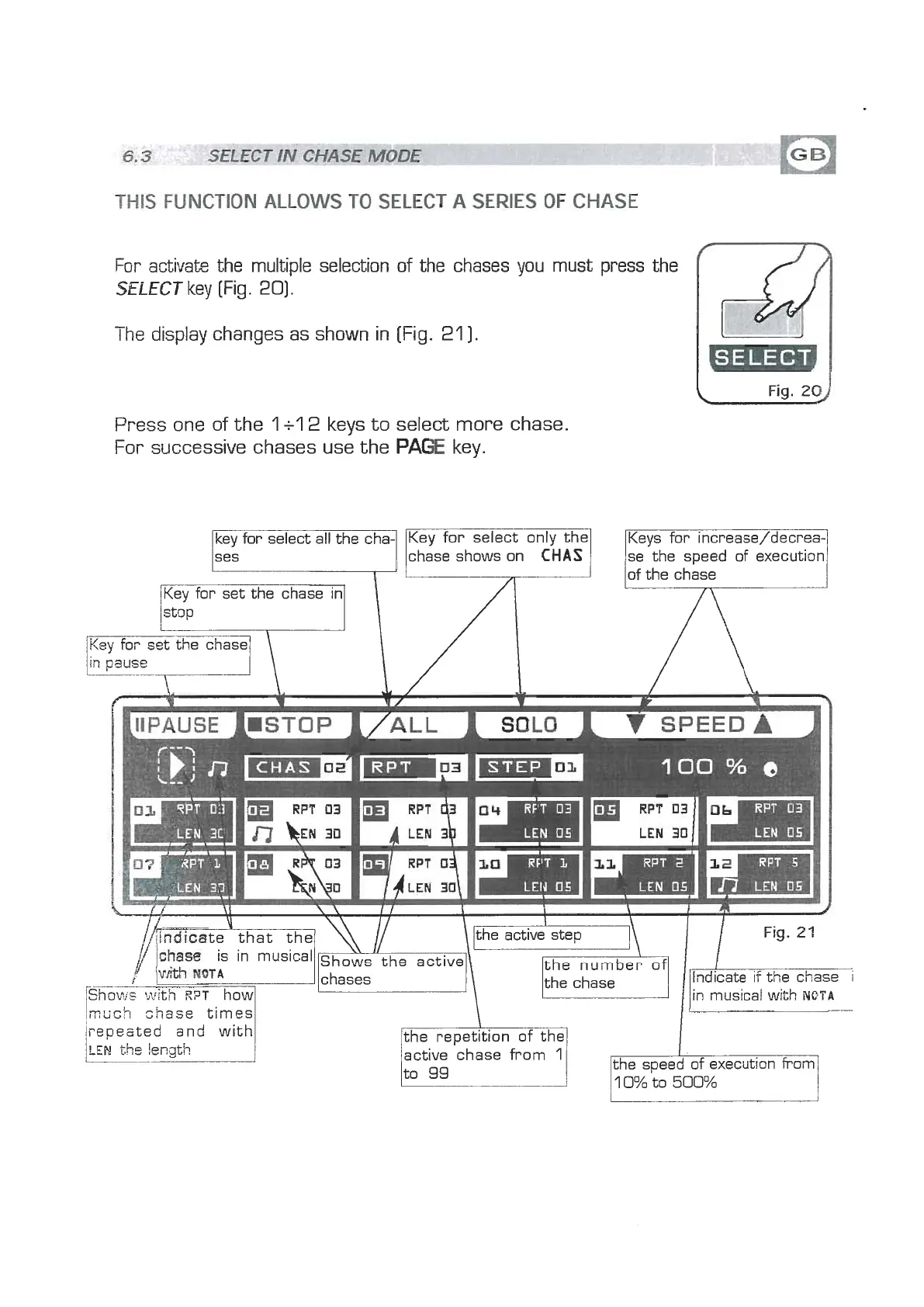
activate the multiple selection of the chases you must press the
SELECT
key (Fig.
20).
-
I
he display changes as shown in [Fig.
21
1.
I
Fig.
20)
Press one of the
1
+l
2
keys to select more chase.
For successive chases use the
PAGE
key.
\
jlnciicate that the
/~~l&~~~eactiv(~~pnumb~of
1
Fig. 22
I
the chase Indicate if the chase
i
~STO~E--?~I
-
I
in musical with
NQTA
//(lndicateY that the1
\\
//
Keys for increase/decrea;
se the speed of execution
key for select all the cha-
ses
mtich
chase
times1
of the chase
Key for set the chase in
stop
l
i
Key for select only the
chase shows on
CHAS
bepeated and with
the chase
lactive 'chase from
I
I
n icate if the chase
in musical with
NQTA
IF--
the speed of execution from
10%
to
500%
L


 To Next Page
 Loading...