THIS
FUNCTION
ALLOWS
TO
SEE
ONE
OF
THE
48
STEPS
OF
THE
ACTIW
CHASE,
CHANGE
THE
PARAMETERS
AND
EDITING.
Press
STEPS
key to activate
SEPS
function
[Fig.
22)
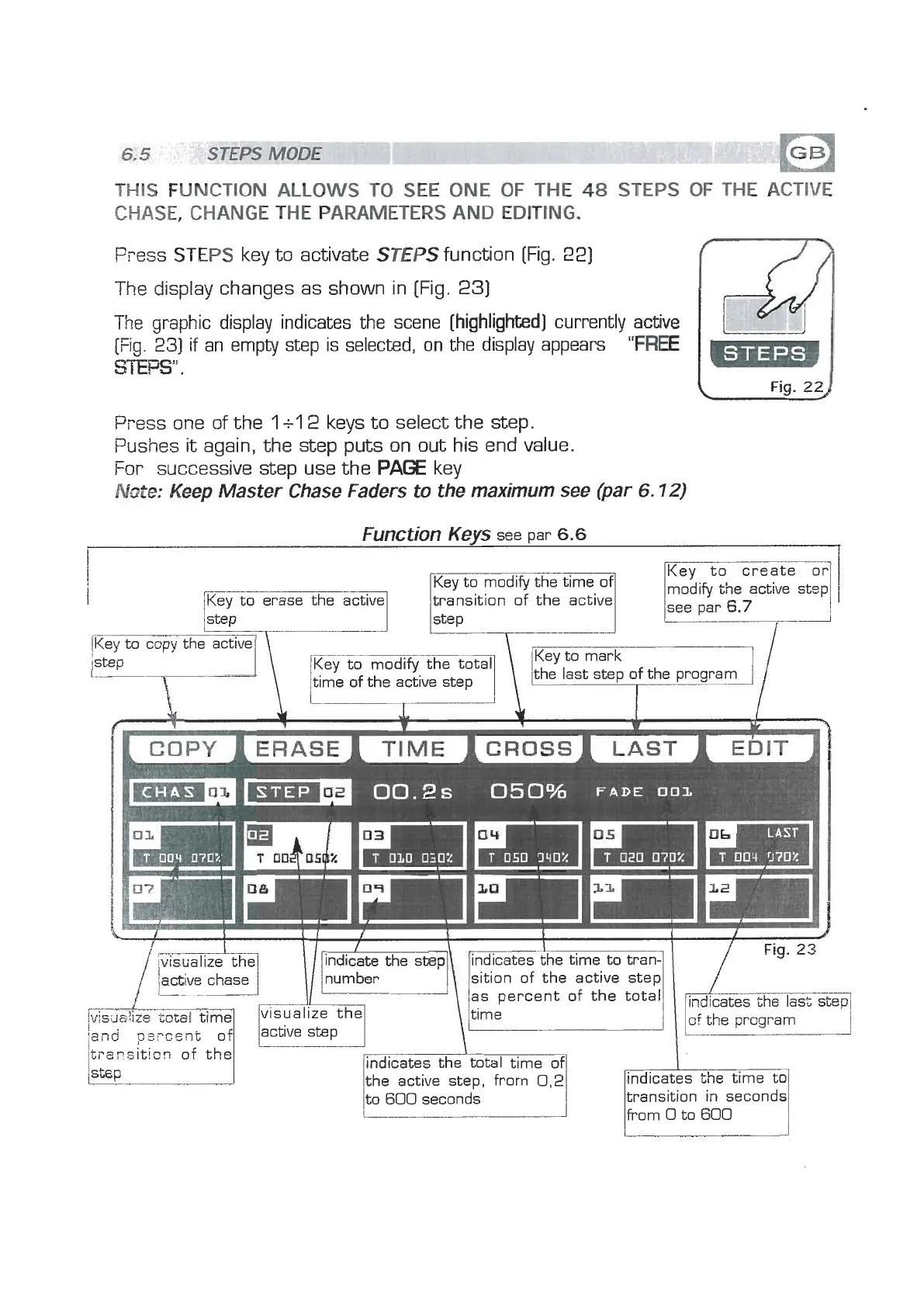
The display changes as shown in [Fig.
23)
The
graphic display indicates the scene
[highlighted]
currently
[Fig.
231
if an empty step is selected, on the display appears
"FREE
mPS".
Pyess one of the
1
+l
2
keys to select the step.
Pushes
it
again, the step puts on out his end value.
For
successive step use the
PAGE
key
Note:
Keep
Master Chase Faders to the maximum see (par
6.72)
(
Fig.
29
Function
Keys
see par
6.6
Key to erase the active
step
Key to create or1
modify the active step
see par
6.7
,----
r~ev to
cow
the=
I
I'
\
I
l
'
step
l..
time of the active step
the last step of the program
indicate the step
indicates the time to tran-
\/nYmber\rI
/
Fig-23
,
lactive chase
sition of the active step
-
visualize the
'and
p,.
active step
trzcsitisn of the
indicates the total time of
the active step, from
0,2
to
600
seconds


 To Next Page
 Loading...