AVA! LAB LE ONLY AFTER
ME
ACTIVATON
OF
THE
MENU
FUNCTIONS
[v.par.
l
U.
l]
-
-
--
&.LOWS
7'0
L
WA
COMF'LEE
SW
FROM
LCBRCVZY
AND
STORE
fT
!M
MEMORY.
ALL@WS
TO
PATCH
WX
/
AU
TOMiQ
fC
/
MAMUAL
.
&LOWS
TO
MODIFY
THE
NAME OF EACH CHANNEL AND ITS
PARAMETERS
@€SET VALUE, BLACKOUT VALUE, HARD/SOFT CROSS) IT ALSO ALLOWS
TO
ASS*
GN
SPECIAL FUNCTIONS TO THE CHANNEL (PAN/TILT,PAN LOW/TILT
LOW,
MP CONTROL).
ATTENTION
!
MODIFICATION OF THE EDIT DMX PATCH PARAMETERS,
jF
MOT
EFFECTED IN AN APPROPRIATE WAY, PREVENTS THE CONNECTED UNIT TO
WORK
c"0RRfCTL Y.
-
I
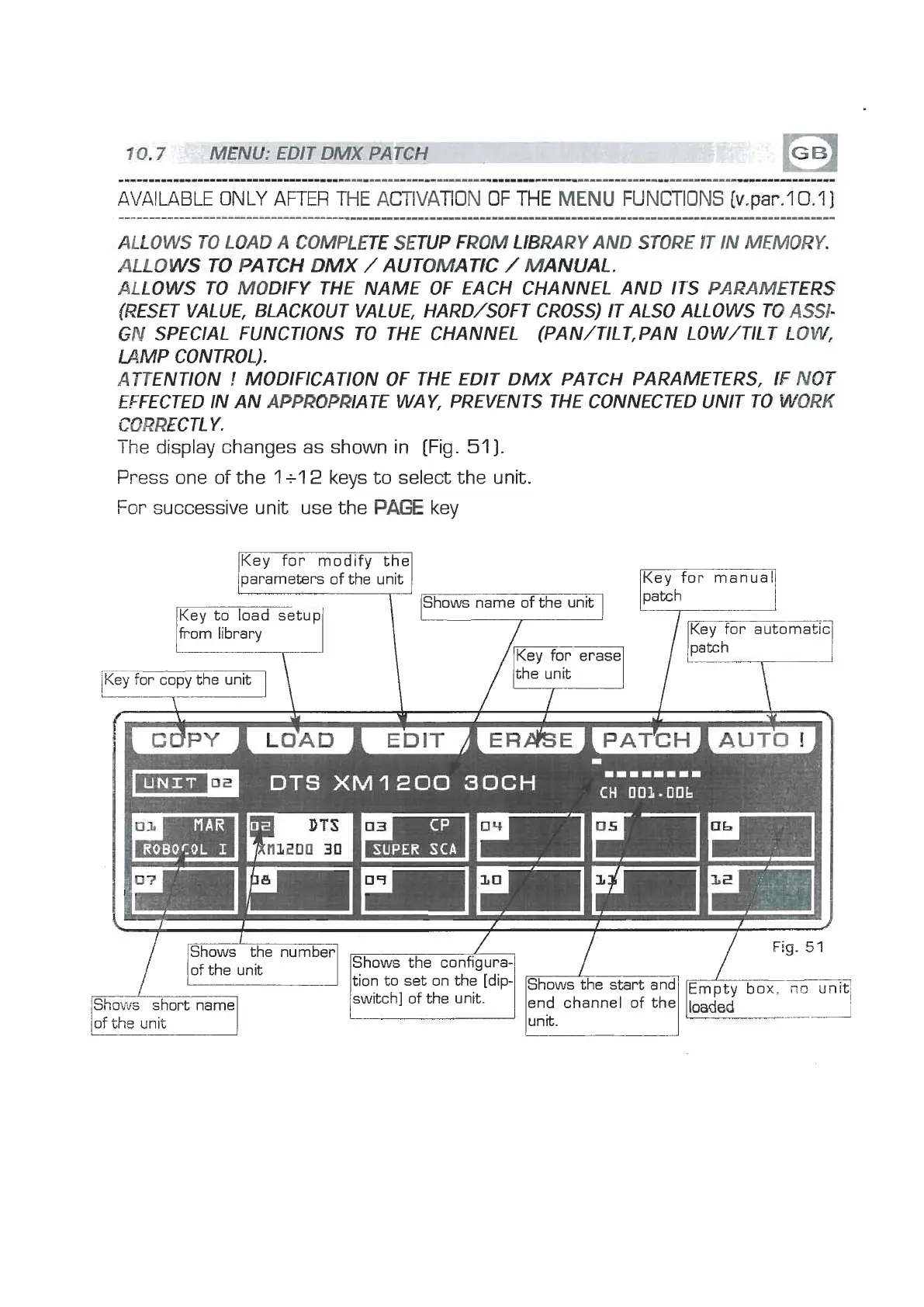
he display changes as shown in [Fig.
511.
Press one of the
1
+l
2
keys to select the unit.
For
successive unit use the
PAE
key
Key for modify the
parameters of the unit
Shows name of the unit
Key to load setup
from library
Key for erase
-
for copy the unit
7-
lKey for manual1
Key for automatic
'i-+]
I
SUPER
Shows the number
of the unit
Shows
short name
LZ7
tion to set on the [dip-
switch] of the unit.


 To Next Page
 Loading...