AfLOWS
TO
ASSIGN
DIRECT
CO-
FUNCTIONS
AT
72
FADERS.
This
function is used to control the performance of programs, chase, effects through
faders or to control a determined
DMX
channel.
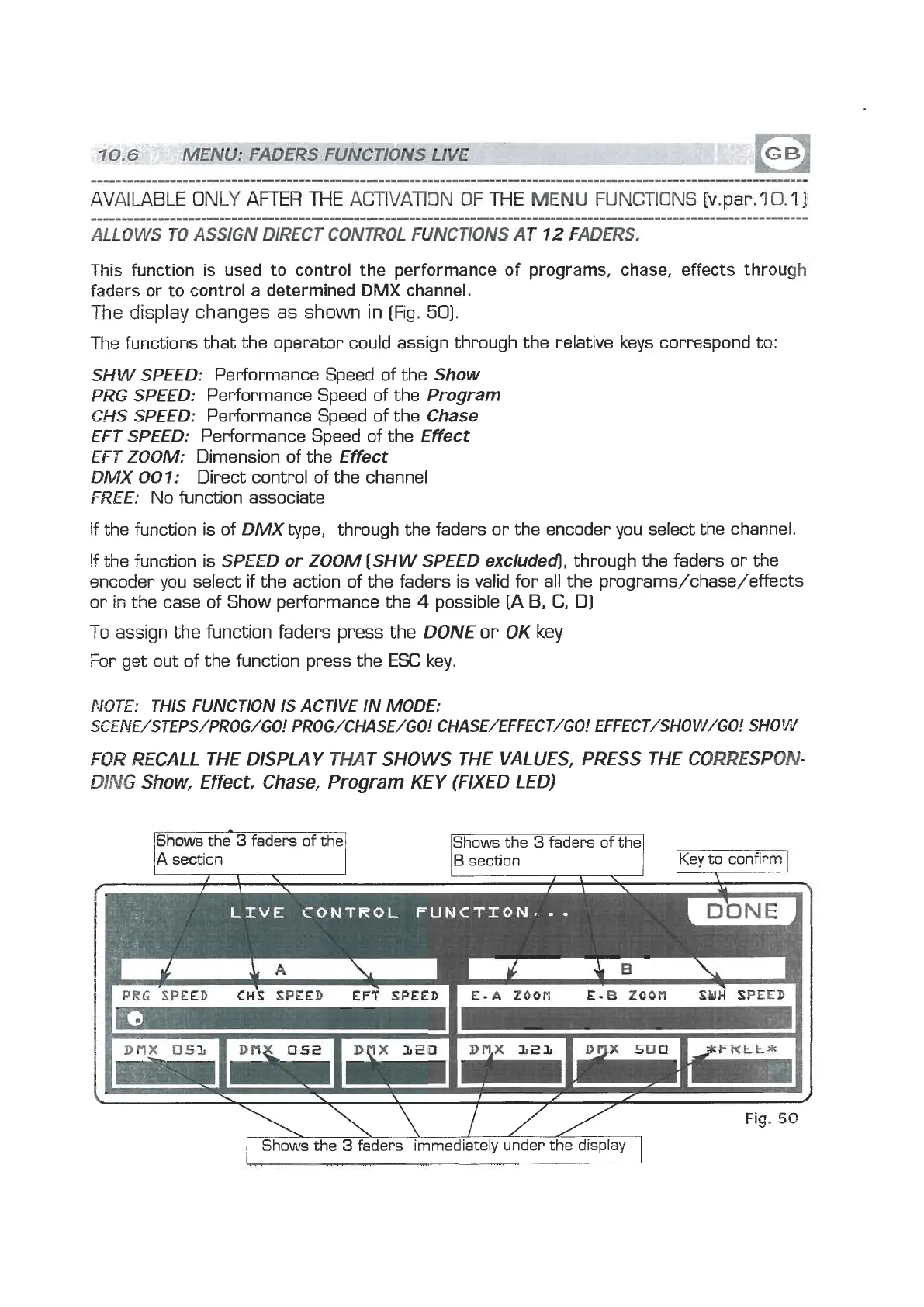
The
display changes as shown in
[Fig.
501.
Ths functions that the operator could assign through the relative keys correspond to:
SHW SPEED:
Performance Speed of the
Show
PR6
SPEED:
Performance Speed of the
Program
CHS SPEED:
Performance Speed of the
Chase
EFT
SPEED:
Performance Speed of the
Effect
EFT
ZOOM:
Dimension of the
Effect
DMX
007:
Direct control of the channel
FREE:
No function associate
If the function is of
DMX
type, through the faders or the encoder you select the channel.
!f
the function is
SPEED or ZOOM [SHW SPEED excluded],
through the faders or the
encoder you select if the action of the faders is valid for all the programs/chase/effects
or
in
the case of Show performance the
4
possible
[A
B,
C,
D]
To
assign
the function faders press the
DONE
or
OK
key
For get out of the function press the
ESC
key
NOTE:
THIS FUNCTION IS ACTIVE IN
MODE:
SCENE/STEPS/PROG/GO! PROG/CHASE/GO! CHASE/EFFECT/GO! EFFECT/SHOW/GO! SHOW
FQR
EULL
THE DISPLA Y THAT SHOWS THE VALUES, PRESS THE CORRESPON-
WIVG
Show,
Effect, Chase, Program KEY (FIXED LED)
A
section
\\W
Fws
the
3
faders immediately under thedisplay
Fig.
5G


 To Next Page
 Loading...