EasyManua.ls Logo

DTS Top 48 - Page 61

DTS Top 48
62 pages
Print Icon
To Next Page IconTo Next Page
To Previous Page IconTo Previous Page
Loading...
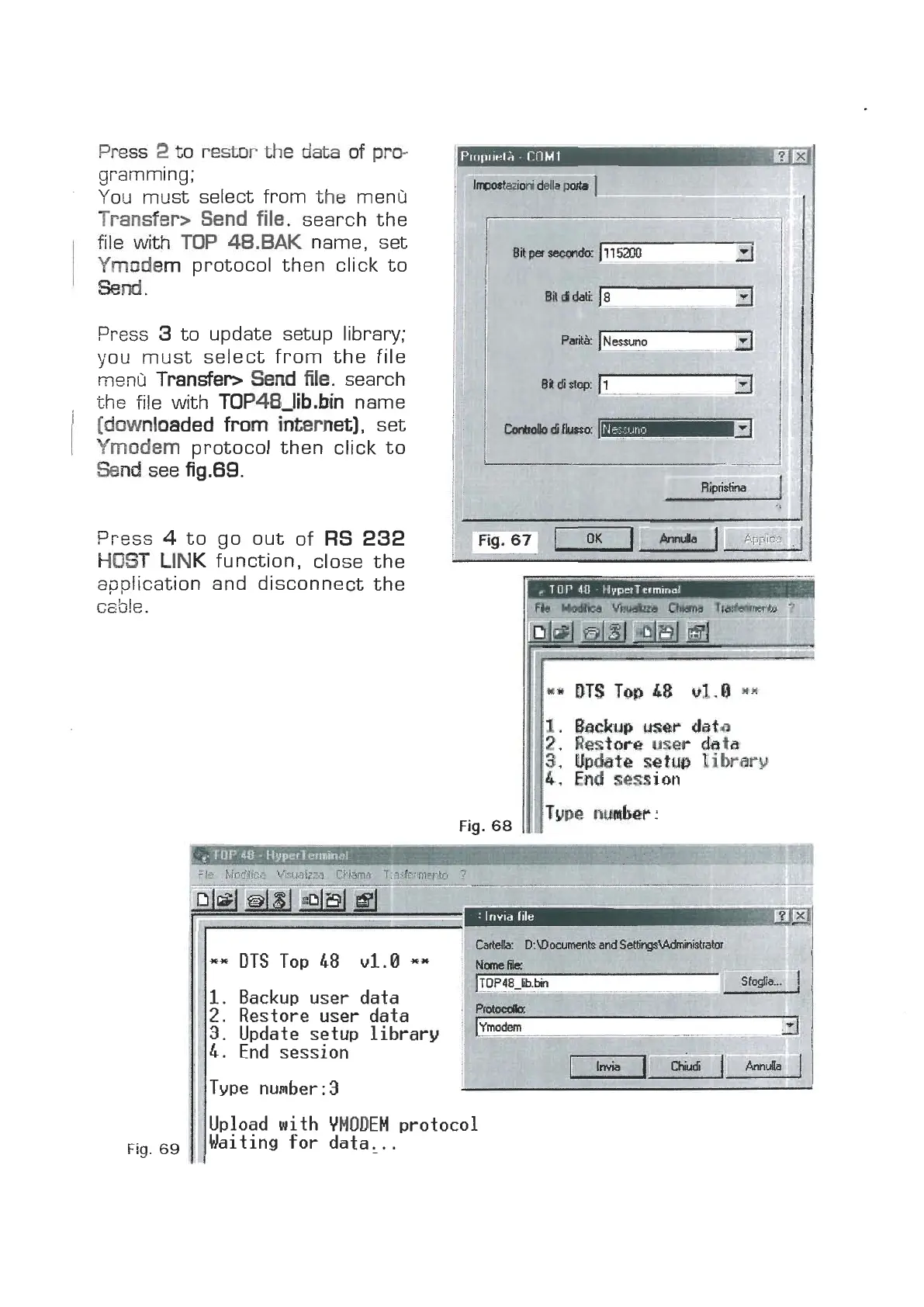
Press
2
m
restor
the
data
of
pm
gramming
;
You must select from
the
menG
Trandem
Bend
file.
search the
file
with
TOP
48.BAK
name, set
Ymodem
protocol then click to
Wnd
.
Press
3
to update setup library;
you must select from the file
menli
Transfer>
Send
file.
search
the file with
TOP48Jib.bin
name
[downloaded
from
internet),
set
Ymodem
protocol then click to
Send
see
fig.89.
Press
4
to go out of
RS
232
HOST'
LINK
function, close the
application and disconnect the
c~ble.
Fig.
69
**
DTS
Top
48
u1.0
**
l.
Backup user data
2.
Restore user data
Fig.
68
II
3. Update setup library
I
4.
End session
Type number:3
I
1.
bchg
user
daf6
2.
Restore
user
data
3.
Wetc
setw
library
4,
End
session
Type
nmber:
II
Upload with
YMODEM
protocol
Waiting for data,.
.
www.bluelight.at