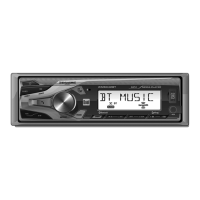
This document is an installation and owner's manual for the Dual WMSX42BT receiver, which is an AM/FM/USB/SiriusXM-Ready™ receiver with Bluetooth and a front panel. It also includes a SiriusXM Connect Tuner and Antenna.
Function Description:
The Dual WMSX42BT is a car audio receiver designed to provide a variety of entertainment options. It supports traditional AM/FM radio, plays MP3 files from USB devices, and is SiriusXM-Ready™ for satellite radio reception. Additionally, it features Bluetooth connectivity for wireless audio streaming and hands-free calling. The unit has a front panel with various controls for power, band/zone selection, volume, mute, talk, mode, display, reset, and preset management. It also includes a USB port and an auxiliary input for connecting external devices.
Important Technical Specifications:
- FM Tuner:
- Tuning range: 87.5MHz-107.9MHz
- Usable sensitivity: 8.5dBf
- 50dB quieting sensitivity: 10dBf
- Stereo separation @ 1kHz: >30dB
- Frequency response: 30Hz-13kHz
- AM Tuner:
- Tuning range: 530kHz-1710kHz
- Usable sensitivity: <42dBu
- Frequency response: 30Hz-2.2kHz
- General:
- Speaker output impedance: 4~8 ohms
- Line output voltage: 2 Volts RMS
- Dimensions: 7" x 3.8" x 2" (178 x 97 x 50 mm)
- CEA-2006 Power Standard Specifications:
- Power Output: 16 Watts RMS x 4 channels at 4 ohms and < 1% THD+N
- Signal to Noise Ratio: 75dBA (reference: 1 watt into 4 ohms)
- Bluetooth:
- Device name: "WMSX42BT"
- Passcode: "1234"
- Supports A2DP wireless streaming audio.
- USB:
- Plays MP3 files.
- Supports ID3 tag versions 1.0 to 2.0.
- Power Supply: 11-16VDC (for proper operation).
- Fuse: One 10 amp ATC fuse.
Usage Features:
-
Power On/Off: Press the power button to turn the unit on or off.
-
Changing Modes: Press the MODE button to select between Radio, USB, SiriusXM®, Auxiliary Input, and Bluetooth. The current mode is shown on the display.
-
Volume Control: Adjust volume using the volume knob (range 00-40).
-
Mute: Press the Mute button to silence audio; press again to resume.
-
Auxiliary Inputs: Insert a 3.5mm cable into the front AUX port for external audio devices.
-
Setting the Clock: Press the volume knob to enter clock setting mode. Rotate the knob right to adjust hours and left to adjust minutes.
-
Display: Press DISP to show clock time for 5 seconds, then it returns to the previous display.
-
Audio / Menu: Press the volume knob momentarily to select Audio/Menu functions. Rotate the knob left/right to adjust or activate desired functions.
-
AM/FM Tuner Operation:
- Seek Tuning: Press TUNE << or TUNE >> to seek the previous or next strong station.
- Manual Tuning: Press and hold TUNE << or TUNE >> to enter manual tuning mode. Then, short press TUNE << or TUNE >> to change frequency one step at a time. Press and hold to advance quickly.
- Band Selection: Press BAND to select between FM1, FM2, FM3, AM1, and AM2 bands.
- Storing Presets: Up to 18 FM and 12 AM stations can be stored. Select the desired band and station, then press and hold a preset button (1-6) for over two seconds. The preset number will appear on the display.
- Recalling Presets: Press the corresponding preset button (1-6).
- Automatically Store: Press and hold AS/CAT for over two seconds to automatically store 18 FM and 12 AM stations.
-
USB Operation:
- Playing MP3 Files: Insert a USB device containing MP3 files.
- Track Select: Press TUNE >> to skip to the next track; press TUNE << to skip to the beginning of the previous track.
- Pause/Play: Press >/II to temporarily stop playback; press again to resume.
- Folder Access: Press Folder Up or Folder Down to navigate folders. The first file in the selected folder will play after about one second.
- Repeat: Press RPT to toggle between RPT ALL (plays all tracks on USB), RPT ONE (repeats selected track), and RPT FLR (repeats all files in current folder).
- Random: Press RDM to play tracks in random order; press again to cancel.
- Intro: Press INT to play the first 10 seconds of each track; press again to cancel.
-
Bluetooth Operation:
- Pairing: The head unit constantly broadcasts a pairing signal when no devices are connected. Complete the pairing sequence from your Bluetooth device using the device name "WMSX42BT" and passcode "1234".
- Streaming Audio Control:
- Press >> to skip to the next audio track.
- Press << to skip to the previous audio track.
- Press >/II to toggle between play and pause.
-
SiriusXM® Satellite Radio Operation:
- Activation: After installing the SiriusXM® Connect Vehicle Tuner and antenna, power on the radio and select SiriusXM® mode. Tune to Channel 1 for the preview channel, then Channel 0 to find the Radio ID. Activate online at www.siriusxm.com/activatenow or by calling 1-866-635-2349 (USA) / www.siriusxm.ca/activatexm or 1-877-438-9677 (Canada).
- Accessing SiriusXM® Radio: Press the Mode Button.
- Direct Channel Tuning: Press and hold the volume knob. Rotate the knob to select digits for the channel number (e.g., CH2, CH25, CH256). Press the Channel Up button between digits. Press the volume knob to tune.
- Channel Browsing: Press and hold Channel Up or Channel Down buttons to rapidly browse channels. Release to tune to the desired channel.
- Category Browsing: Long press AS/CAT to enter browsing mode ("b" flashes). Rotate the volume knob to select a category. Press the knob to enter the category. Short press << or >> to navigate categories. Long press << or >> for rapid browsing. Press DISP to return to the category list. Long press AS/CAT to exit.
- Mature Lock Control: Long press the volume knob, then immediately press DISP to enter the pass code screen (default 0000). Rotate the knob to select digits, using Channel Up between digits. Press the volume knob to enter the code. Rotate the knob right to lock (ON) or left to unlock (OFF) Parental Control Mature Channel.
- Pass Code Set: Long press the volume knob, then immediately press DISP twice, then press the volume knob. Enter the new pass code, then press the volume knob. A "SUCCESS" message will appear.
- SiriusXM Presets: Similar to AM/FM, presets can be stored and recalled for SiriusXM channels (SXM1, SXM2, SXM3).
- Display Modes (SiriusXM): Press and hold DISP to access display mode settings. Default is DISP ALL (scrolls all metadata). Short press DISP to cycle through metadata labels (Channel Number, Channel Name, Artist Name, Song Title, Content Info, Category).
Maintenance Features:
- Installation Preparation: Disconnect the negative battery terminal before installation. Avoid high temperatures, direct sunlight, dust, dirt, or excessive vibration.
- DIN Mounting: Insert the mounting sleeve into the dashboard or installation kit. Bend mounting tabs to secure the sleeve. Connect wiring and slide the head unit into the sleeve until it clicks.
- ISO Mounting: Use existing brackets or those supplied with the installation kit. Mount brackets to the sides of the head unit with screws.
- Wiring Diagram: Provides detailed connections for SXM IN (SiriusXM tuner and antenna), Remote Turn-On (BLUE), Ground (BLACK), Accessory (RED), Memory (YELLOW), Right Front Speaker (Gray/Black, Gray), Right Rear Speaker (Violet/Black, Violet), Left Front Speaker (White/Black, White), Left Rear Speaker (Green/Black, Green).
- Fuse Replacement: When replacing the fuse, ensure it's the correct type and amperage (10 amp ATC fuse). Incorrect fuses can damage the radio.
- Reset Button: Press the RESET button (located behind the display panel) to restore factory settings, including SiriusXM data reset, if abnormal operation occurs.
- Troubleshooting Guide: Provides solutions for common issues like the unit not turning on (check yellow/red wires, ground, fuse), unit having power but no sound (check speaker wires, pinched wires), unit blowing fuses (check yellow/red wires, speaker wires, fuse rating), "NO FILE" on display (check for playable MP3s), and "NO SUPPORT" on display (check ID3 tag version).
- SiriusXM Radio Advisory Messages: Explains common SiriusXM error messages (Check Antenna, Check Tuner, No Signal, Subscription Updated, Channel Unavailable, Channel Unsubscribed, Channel Locked) and provides troubleshooting steps and contact information for SiriusXM Listener Care.
- Limited One Year Warranty: Covers defects in material and workmanship for one year from the original purchase date. Excludes software, installation costs, damage from accident/misuse/abuse/neglect, improper installation, incorrect voltage, unauthorized repair, or failure to follow instructions. Provides contact information for service.
- FCC Compliance: States that the device complies with FCC rules, ensuring it does not cause harmful interference and accepts received interference. Includes warnings about unauthorized modifications and suggestions for correcting interference (reorient antenna, increase separation, connect to different circuit, consult technician).


 To Next Page
 General