Need help?
Do you have a question about the Dual Electronics Corporation XD18BT and is the answer not in the manual?
Read entire manual before installation.
Disconnect battery terminal. Avoid extreme environments.
Steps for unit installation, including sleeve, wiring, and testing.
Details on fuse type and rating for radio protection.
Diagram for connecting power, ground, speakers, and antenna.
Identification and numbering of all unit controls and ports on the front panel.
Power, modes, volume, mute, display, dimmer, clock, reset, audio/menu operations.
Seek tuning, manual tuning, and band switching for radio reception.
Storing, recalling, and automatically storing radio presets.
Playing MP3s, track selection, folder access, and playback controls.
Repeat, random, and intro functions for USB media playback.
Steps to pair a Bluetooth device with the head unit.
How to control music playback via Bluetooth connection.
Using the smartphone app for remote control of receiver functions.
Using Siri or Google Assistant via Bluetooth connection.
FM/AM tuner ranges, sensitivity, frequency response, and output voltage.
Dimensions, speaker impedance, and CEA-2006 power output ratings.
Solutions for power, sound, fuse, and display errors.
Troubleshooting for 'NO FILE' and 'NO SUPPORT' messages.
Coverage, exclusions, user rights, and obtaining service information.
FCC Part 15 compliance and interference guidelines.
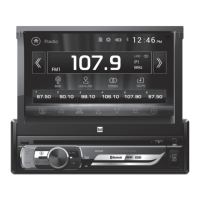
The Dual XD18BT is an AM/FM receiver designed for in-car audio entertainment, featuring Bluetooth connectivity and a fixed faceplate. This unit allows users to enjoy various audio sources, including radio, USB-stored MP3 files, and audio streamed wirelessly from Bluetooth-enabled devices. Its user-friendly interface and a range of control options make it a versatile choice for enhancing the in-car audio experience.
The primary function of the XD18BT is to serve as an AM/FM radio receiver, providing access to local broadcasts. Beyond radio, it expands audio playback capabilities through a front-panel USB port, allowing users to play MP3 files stored on USB devices. An auxiliary input (AUX) port is also available on the front panel, enabling connection of external audio sources via a 3.5mm cable.
A key feature of this receiver is its integrated Bluetooth functionality. This allows for wireless audio streaming from smartphones or other Bluetooth-enabled devices, providing convenience and reducing cable clutter. The unit supports A2DP wireless streaming audio, ensuring a quality audio experience from mobile devices.
The XD18BT also incorporates voice activation capabilities, designed to work seamlessly with smartphone assistants like Siri® or Google Assistant™ via Bluetooth. This feature allows users to interact with their smartphone's assistant while driving, enhancing safety and convenience by minimizing manual interaction with the phone.
The receiver's controls are intuitively laid out on its fixed faceplate. A central volume knob serves multiple purposes, including adjusting audio levels and navigating audio/menu functions. Pressing the volume knob momentarily allows selection between audio functions, while pressing and holding it for more than two seconds grants access to menu functions. Rotating the knob left or right adjusts or activates the desired function or audio setting.
Powering the unit on and off is done via a dedicated button. Mode selection is handled by the "SOURCE" button, which cycles through available inputs: Radio, USB, Auxiliary Input, and Bluetooth. The current operating source is displayed on the unit's screen.
For radio operation, "TUNE" buttons allow for manual frequency adjustment, moving up or down one step at a time. Holding these buttons enables quick advancement through frequencies. The "BAND" button cycles through FM1, FM2, FM3, AM1, and AM2 bands, each capable of storing up to six preset stations. Storing a station involves selecting the desired band and station, then pressing and holding one of the preset buttons (1-6) for more than two seconds. Recalling presets is as simple as pressing the corresponding preset button. An automatic store function is also available by holding the volume knob for two seconds and then pressing "DISP," which automatically stores 18 FM and 12 AM stations.
When playing MP3 files from a USB device, "TUNE" buttons are used to skip to the beginning of the next or previous track. Holding these buttons enables fast forward or reverse within a track. A "Play/Pause" button (labeled with a play/pause icon) temporarily stops and resumes USB playback. Folder navigation is possible using "Folder Up" or "Folder Down" controls. The unit also offers playback modes such as "Repeat" (RPT ALL for all tracks, RPT FLR for current folder, RPT ONE for current track) and "Random" (RDM) for shuffled playback. An "Intro" (INT) function plays the first 10 seconds of each track.
Bluetooth pairing is initiated by ensuring Bluetooth is activated on the mobile device. The head unit constantly broadcasts its pairing signal when no devices are connected. The device name for pairing is "Dual Media Player," and the default passcode is "1234" (with "0000" as an alternative if "1234" fails). Once paired, Bluetooth allows for wireless audio streaming, with controls for skipping tracks (forward and backward) and toggling play/pause.
The XD18BT also features a "Mute" button to silence the audio temporarily and a "DISP" button to cycle through various displayed information on the screen. A "DIM" button allows users to select different dimmer levels (HI, MED, LOW) for the display. Setting the clock involves pressing and holding "BAND/DISP" until the hours flash, then rotating the volume knob to adjust, and pressing "BAND/DISP" again to adjust minutes.
For enhanced control, the Dual iPlug P2 Smart App Remote Control is available for Apple and Android smartphones. This app allows users to change modes, stations, songs, volume, and settings directly from their smartphone via Bluetooth, even without a direct line-of-sight to the receiver.
The manual provides a troubleshooting guide to address common issues. For instance, if the unit does not power on, it suggests checking connections for proper voltage, ensuring the black wire is connected to ground, and verifying the fuse. If the unit has power but no sound, it advises checking speaker connections and insulating bare speaker wires to prevent short circuits. In case of blown fuses, it recommends checking for pinched wires and using a fuse with the correct rating.
The unit includes a "RESET" button on the front panel, which can be pressed to restore the unit to factory settings if abnormal operation occurs. This is a useful feature for resolving software-related glitches.
When replacing fuses, it is crucial to use a fuse of the correct type and amperage (one 10 amp AGC fuse located beside the Heat Sink) to prevent damage to the radio.
The manual emphasizes the importance of proper installation, advising users to disconnect the negative battery terminal before starting and to consult a qualified technician if unsure about wiring. It also warns against installing the unit in locations subject to high temperatures, direct sunlight, or excessive dust, dirt, or vibration, which can contribute to the longevity and proper functioning of the device.
 General
| Brand | Dual Electronics Corporation |
|---|---|
| Model | XD18BT |
| Type | Car Receiver |
| Bluetooth | Yes |
| USB Port | Yes |
| AUX Input | Yes |
| AM/FM Tuner | Yes |
| Display Type | LCD |
| Remote Control | Yes |

 To Next Page