EasyManua.ls Logo

Dual 1010 - Operating the switch button (78 b) to Start actuates the Stop cycle; No playback. Muting switch fails to open; Stop switching; Muting switch

Dual 1010
18 pages
Print Icon
To Next Page IconTo Next Page
To Previous Page IconTo Previous Page
Loading...
On
reaching
the
shut-off
groove,
the
tonearm
automatically
returns
to
its
rest
position
and
the
unit
shuts
off
(see
shut-off
mechanism).
However,
should
the
tonearm
be
lifted
off
manually
and
returned
to
the
tonearm
rest,
the
tabs
(LS)
of
the
arm
segment
(170)
release
the
latch
(179).
The
tension
spring
(181)
then
returns
the
switch
arm
(125)
to
its
initial
position,
opening
the
line
switch
and
disengaging
the
drive
wheel.
Stop
switching
Placing
the
switch
button
in
“Stop”
position
moves
the
switch
lever
(212)
and
switch
spring
(UF)
towards
the
main cam,
as
in
the
start
cycle,
but
only
half
as
far.
This
causes
the
main
cam
to
push
the
cam
follower
lever
(143)
to
the
side,
into
its
stop
position.
Muting
switch
A
muting
switch
(163)
is
provided
to
prevent
change
cycle
noises
from
being
picked
up
by
the
tonearm
cartridge.
The
switch
springs
(S)
for
both
channels
are
actuated
by
the
main
cam
(140).
In
rest
position,
the
muting
switch
opens.
Trouble
shooting:
Symptom
Cause
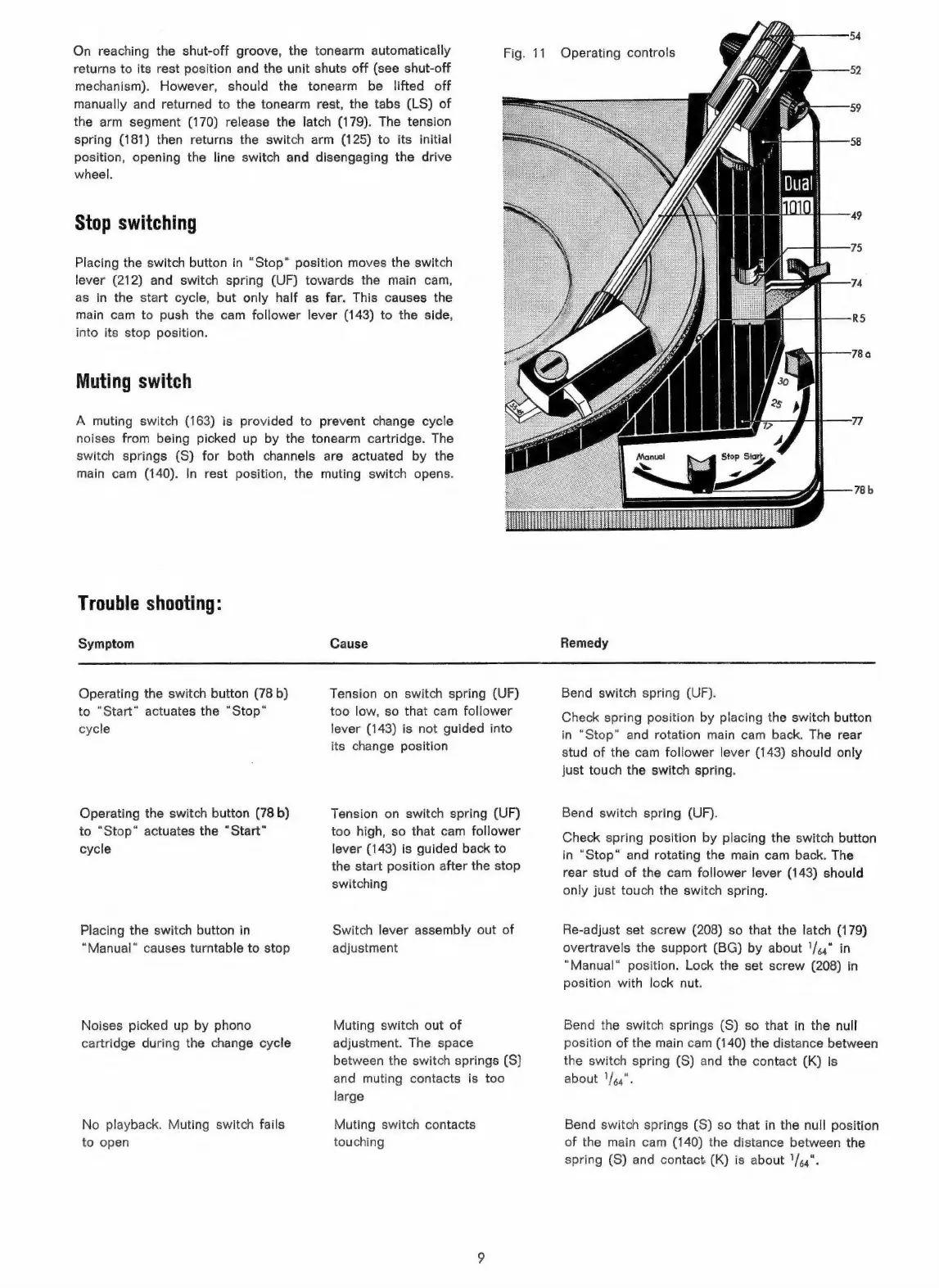
Fig.
11
Operating
controls
78b
Remedy
Operating
the
switch
button
(78
b)
to
“Start”
actuates
the
“Stop“
cycle
Operating
the
switch button
(78
b)
to
“Stop”
actuates
the
“Start“
cycle
Placing
the
switch
button
in
“Manual"
causes
turntable
to
stop
Noises
picked
up
by
phono
cartridge
during
the
change
cycle
No
playback.
Muting
switch
fails
to
open
Tension
on
switch
spring
(UF)
too
low,
so
that
cam
follower
lever
(143)
is
not
guided
into
its
change
position
Tension
on
switch
spring
(UF)
too
high,
so that
cam
follower
lever
(143)
is
guided
back
to
the
start
position
after
the
stop
switching
Switch
lever
assembly
out
of
adjustment
Muting
switch
out
of
adjustment.
The
space
between
the
switch
springs
(S)
and
muting
contacts
is
too
large
Muting
switch
contacts
touching
Bend
switch
spring
(UF).
Check
spring
position
by
placing
the
switch
button
in
“Stop”
and
rotation
main
cam
back.
The
rear
stud
of
the
cam
follower
lever
(143)
should
only
just
touch
the
switch
spring.
Bend
switch
spring
(UF).
Check
spring
position
by
placing
the
switch
button
in
“Stop“
and
rotating
the
main
cam
back.
The
rear
stud
of
the
cam
follower
lever
(143)
should
only
just
touch
the
switch
spring.
Re-adjust
set
screw
(208)
so
that
the
latch
(179)
overtravels
the
support
(BG)
by
about
1/44"
in
“Manual”
position.
Lock
the
set
screw
(208)
in
position
with
lock
nut.
Bend
the
switch
springs
(S)
so
that
in
the
null
position
of
the
main
cam
(140)
the
distance
between
the
switch
spring
(S)
and
the
contact
(K)
is
about
VWe4".
Bend
switcn
springs
(S)
so
that
in
the
null
position
of
the
main
cam
(140)
the
distance
between
the
spring
(S)
and
contact
(K)
is
about
1/44".

Related product manuals