EasyManua.ls Logo

Dual C 810 - Page 7

Dual C 810
12 pages
Print Icon
To Next Page IconTo Next Page
To Previous Page IconTo Previous Page
Loading...
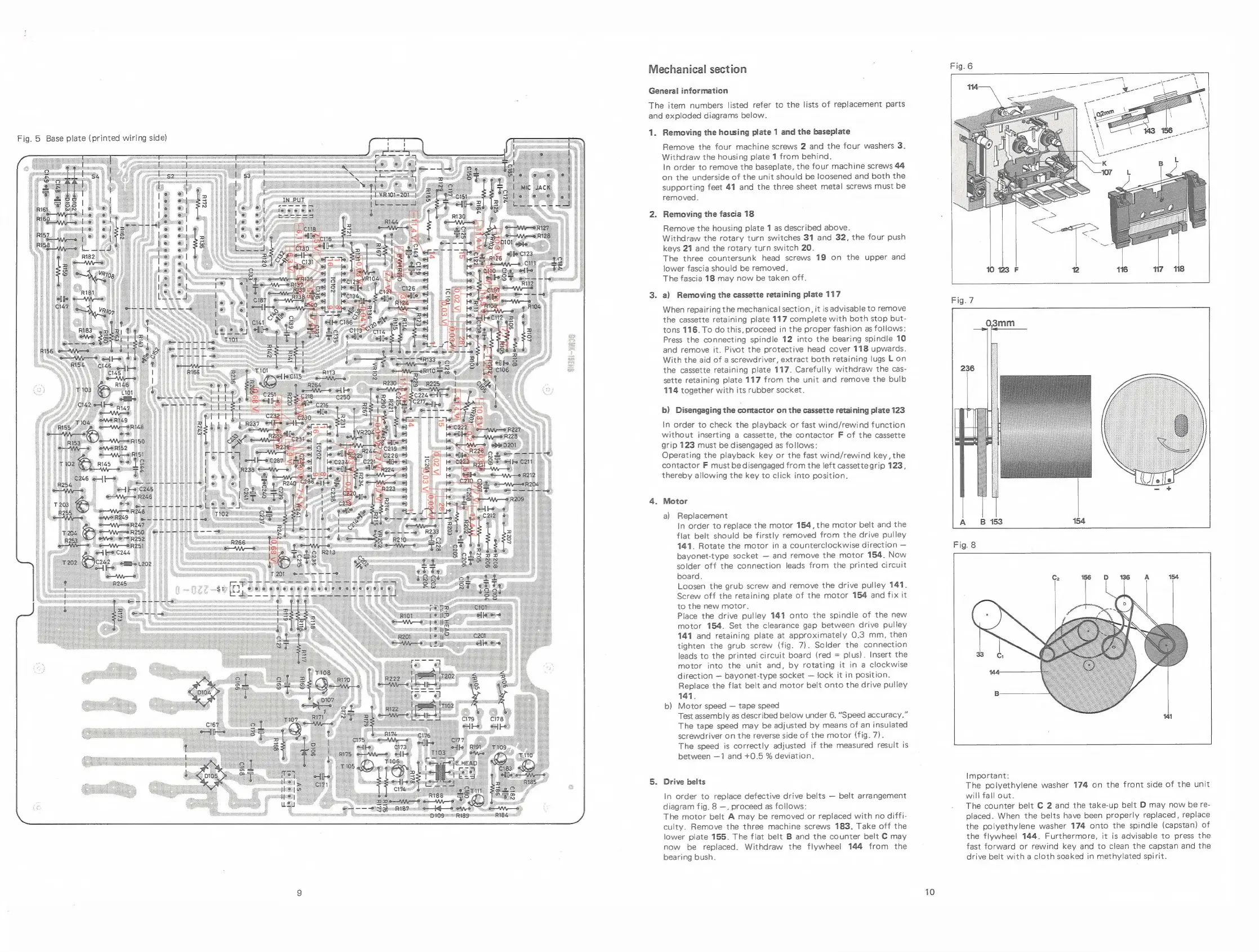
Fig.
5
Base
plate
(printed
wiring
side)
Mechanical
section
General
information
The
item
numbers
listed
refer
to
the
lists
of
replacement
parts
and
exploded
diagrams
below.
1.
Removing
the
housing
plate
1
and
the
baseplate
Remove
the
four
machine
screws
2
and
the
four
washers
3.
Withdraw
the
housing
plate
1
from
behind.
In
order
to
remove
the
baseplate,
the
four
machine
screws
44
on
the
underside
of
the
unit
should
be
loosened
and
both
the
supporting
feet
41
and
the
three sheet
metal
screws
must
be
removed.
Removing
the
fascia
18
Remove
the
housing
plate
1
as
described
above.
Withdraw
the
rotary
turn
switches
31
and
32,
the
four
push
keys
21
and
the
rotary
turn
switch
20.
The
three
countersunk
head
screws
19
on
the
upper
and
lower
fascia
should
be
removed.
The
fascia
18
may
now
be
taken
off.
a)
Removing
the
cassette
retaining
plate
117
When
repairing
the
mechanical
section,
it
is
advisable
to
remove
the
cassette
retaining
plate
117
complete
with
both
stop
but-
tons
116.
To
do
this,
proceed
in
the
proper
fashion
as
follows:
Press
the
connecting
spindle
12
into
the
bearing
spindle
10
and
remove
it.
Pivot
the
protective
head
cover
118
upwards.
With
the
aid
of
a
screwdriver,
extract
both
retaining
lugs
Lon
the
cassette
retaining
plate
117.
Carefully
withdraw
the
cas-
sette
retaining
plate
117
from
the
unit
and
remove
the
bulb
114
together
with
its
rubber
socket.
b)
Disengaging
the
contactor
on
the
cassette
retaining
plate
123
In
order
to
check
the
playback
or
fast
wind/rewind
function
without
inserting
a
cassette,
the
contactor
F
of
the
cassette
grip
123
must
be
disengaged
as
follows:
Operating
the
playback
key
or
the
fast
wind/rewind
key,
the
contactor
F
must
be
disengaged
from
the
left
cassettegrip
123,
thereby
allowing
the
key
to
click
into
position.
Motor
a)
Replacement
In
order
to
replace
the
motor
154,
the
motor
belt
and
the
flat
belt
should
be
firstly
removed
from
the
drive
pulley
141.
Rotate
the
motor
in
a
counterclockwise
direction
bayonet-type
socket
and
remove
the
motor
154.
Now
solder
off
the
connection
leads
from
the
printed
circuit
board.
Loosen
the
grub
screw
and
remove
the
drive
pulley
141.
Screw
off
the
retaining
plate
of
the
motor
154
and
fix
it
to
the
new
motor.
Place
the
drive
pulley
141
onto
the
spindle
of
the
new
motor
154.
Set the
clearance
gap
between
drive
pulley
141
and
retaining
plate
at
approximately
0.3
mm,
then
tighten
the
grub
screw
(fig.
7).
Solder
the
connection
leads
to
the
printed
circuit
board
(red
=
plus).
Insert
the
motor
into
the
unit
and,
by
rotating
it
in
a
clockwise
direction
bayonet-type
socket
lock
it
in
position.
Replace
the
flat
belt
and
motor
belt
onto
the
drive
pulley
141.
b)
Motor
speed
tape
speed
Test
assembly
as
described
below
under
6.
“Speed
accuracy.”
The
tape
speed
may
be
adjusted
by
means
of
an
insulated
screwdriver
on
the
reverse
side
of
the
motor
(fig.
7).
The
speed
is
correctly
adjusted
if
the
measured
result
is
between
—1
and
+0.5
%
deviation.
Drive
belts
In
order
to
replace
defective
drive
belts
belt
arrangement
diagram
fig.
8
—,
proceed
as
follows:
The
motor
belt
A
may
be
removed
or
replaced
with
no
diffi-
culty.
Remove
the
three
machine
screws
183.
Take
off
the
lower
plate
155.
The
flat
belt
B
and
the
counter
belt
C
may
now
be
replaced.
Withdraw
the
flywheel
144
from
the
bearing
bush.
10
o2me
A
ir
go
po
143
Fig.
7
Fig.
8
Important:
The polyethylene
washer
174
on
the
front
side
of
the
unit
will
fall
out.
The
counter
belt
C
2
and
the
take-up
belt
D
may
now
be
re-
placed.
When
the
belts
have
been
properly
replaced,
replace
the
polyethylene
washer
174
onto
the
spindle
(capstan)
of
the
flywheel
144.
Furthermore,
it
is
advisable
to
press
the
fast
forward
or
rewind
key
and
to
clean
the
capstan
and
the
drive
belt
with
a
cloth
soaked
in
methylated
spirit.

Related product manuals