- 6 -- 5 -
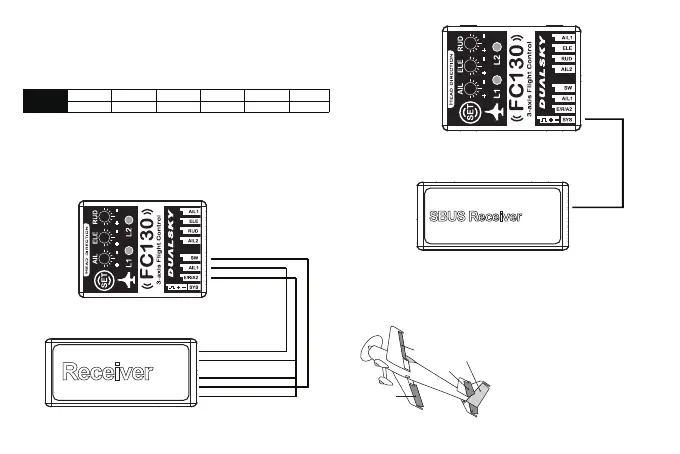
● Input signal supports Futaba S.BUS, only one wire is needed to
connect to SYS port on FC130 when using S.BUS link. SYS port has
higher priority than other input ports. When SYS port is using, other
input ports won’t work, transmitter channel sequence must be the
same as following chart:
Sequence CH1 CH2 CH3 CH4 CH5
Channel Aileron 1 Elevator Throttle Rudder Mode Switch
● Caution: Futaba and S.BUS is the trademark and technology or
Futaba Corp., we don’t provide technical support to future
incompatibility.
3. Connect the FC130 to receiver as shown below
Normal Receiver
MODE
AIL1
E/R/A2
CH5/GEAR
Rudder
Aileron1
Elevator
Reserved
AIL
ELE
THR
RUD
CH5
S.BUS Receiver
SBUS
4. FC130 corresponding control surface
● Single and double aileron airplane
RUDDER
ELEVATOR
AIL2
AIL1
* Diagram show double aileron airplane
Aileron2
CH6
Aileron 2
AIL2
(
Orange
)
(
Red
)
(
Brown
)


 To Next Page
 Loading...