6
Control of the heating system operating conditions
The 720 thermostat permanently controls the operating condition of the heating system. .
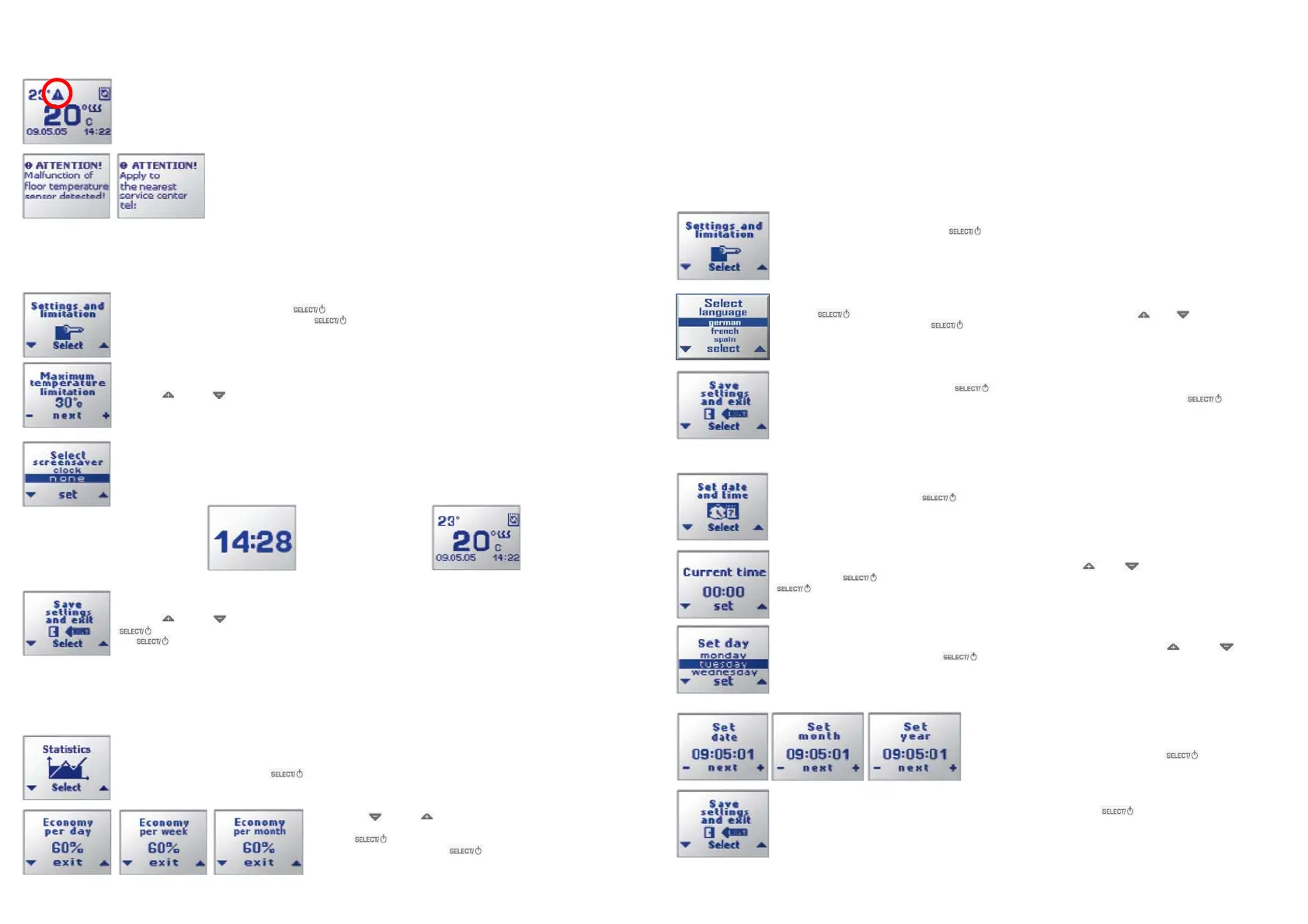
If the heating of the floor surface to the preset temperature appears to be impossible the ATTENTION sign is displayed.
This condition occurs, for example, when windows/doors are always open, or in case the installed power of the heating
system is not enough to achieve the desired heating level in this room.
In case of a malfunction (cut-off or short-circuiting of connecting wires) during which normal opera-
tion of the heating system is impossible, the thermostat turns the heating off and displays a warning
message. You should contact the manufacturer or your local dealer to repair or replace the tem-
perature sensor.
Setting of the common parameters of the thermostat
Several common parameters are valid for all thermostat operating modes. They can be set via the subdivision Settings and limitation of the
main Menu. There you can set a limit of maximum floor temperature (this may be important for some types of floor coverings) and the indication
of the device's operating mode: heating parameters, current time and date or current time (in large print).
To set the common parameters, press the button while in the operating mode, and choose the subdivision Set-
tings and limitation and open by pressing the button.
The window to set the maximum floor temperature limit appears on the display.
Press the and the buttons to set the required value and press the Set button.
The window for choosing the type of indication, in the device's operating mode, appears.
The following types of indication are available:
a) «Clock» — displays the current daytime in large figures
b) «None» — the main indication window of the device indicates the heating parameters, the current date and daytime
Clock Main display
The device returns to it after pressing any key when the «Clock» screen is displayed and after using the menu. If the
indication type «Clock» is selected, the device turns to it after 40 seconds of pressing any key.
Press the and the buttons to choose the desired option of indication («screensaver») and press the
button. The display returns to the selection of the main Menu. Select the item Save settings and exit and press
the button
The device now turns on its operating mode with the entered common parameters.
Output of energy saving statistics data
The I•WARM 720 accumulates statistic data on the heating system operation, which allows you to evaluate the actual saving benefit from the heat
controller used in your heating system. The result is displayed by the thermostat is calculated by this formula:
Saving during a time period = 100% - (Heating time during the time period/time period) * 100%
To display the statistics data press the Menu button when the 720 thermostat is in the operating mode, then choose the
Statistics subdivision and press the button.
Pressing the and the buttons you can view the statistic data for 24
hours, for a week, or for a month. To exit from statistics viewing mode
press the button. In the main Menu go to the subdivision Save
settings and exit and press the button. The 720 thermostat will
return to its current operation and indication mode.
3
Entering the correct date and time ensures the correct operation in the daily and the weekly program modes.
To set the date and time, press the button while in the basic mode and choose the Set date and time submenu.
.
Set the date and the time
In the appearing window the first two digits (hours) are blinking. Press the or the buttons to set the current hour.
Then press the button. Now the other two digits (minutes) are blinking. Set the correct value and press the
button.
Now the current time is set and the display prompts you to select a week day. By pressing the and the arrows
set the current weekday; then press the button.
Then the display shows the windows for the setting of the date, month and
year with the respective blinking digits. Set them one by one in a similar
way to setting the hour and minutes, press the button each time
for confirmation. Thus, you have set the current time, weekday and date.
The displays animation confirms the settings made and the indicator will go back to the Menu. Using the up and the down
arrow buttons to choose the subdivision Save settings and exit and press the button. The device now runs in its
operating mode. This operating mode is intended to continuously maintaining a comfortable room temperature as set by
you. Now you have the possibility to program the daily/weekly program modes according to your needs.
To set the common parameters, press the button while in the operating mode, and choose the subdivision
Settings and limitation
Basic settings
After setting the menu language, Press the button to confirm the settings until the device will return to the main
menu. To return to the basic indication choose the submenu Save settings and exit and press the button.
Press the again and the Select language screen will appear. Choose with the and button the language
your desired language and press the button.
Set the Language
Please note, English is the factory preset thermostat menu language. The following languages are available:
- German
- English
- French
- Portuguese
- Spanish
- Russian
To set the desired menu language proceed like discribed as follows.
The following chapters will present the basic setting options. You can choose between manifold options. The settings will enable you to adjust
your heating system to your requirements and to operate the heating system energy-efficient.


 To Next Page
 Loading...