Need help?
Do you have a question about the Duco DucoBox Silent Connect Series and is the answer not in the manual?
Illustrates correct and incorrect mounting positions for the DucoBox.
Shows how to securely mount the DucoBox, including weight considerations.
Guidelines for connecting air ducts, emphasizing restriction and bends.
Details the connectors and buttons on the DucoBox for power and configuration.
Illustrates wired and wireless communication connections for DucoBox.
Explains how to install and connect CO₂ and humidity Boxsensors.
How to adjust parameters like CO₂ setpoint using Duco Network Tool.
Guides on activating 'Installer mode' for adding/removing components.
Explains the meaning of different LED colors and patterns on the DucoBox.
Instructions for configuring the home type and occupant number for optimal ventilation.
Step-by-step guide for pairing wireless and wired control components.
Procedures for removing or replacing paired components from the network.
General tips for network management, factory reset, and using the Network Tool.
Detailed steps for calibrating the ventilation system for optimal performance.
Steps to verify if the air flow rates have been set correctly after calibration.
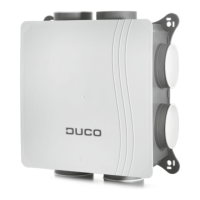
The DucoBox Silent Connect is a central component in a Duco Demand-Controlled Natural Ventilation System, designed to provide efficient and quiet ventilation. It serves as both an extractor fan and the system's "master" or brain, managing the overall ventilation process by responding to signals from various slave components.
The primary function of the DucoBox Silent Connect is to extract stale air from a building, particularly air with excessive CO₂ content or humidity. It continuously monitors indoor air quality through connected sensors and adjusts its operation to maintain a healthy and comfortable indoor environment. As the system's master, it receives and interprets data from slave components, such as CO₂ and humidity sensors, as well as manual input from user controllers. Based on this information, it intelligently controls the entire ventilation system, ensuring optimal air exchange while minimizing energy consumption and noise levels. The DucoBox Silent Connect is designed to be the quietest box in Europe, making it suitable for residential applications where noise is a concern.
The system supports both wireless (RF) and wired communication with slave components, offering flexibility in installation. RF components have a maximum free-field range of 350 meters, though this distance will be reduced in buildings due to obstacles like walls, concrete, and metal. Non-battery-powered RF slave components also act as repeaters, forwarding signals to the master if a direct connection is not strong enough. Wired components can be daisy-chained, simplifying installation by allowing a single central power supply for multiple components. The recommended cable for wired connections is a shielded 5 x 0.75 mm² data cable to prevent interference.
Optional Boxsensors can be integrated directly into the DucoBox Silent Connect to measure CO₂ and/or humidity within the air duct. A single DucoBox Silent Connect can accommodate one CO₂ and one Humidity Boxsensor. These sensors can be clipped together if the living room (CO₂ measurement) and bathroom (humidity measurement) are connected to the same duct/zone. An optional Communication Print allows the DucoBox to communicate via ModBus and/or Ethernet, enabling integration with building management systems.
The DucoBox Silent Connect offers several features to ensure optimal performance and ease of use. The system can be configured to match the specific type of home (low-rise or high-rise) and the number of occupants, which helps the ventilation system adjust its mid-position more effectively. This configuration is particularly important in the Netherlands.
Installation involves careful positioning and fixing of the DucoBox, with recommendations to avoid placing an exhaust air valve directly on the box and to use a 90° bend instead. Adhering to "10 unmissable tips" during installation, such as avoiding excessive bends in ductwork, using appropriate duct diameters, and ensuring airtight connections, is crucial for energy efficiency and noise reduction.
Electronic installation includes changing settings, which can be done using the Duco Network Tool software. This tool allows installers to adjust parameters like CO₂ setpoints and diagnose system problems. The system operates in two modes: 'Installer mode' and 'User mode'. 'Installer mode' is activated by pressing the 'INST' button on the DucoBox Silent Connect, indicated by a flashing LED. This mode is used for adding, removing, or replacing components. The system automatically reverts to 'User mode' after 15 minutes of inactivity.
Pairing components is straightforward: activate 'Installer mode', then tap each component to be paired. For RF components, it's recommended to start with the component closest to the master. Removing or replacing components is possible within 30 minutes after the component is paired or the system is restarted. This involves activating 'Installer mode' by long-pressing diagonal buttons on a paired control, then pressing a button on the component to be removed or tapping twice for replacement.
Air calibration is a critical step to ensure the system operates quietly and energy-efficiently. This procedure should be performed on a calm day (wind force 2 or less). It involves setting all exhaust vents to match desired flow rates, closing all windows and doors, ensuring all duct openings and the DucoBox cover are closed, avoiding air leaks, and setting window ventilators to the open position. The system offers 'HIGH' and 'LOW' configuration modes for air calibration, with 'HIGH' being the standard for lowest consumption and 'LOW' offering a boost mode with potentially higher noise and consumption. After selecting a mode, the installer measures flow rates at the vents and adjusts the DucoBox rpm using either a paired User controller/CO₂/Humidity Sensor or the 'DOWN' and 'UP' buttons on the DucoBox itself. Once all vents are calibrated, the system exits configuration mode, and the DucoBox performs a final calibration.
The DucoBox Silent Connect is designed for ease of maintenance. Detailed maintenance instructions and videos are available on the Duco website and duco.tv. For any service problems, users are advised to contact their installer, keeping the product's serial number handy. Installers, in turn, should contact their Duco products seller with the serial number for support.
The system includes LED indications to provide visual feedback on its status. Different LED patterns and colors indicate various states, such as being in or out of the network, logging in, waiting for associated components, initialising, or displaying changes being put through by the master. An orange LED indicates that the system is not working correctly because it has not been calibrated, prompting a restart and adherence to the '10 essential tips' if the problem persists.
Tips for troubleshooting include removing all components from the network by activating 'Installer mode' and long-pressing 'INST' until the LED flashes red, which reboots the DucoBox. Factory settings for the DucoBox and all paired components can be restored by long-pressing 'INST' and 'ENTER' if not in 'Installer mode'. The Duco Network Tool can also be used to read out information from components, aiding in diagnostics and maintenance.
 General
| Type | Ventilation Fan |
|---|---|
| Series | DucoBox Silent Connect |
| Smart Features | Yes |
| Noise level | Up to 40 dB(A) |
| Installation | Wall or ceiling mount |
| Control options | App Control |
| Energy efficiency | High |

 To Next Page