Remote Control
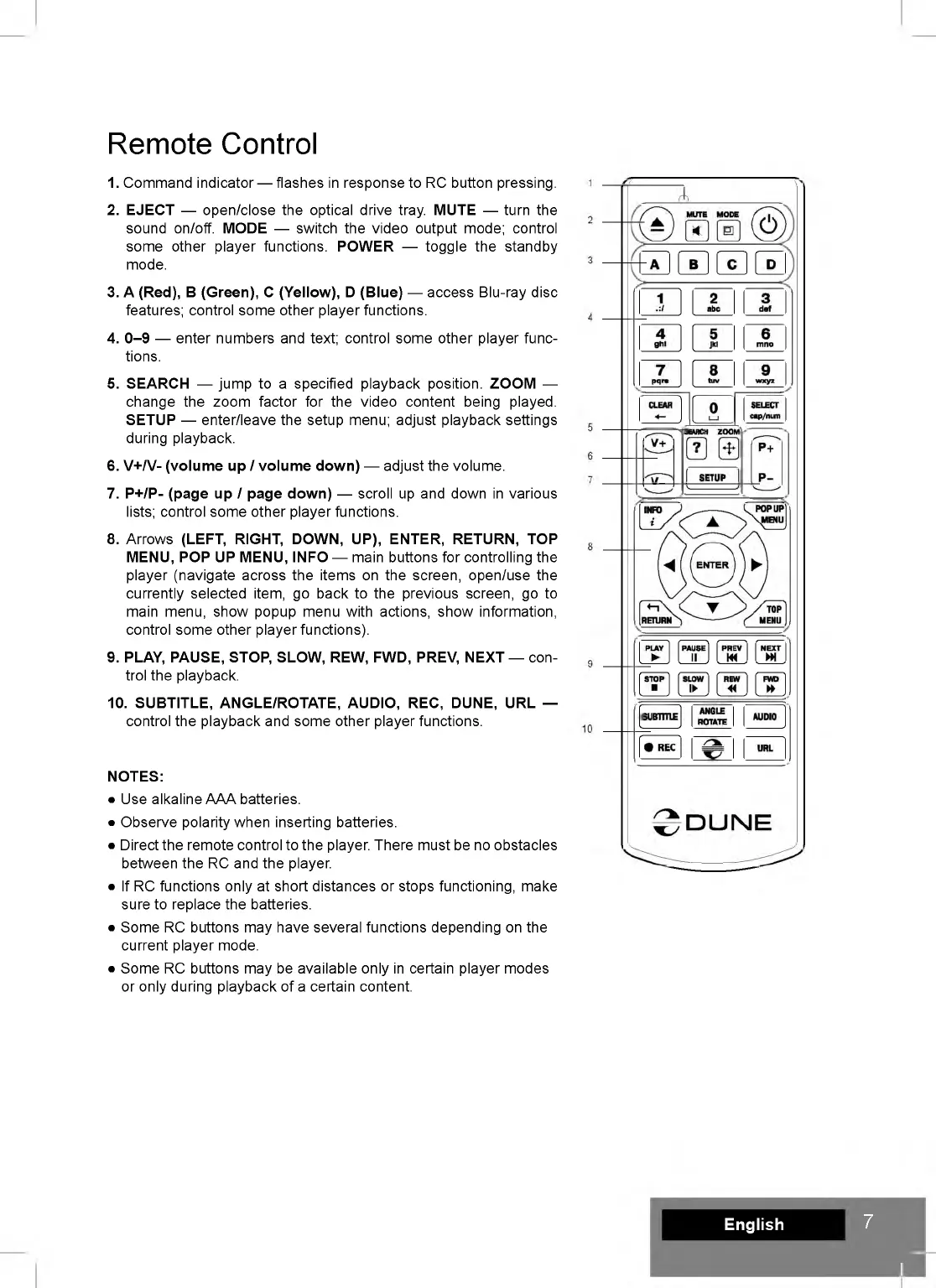
1. Command indicator — flashes in response to RC button pressing.
2. EJECT — open/close the optical drive tray. MUTE — turn the
sound on/off. MODE — switch the video output mode; control
some other player functions. POWER — toggle the standby
mode.
3. A (Red), B (Green), C (Yellow), D (Blue) — access Blu-ray disc
features; control some other player functions.
4. 0-9 — enter numbers and text; control some other player func
tions.
5. SEARCH — jump to a specified playback position. ZOOM —
change the zoom factor for the video content being played.
SETUP — enter/leave the setup menu; adjust playback settings
during playback.
6. V+/V- (volume up / volume down) — adjust the volume.
7. P+/P- (page up / page down) — scroll up and down in various
lists; control some other player functions.
8. Arrows (LEFT, RIGHT, DOWN, UP), ENTER, RETURN, TOP
MENU, POP UP MENU, INFO — main buttons for controlling the
player (navigate across the items on the screen, open/use the
currently selected item, go back to the previous screen, go to
main menu, show popup menu with actions, show information,
control some other player functions).
9. PLAY, PAUSE, STOP, SLOW, REW, FWD, PREV, NEXT — con
trol the playback.
10. SUBTITLE, ANGLE/ROTATE, AUDIO, REC, DUNE, URL —
control the playback and some other player functions.
NOTES:
• Use alkaline AAA batteries.
• Observe polarity when inserting batteries.
• Direct the remote control to the player. There must be no obstacles
between the RC and the player.
• If RC functions only at short distances or stops functioning, make
sure to replace the batteries.
• Some RC buttons may have several functions depending on the
current player mode.
• Some RC buttons may be available only in certain player modes
or only during playback of a certain content.
English
7
II


 To Next Page