4
HOME AUTOMATION UI
The Home Automation UI is intended for typical everyday Home Automation tasks, for high-level Smart Home
configuration, and provides only basic operations for Z-Wave network configuration and administration. For advanced
Z-Wave configuration, please use the Expert UI.
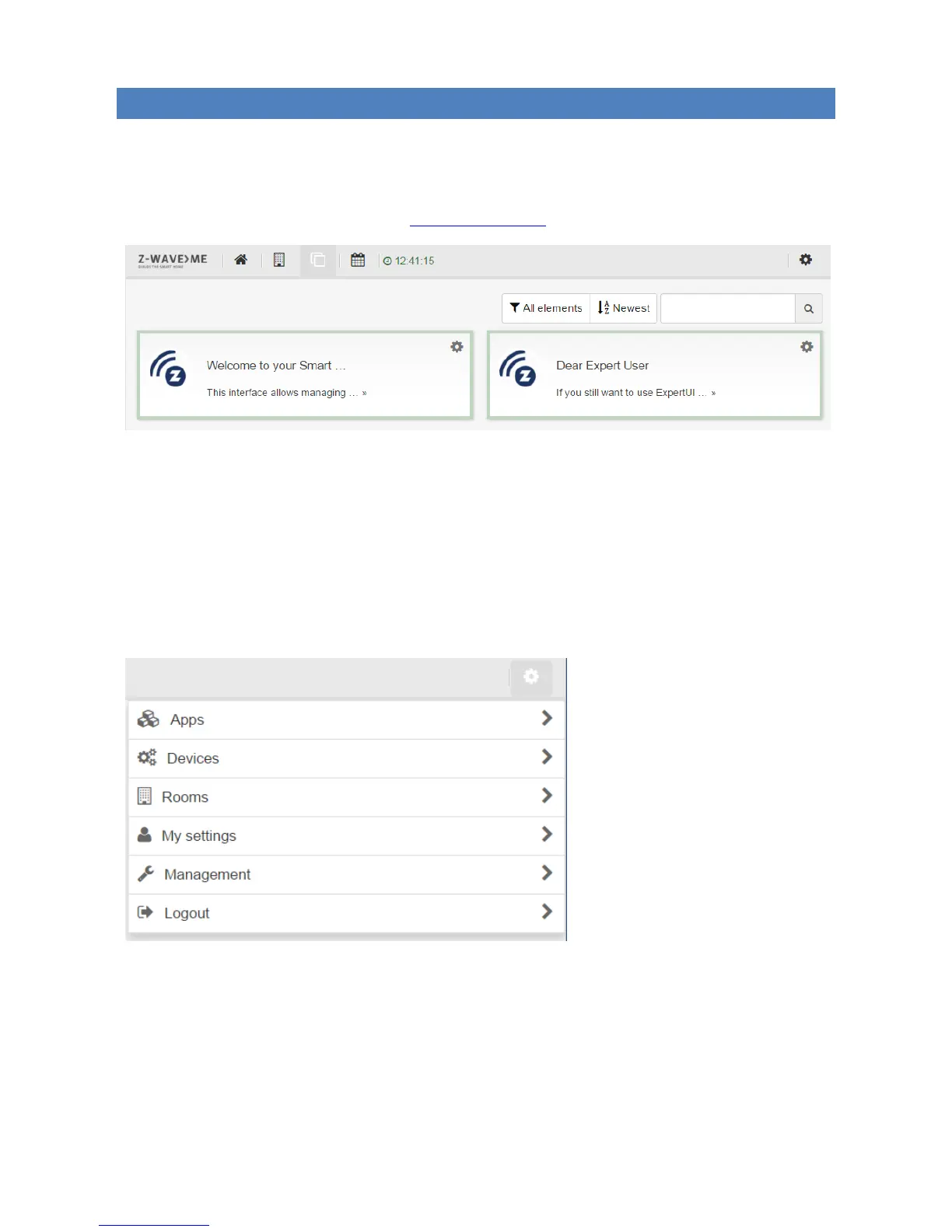
When you log in into the Web UI (using the URL http://IP-address:8083), you get into the Home Automation UI.
The top menu bar has the following icons:
“Home”: opens the Dashboard screen, which shows the UI elements (corresponding to Z-Wave devices and
other objects) configured to be shown on the dashboard for easy access.
“Rooms”: opens the Rooms screen, which shows the configured rooms.
“Elements”: opens the Elements screen, which shows all the available Elements (UI blocks corresponding to
configured Z-Wave devices and other objects).
“Events”: opens the Events screen, which shows the log of system events.
The “Settings” icon at the top right corner of the screen shows the “Settings” menu:
The “Settings” menu has the following items:
“Apps”: install and configure Home Automation applications.
“Devices”: configure Z-Wave devices and IP cameras.
“Rooms”: configure Rooms.
“My settings”: configure UI and account settings.
“Management”: system configuration.
“Logout”: log out from the Web UI.


 To Next Page