Need help?
Do you have a question about the DUNE HD Max and is the answer not in the manual?
Lists the main features of the Dune HD Max media player, covering its processor, playback capabilities, and connectivity options.
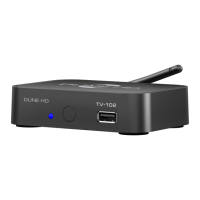
Identifies the main media player unit and its accompanying remote control, including battery information.
Guides on connecting the player to A/V equipment, powering it on, and basic troubleshooting.
Describes how to use the MODE button and numbered keys for quick video output mode selection.
How to turn the player on, put it into standby, or turn it off completely, and differences in standby modes.
 General
| 3D Support | Yes |
|---|---|
| Video outputs | HDMI, Composite, Component |
| Video Output | Composite, Component |
| Audio Output | HDMI, Optical |
| Supported Formats | MKV, AVI, MP4, MOV, VOB |
| Type | Media Player |
| Video codecs | MPEG2, MPEG4, XVID, VC1, H.264 |
| Audio codecs | AAC, FLAC, MP3, WAV, OGG |
| Ethernet | 10/100 Mbps |
| Wi-Fi | Optional (via USB dongle) |
| Card Reader | SD |
| Resolution | 1080p |
| File Formats | FLAC, MP3, WAV, OGG, AAC, JPG, PNG, GIF |
| Subtitles | SRT, SUB, SSA, ASS |

 To Next Page