D-2
ELECTRICAL ADJUSTMENTS
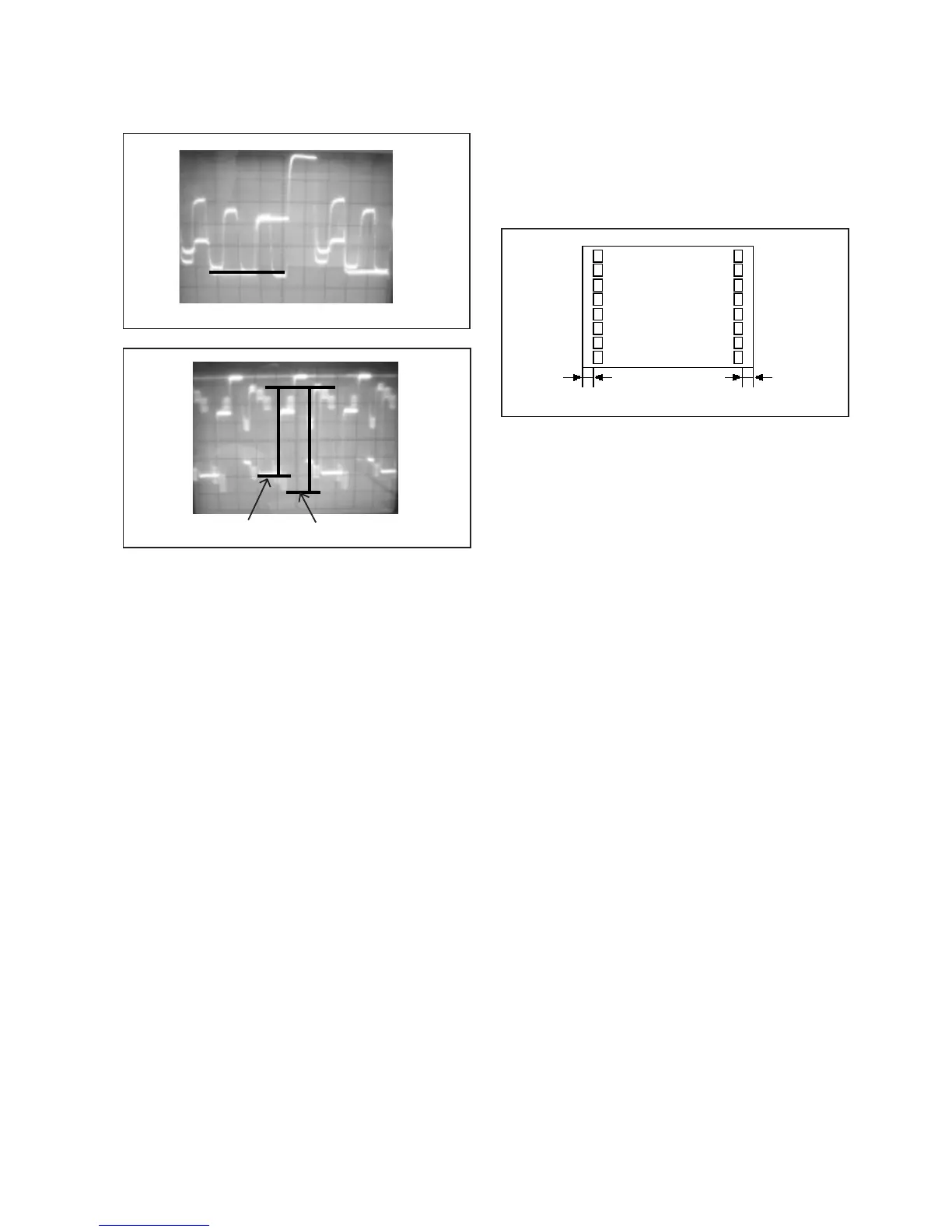
2-8: OSD HORIZONTAL
1.
2.
Activate the adjustment mode display of Fig. 1-1.
Press the VOL.UP/DOWN button on the remote control
until the difference of A and B becomes minimum.
(Refer to Fig. 2-3)
Fig. 2-3
Receive an 70dB monoscope pattern.
Using the adjustment control, set the brightness and
contrast to normal position.
Activate the adjustment mode display of Fig. 1-1 and
press the channel button (13) on the remote control to
select "BRI.CENT".
Press the VOL.UP/DOWN button on the remote control
until the white 10% is starting to be visible.
Press the TV/AV button on the remote to set to the
AV mode. Then perform the above adjustment 2~4.
1.
2.
3.
4.
5.
2-9: SUB BRIGHTNESS
Fig. 2-1
Fig. 2-2
2-5: HORIZONTAL PHASE
1.
2.
3.
4.
Receive the monoscope pattern.
Using the adjustment control, set the brightness and
contrast to normal position.
Activate the adjustment mode display of Fig. 1-1 and
press the channel button (05) on the remote control to
select "H.PHAS".
Press the VOL.UP/DOWN button on the remote
control until the SHIFT quantity of the OVER SCAN on
right and left becomes minimum.
2-6: VERTICAL SIZE
1.
2.
3.
4.
Receive the crosshatch signal from the Pattern
Generator.
Activate the adjustment mode display of Fig. 1-1 and
press the channel button (06) on the remote control to
select "V.SIZE".
Press the VOL.UP/DOWN button on the remote control
until the SHIFT quantity of the OVER SCAN on upside
and downside becomes 10 ± 2%.
Receive a broadcast and check if the picture is normal.
NOTE: Adjust after performing adjustments in section 2-5
2-7: VERTICAL SHIFT
1.
2.
3.
Receive the crosshatch signal from the Pattern
Generator.
Activate the adjustment mode display of Fig. 1-1
and press the channel button (07) on the remote
control to select "V.SFT".
Press the VOL.UP/DOWN button on the remote
control until the horizontal line becomes fit to the
notch of the shadow mask.
NOTE: Adjust after performing adjustments in section 2-6
Red 110%
Receive an 70dB the color bar pattern.
Activate the adjustment mode display of Fig. 1-1
press the channel button (17) on the remote control
to select "CONT.MAX".
Press the VOL.UP/DOWN button on the remote control
until the contrast step No. becomes "100".
Press the TV/AV button on the remote to set to the
AV mode.
Activate the adjustment mode display of Fig. 1-1
press the channel button (17) on the remote control
to select "CONT.MAX".
Press the VOL.UP/DOWN button on the remote control
until the contrast step No. becomes "100".
1.
2.
3.
4.
5.
6.
2-10: SUB CONTRAST
BA
TV
00 OSD H 12
"A"
White 100%
2-11: Confirmation of Fixed Value (Step No.)
Please check if the fixed values of the each adjustment
items are set correctly referring below.
RF
04
150
30
55
40
75
00
40
60
10
03
03
15
15
NO.
04
14
15
16
18
20
21
23
24
25
26
27
28
29
FUNCTION
H VCO
BRI.MAX
BRI.MIN
CONT.CENT
CONT.MIN
COL.MAX
COL.MIN
SHAR.CENT
SHAR.MAX
SHAR.MIN
CB DL
CR DL
CB PED
CR PED
AV
04
150
30
55
40
75
00
40
60
10
03
03
15
15
DIGITAL
04
150
30
55
40
75
00
40
60
10
03
03
15
15



 To Next Page