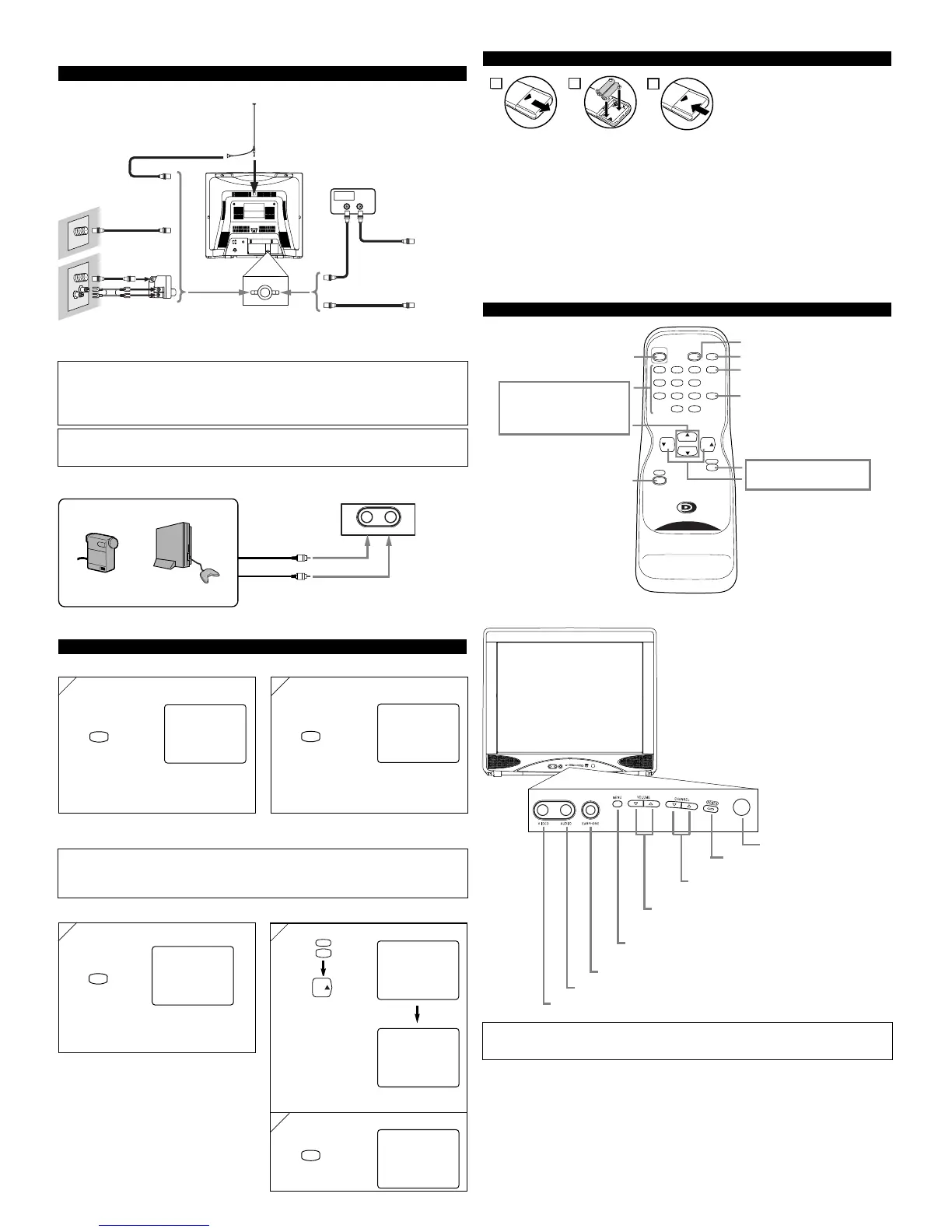
VHF/UHF
Combiner
OR
OR
75-ohm
Coaxial Cable
From Cable
System
From Cable
System
or Satellite
Antenna
CATV Box
*
or Satellite Box
*Some cable TV systems use scrambled signals and
require a special converter to receive these channels.
Consult your local cable company.
CAUTION: TO PREVENT ELECTRIC SHOCK, MATCH WIDE BLADE OF PLUG TO
WIDE SLOT AND FULLY INSERT.
MISE EN GARDE: POUR ÉVITER LES RISQUES D’ÉLECTROCUTION, INTRODUIRE
LA LAME LA PLUS LARGE DE LA FICHE DANS LA BORNE CORRESPONDANTE DE
LA PRISE ET POUSSER JUSQU’AU FOND.
[EXTERNAL CONNECTION]
Front AUDIO/VIDEO INPUT
Video Cable
Audio Cable
Video GameVideo Camera
Front of this TV
Notes:
●
If you hit [GAME] when the TV is off, the TV turns on and enters in Game mode.
●
If you adjust another picture control while in Game mode, this mode will automatically be
canceled.
ex.
Cables used here are available on the market.
OPERATIONS
Note:
●
If some digits appear in the corner of the screen when the unit is turned on at the first time, hit
[POWER] without unplugging the power cord.
REMOTE CONTROL AND FRONT PANEL FUNCTION
POWER button
To turn TV on/off
Channel number buttons
CH(ANNEL)
KK
/
LL
buttons
MENU button
To view on-screen menu
GAME button
SLEEP button
DISPLAY button
To display CH No./Audio Status
CHANNEL RETURN button
To return previous screen
MUTE button
VOL(UME)
KK
/
LL
buttons
To select channels
To adjust volume
INSTALLING THE BATTERIES
Install two AA batteries (supplied)
matching the polarity indicated inside
battery compartment of the remote con-
trol.
[BATTERY PRECAUTIONS]
• Be sure to follow the correct polarity as indicated in the battery compartment.
Reversed batteries may cause damage to the device.
• Do not mix different types of batteries together (e.g. Alkaline and Carbon-Zinc) or old batteries
with fresh ones.
• If the device is not to be used for a long period of time, remove the batteries to prevent
damage or injury from possible battery leakage.
• Do not try to recharge batteries not intended to be recharged; they can overheat and rupture.
To use external input
Picture: GAME (ON)
Input: External
Select “PICTURE”
Note:
•
For your safety and to avoid damages to the unit, unplug the antenna cable from the
ANT. IN jack before moving the unit.
After 10 seconds


 To Next Page