IB-HT395-WM-E-073003
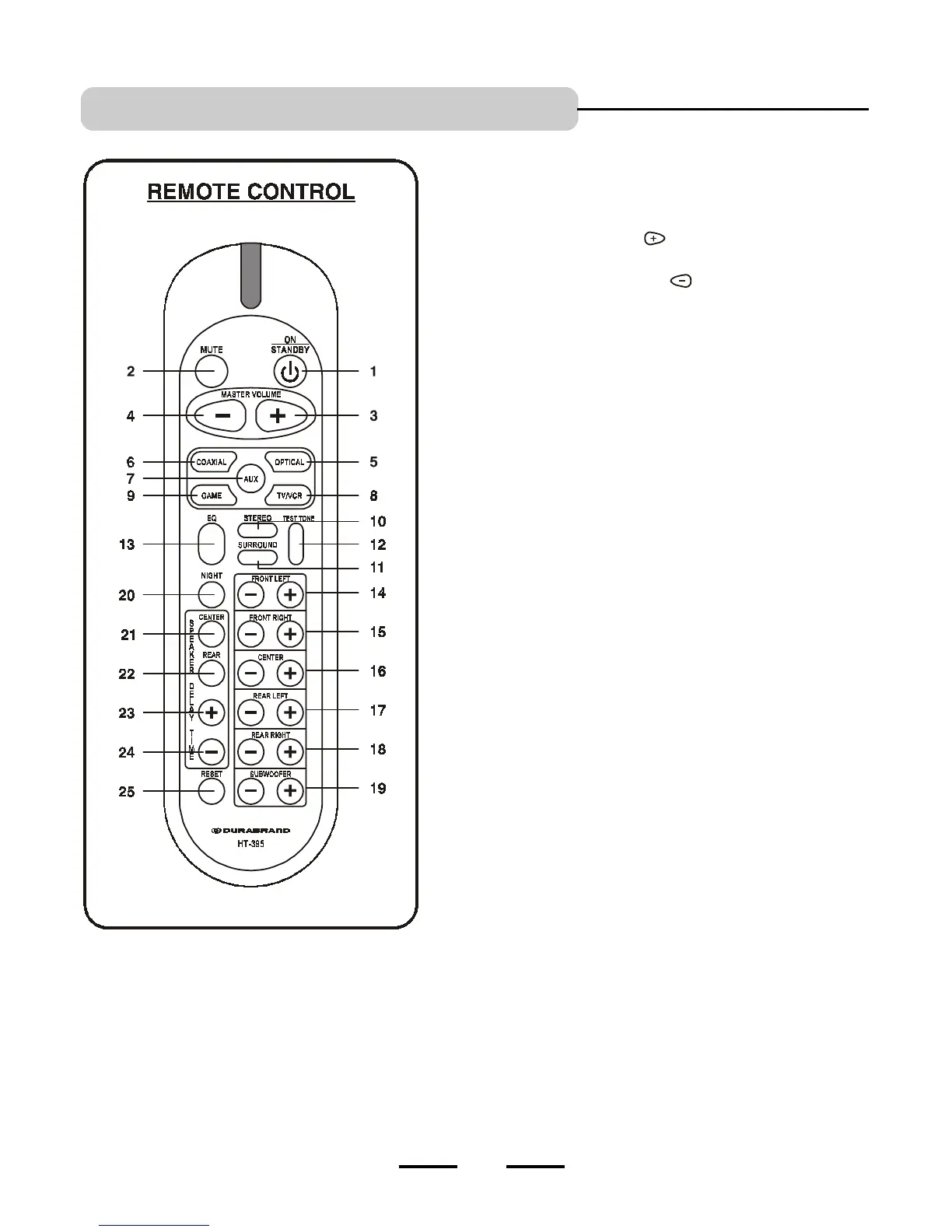
1. ON/STANDBY button - Switches the player from STANDBY to ON or
ON to STANDBY (if the main POWER of the set is on).
2. MUTE button - Instantly turns off the sound. Press again to restore
the sound.
3. MASTER VOLUME UP button
- Press to raise the volume level
of all speakers.
4. MASTER VOLUME DOWN button - Press to lower the volume
level of all speakers.
5. DVD OPTICAL button - Selects the DVD OPTICAL audio input mode.
The DVD OPTICAL indicator on the front panel will light.
6. DVD COAXIAL button - Selects the DVD COAXIAL audio input
mode. The DVD COAXIAL indicator on the front panel will light.
7. AUX button - Selects the AUXILIARY audio input mode. The AUX
indicator on the front panel will light.
8. TV / VCR button - Selects the TV or VCR audio input mode. The
TV / VCR indicator on the front panel will light.
9. GAME button - Selects the TV GAME (or VIDEO CAMERA) play mode.
The GAME indicator on the front panel will light.
10. STEREO button - Press to select STEREO (2 channel) listening mode,
and the STEREO indicator on the front panel will be on.
11. SURROUND button - Press to select Dolby Digital, Dolby Pro Logic
(5.1 channel) audio listening mode. The sound will come out of all 6
speakers.
12. TEST TONE button - Press to activate the test tone noise function to
check whether all your speakers are connected properly.
13. EQ button - Press to select different tone effects.
14. FRONT LEFT UP & DOWN VOLUME buttons - Press to adjust the
individual FRONT LEFT speakers sound level.
15. FRONT RIGHT UP & DOWN VOLUME buttons - Press to adjust the
individual FRONT RIGHT speakers sound level.
16. CENTER UP & DOWN VOLUME buttons - Press to adjust the
individual CENTER speakers sound level.
17. REAR LEFT UP & DOWN VOLUME buttons - Press to adjust the
individual REAR LEFT speakers sound level.
18. REAR RIGHT UP & DOWN VOLUME buttons - Press to adjust the
individual REAR RIGHT speakers sound level.
19. SUBWOOFER UP & DOWN VOLUME buttons - Press to adjust the
SUBWOOFER speakers sound level.
20. NIGHT button - Press to select NIGHT listening mode (Reduced sound
level).
21. CENTER DELAY button - Press to delay the center speakers sound.
22. REAR DELAY button - Press to delay the rear speakers sound.
23. TIME UP button - Press to increase the time amount of sound delay.
24. TIME DOWN button - Press to decrease the time amount of sound
delay.
25. RESET button - Press to reset all speakers outputs to the factorys
default settings.
LOCATION OF CONTROLS
5


 To Next Page