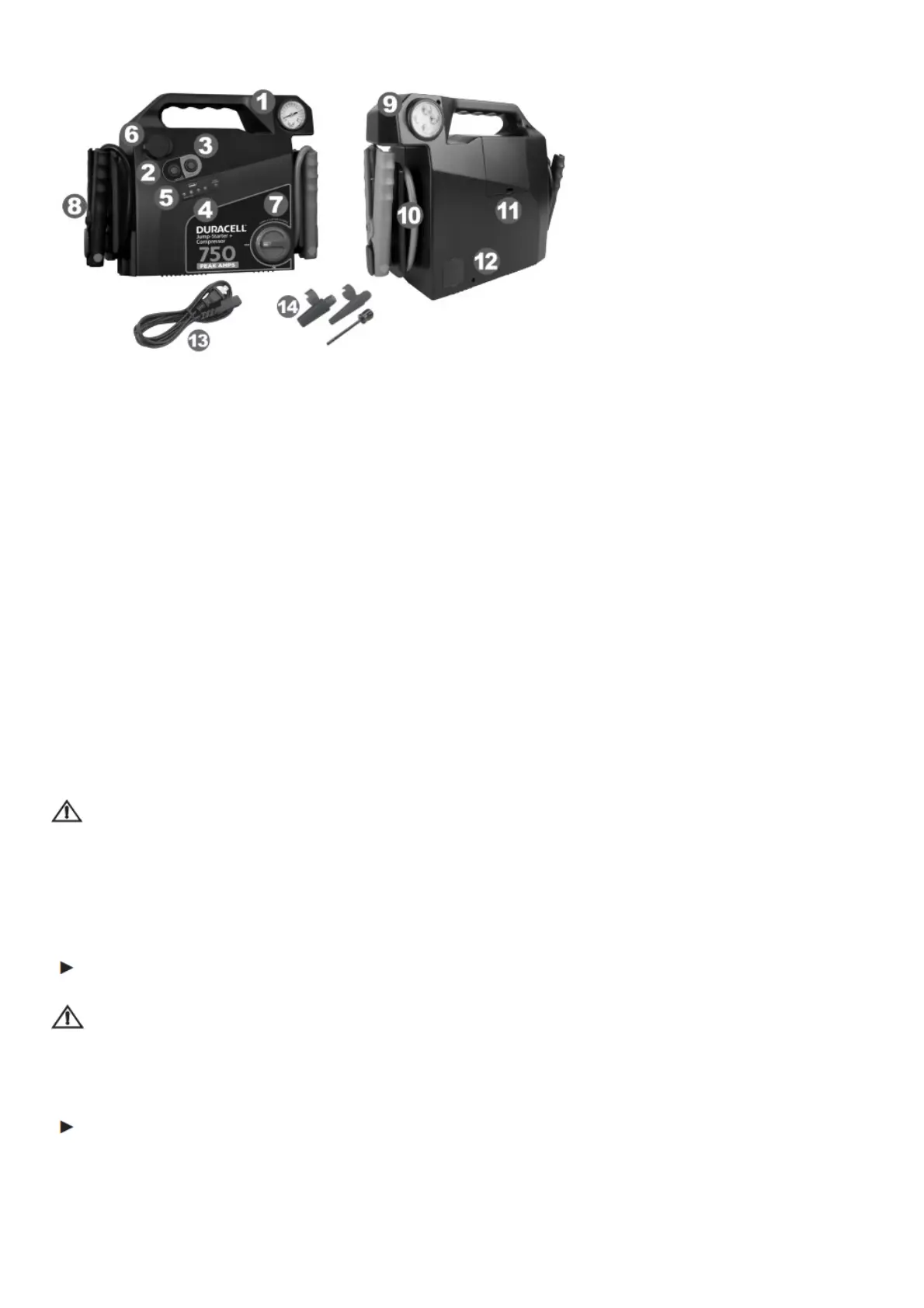
1. Features
1. Pressure gauge
2. Air compressor on/off
3. Fuel gauge button and USB on/off switch turns on the fuel gauge indicator. Turns on power
to the USB charge port.
4. LED fuel gauge/ battery level indicator shows battery fuel level.
5. USB charge port Supplies up to 2.1 Amps of charging power for your USB devices.
6. 12V DC power socket powers 12V DC devices and appliances.
7. Jump-starter ON/OFF switch
8. Negative jump starting clamp (see Section 6).
9. Emergency light provides bright LED illumination in dark locations.
10. Positive jump starting clamp (see Section 6).
11. Storage compartment for compressor hose, accessories and charger cord.
12. AC battery charger recharges the jump-starter’s internal battery from a standard AC wall outlet.
13. AC power cord
14. Compressor accessories
2. Important Safety Information
Misusing or incorrectly connecting the Duracell
®
Jump-starter may damage the equipment or create
hazardous conditions for users.
WARNING: ELECTRICAL SHOCK HAZARD
The jump-starting clamps may spark if touched together. Always keep the clamps in their storage
holsters when they are not being used.
3. Charging/Recharging the Jump-starter
Charging before first use
IMPORTANT
Prior to using the jump-starter for the first time, ensure that the battery of the jump-starter is fully
charged. If the battery has been fully discharged, charging/recharging with the AC battery charger
may take up to 12 hours.
Charging / recharging with the internal charger
Recharging with the internal charger is a true “plug-in-and-forget” charging method. We recommend
leaving the AC battery charger connected when the jump-starter is not in use.
1. Disconnect any USB and 12V DC appliances from the DC power outlets.
2. Remove the AC cord from the storage compartment under the unit.



 To Next Page