The Duratech Soldering Station (model TS-1640, ZD-8936) is a temperature-controlled soldering station designed for lead-free soldering applications. It features a compact, light, and durable design, making it suitable for various work environments.
Function Description:
This device is primarily used for soldering and desoldering electronic components. It provides a controlled temperature environment for the soldering iron, ensuring precise and efficient work. The station is equipped with an LED display that shows the current temperature, allowing users to monitor and adjust settings accurately.
Important Technical Specifications:
- Rated Power Input: 60W
- Rated Voltage Range: AC 220-240V 50Hz
- Soldering Station Temperature Range: 160°C to 480°C (320°F to 896°F)
- Display: LED Segment Displays
- Fast Start-up: Reaches 350°C from room temperature in approximately 30 seconds.
- Included Tip: N9-1 tip.
Usage Features:
Before operation, users should place the soldering iron in its holder and connect the plug to the receptacle on the station, turning it clockwise to tighten the plug nut. The control unit then connects to the power socket, and the power is switched on. A brief self-test illuminates all display elements, after which the electronic system automatically switches to the set temperature.
Display & Temperature Settings:
- Temperature Adjustment: The "+" and "-" buttons are used to adjust the temperature. A short press changes the set-point by ±1°C, while holding the button down allows for quick adjustment to the target temperature.
- Temperature Unit Toggle: The "*" button serves as a transfer button to switch between Celsius (°C) and Fahrenheit (°F). The default unit is Celsius.
- Safety Precautions:
- Do not use the system near flammable items.
- Advise others in the work area that the unit can reach very high temperatures and should be considered potentially dangerous.
- Turn off the power switch during breaks and when finished using.
- Before replacing parts or storing the system, turn off the power and allow it to cool down to room temperature.
- Avoid touching grounded parts with your body (e.g., pipes, heating radiators), as the grip of the antistatic designed soldering tool is conductive.
- Do not use the soldering tool in a moist or wet environment.
- Always place the soldering iron on its holder after use.
- The power cord should only be inserted into approved power sockets or adapters.
- The soldering tip can reach temperatures of around 400°C (752°F) when the power switch is on. Mishandling can lead to burns and fire. Do not touch metallic parts near the soldering tip/nozzle.
- This appliance is not intended for use by young children or infirm persons unless adequately supervised. Young children should be supervised to ensure they do not play with the appliance.
- A fire may result if the appliance is not used with care: be careful when using near combustible material, do not apply to the same place for a long time, place the appliance on its stand after use, allow it to cool down before storage, and do not leave the appliance unattended when switched on.
- Unused soldering tools should be stored in a dry location out of reach of children. Switch off all unused soldering tools.
Maintenance Features:
- Intended Use: Do not use this tool for any applications other than soldering or desoldering.
- Handling: Do not tap the iron against the workbench or subject it to severe shocks.
- Tip Cleaning: Do not file the soldering tip to remove oxide. Instead, use a tip cleaner or the provided cleaning sponge. Always tin the tip before storing it away.
- Power Disconnection: Always turn off the power before connecting or disconnecting the soldering iron.
- Damage Check: Discontinue any further use if the control station, soldering iron, or cabling are damaged or worn.
The Duratech Soldering Station is distributed by TechBrands by Electus Distribution Pty. Ltd. in Australia.

 Need help?
 General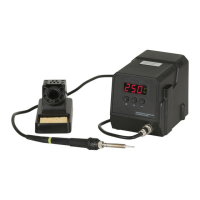

 To Next Page
