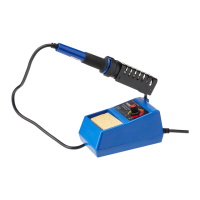
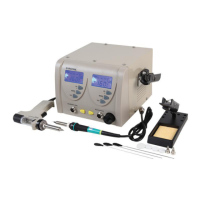
The Duratool ZD-929C is a 48W Digital Soldering Station designed for electrical work. It is a comprehensive soldering solution that includes a control station, a soldering iron, and an iron holder. The device is intended for use by individuals aged 8 years and above, provided they have received supervision or instruction on safe usage and understand the associated hazards.
Function Description:
The primary function of the ZD-929C soldering station is to provide a controlled heat source for soldering applications. It allows users to precisely set and monitor the temperature of the soldering iron tip, ensuring optimal conditions for various soldering tasks. The digital display provides real-time feedback on the tip's temperature, and a visual indicator (red light) signals when the heating element is active. The station is specifically designed for electrical work, and the use of acidic solder is explicitly warned against as it can damage the iron tip.
Important Technical Specifications:
- Model: ZD-929C
- Power Consumption: 48W
- Input Voltage: 220-240V~50Hz
- Output Voltage: 24V AC
- Temperature Range: 160-480°C
- Temperature Accuracy: +/-5°C
- Dimensions (L x W x H): 96 x 116 x 170mm
- Weight: 2.3kg
Usage Features:
The ZD-929C offers several user-friendly features to enhance the soldering experience:
- Digital LCD Display: The station is equipped with an LCD display that shows the set and actual temperature of the soldering iron tip.
- Temperature Control: Users can easily regulate the temperature using a rotary control. The display switch allows toggling between "SET" to adjust the temperature and "READ" to view the actual tip temperature.
- Temperature Unit Switching: A dedicated "°C/°F" button allows users to switch the temperature display between Celsius and Fahrenheit units as preferred.
- Iron Holder: The soldering iron holder can be conveniently mounted on either the left or right side of the control station, accommodating both left-handed and right-handed users. It features a locking wheel to secure its position.
- Tip Cleaning Sponge: The station includes a tip cleaning sponge, which should be dampened before use and kept damp during operation to effectively clean the soldering tip.
- Power Switch: A power switch located on the front of the station controls the power supply to the unit. The LCD illuminates when the power is on.
- Heating Element Indicator: A flashing red light on the display indicates when the heating element is active, signifying that the iron is heating up to the set temperature.
- Safety Precautions: The manual emphasizes several safety measures, including never leaving the station unattended while powered on, avoiding contact with the hot soldering tip, not using the product near flammable items, and ensuring adequate ventilation. The appliance must be earthed.
- First-Time Use: During the initial use, the soldering iron may emit a slight smoke as the heating element dries out; this is normal and temporary.
- Tip Protection: After soldering work, it is recommended to adjust the temperature to 270°C or switch off the power, clean the tip, and tin it with fresh solder to prevent oxidation and extend its life. Lowering the temperature during breaks also helps prolong tip life.
Maintenance Features:
Proper maintenance is crucial for the longevity and performance of the ZD-929C soldering station:
- Cleaning: The iron should only be cleaned when it is switched off and at room temperature. A damp cloth with a small amount of liquid detergent can be used for cleaning. It is critical never to submerge the soldering iron in liquid or allow any liquid to enter the case. Abrasives, chemicals, or solvents that could damage the iron should be avoided.
- Tip Care: Users are advised not to file down tips or clean them with abrasives. If the tip becomes worn, replacement irons are available.
- Troubleshooting: The manual provides guidance for common issues:
- Intermittent Tip Heating: This may indicate a damaged mains cord or a loose connection.
- Tip Not Reaching Set Temperature: This suggests a defective heating element.
- Solder Not Wetting the Tip: This could be due to the tip temperature being too high or the tip being badly oxidized and requiring cleaning.
- Storage: Before storage, the power should be turned off, and the product allowed to cool down to room temperature.
- Waste Disposal: The product is marked as Waste Electrical & Electronics Equipment (WEEE) and should not be mixed with general household waste. It must be disposed of separately for treatment, recovery, and recycling of materials. Local authorities should be contacted for details on recycling schemes.

 Need help?
 General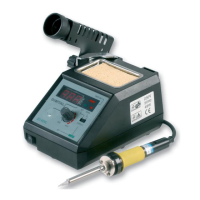

 To Next Page