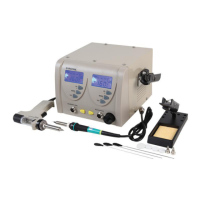
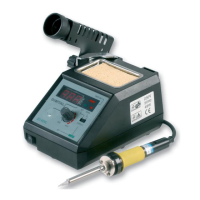
The Duratool D02265 is a 48W Soldering Station designed for electrical work, offering a controlled temperature environment for soldering tasks. It comprises a control station, an integrated soldering iron, an iron holder, and a cleaning sponge.
Function Description:
The primary function of the Duratool D02265 is to provide a heated soldering iron for joining electronic components and wires using solder. The control station allows users to regulate the temperature of the soldering iron tip, ensuring optimal conditions for various soldering applications. The iron holder provides a safe and convenient place to rest the soldering iron when not in use, and the damp cleaning sponge is used to clean the soldering tip, maintaining its effectiveness.
Important Technical Specifications:
- Model: D02265
- Power Consumption: 48W
- Input Voltage: 220-240V~50Hz
- Temperature Range: 150-450°C
- Dimensions (L x W x H): 120 x 80 x 70mm
- Weight: 0.6kg
Usage Features:
- Temperature Control: The soldering station features a rotary control for adjusting the iron's temperature. The control is color-coded to indicate approximate temperature ranges:
- Yellow: approx 150°C
- Orange: approx 150 to 270°C
- Red: approx 270 to 450°C
It is recommended to use the lower part of the first red sector for lead solder and the lower end of the second red sector for silver solder.
- Power Indicator: An LED illuminates when the power is on, indicating that the station is active.
- Iron Holder: The integrated iron holder provides a secure resting place for the soldering iron during and between uses.
- Tip Cleaning Sponge: A damp sponge is provided in the iron holder tray for cleaning the soldering tip. Keeping the sponge damp during use is crucial for effective tip cleaning.
- Safety Precautions:
- Always place the soldering iron in its stand when not in use.
- Never leave the soldering station unattended while powered on.
- Avoid touching the soldering tip or surrounding metallic parts until they have cooled down completely.
- Do not use the product near flammable items.
- Ensure adequate space and ventilation around the appliance to dissipate heat and fumes.
- The appliance must be earthed.
- Only use for electrical work; acidic solder will damage the iron tip.
- Lowering the temperature during breaks extends the life of the tip.
- After soldering, adjust the temperature to 270°C or switch off the power, clean the tip, and tin it with fresh solder to prevent oxidation.
Maintenance Features:
- Cleaning:
- Cleaning should only be performed when the iron is switched off and at room temperature.
- The iron can be cleaned with a damp cloth and a small amount of liquid detergent if necessary.
- Never submerge the soldering iron in liquid or allow any liquid to enter the case.
- Avoid using chemicals, abrasives, or solvents that could damage the soldering iron.
- Tip Replacement:
- Tips should only be replaced when the iron is switched off and at room temperature.
- The tip can be changed by unscrewing the knurled nut barrel.
- It is crucial that the iron is switched off, unplugged, and allowed to cool before and after tip replacement.
- After removing the tip, blow out any remaining oxide dust from the tip retaining area.
- Replace the tip and tighten the knurled nut barrel assembly with fingers. Pliers should only be used to tighten the nut if loosening occurs when the iron is hot.
- Do not overtighten the nut, as this could damage the heating element.
- Never file down tips or clean them with abrasives. Replacement tips are available.
- Troubleshooting:
- Tip heats intermittently: Could indicate a damaged mains cord or a loose connection.
- Tip will not reach set temperature: Suggests a defective heating element.
- Solder will not wet the tip: The tip temperature may be too high, or the tip is badly oxidized and requires cleaning.
- Increased resistance between tip and ground: Check that the tip attachment is tightened.
- End-of-Life Disposal: The product is marked as Waste Electrical & Electronics Equipment (WEEE) and should not be mixed with general household waste. It must be kept separate for treatment, recovery, and recycling. Users should contact their local authority for details on recycling schemes.


 To Next Page

 General