3
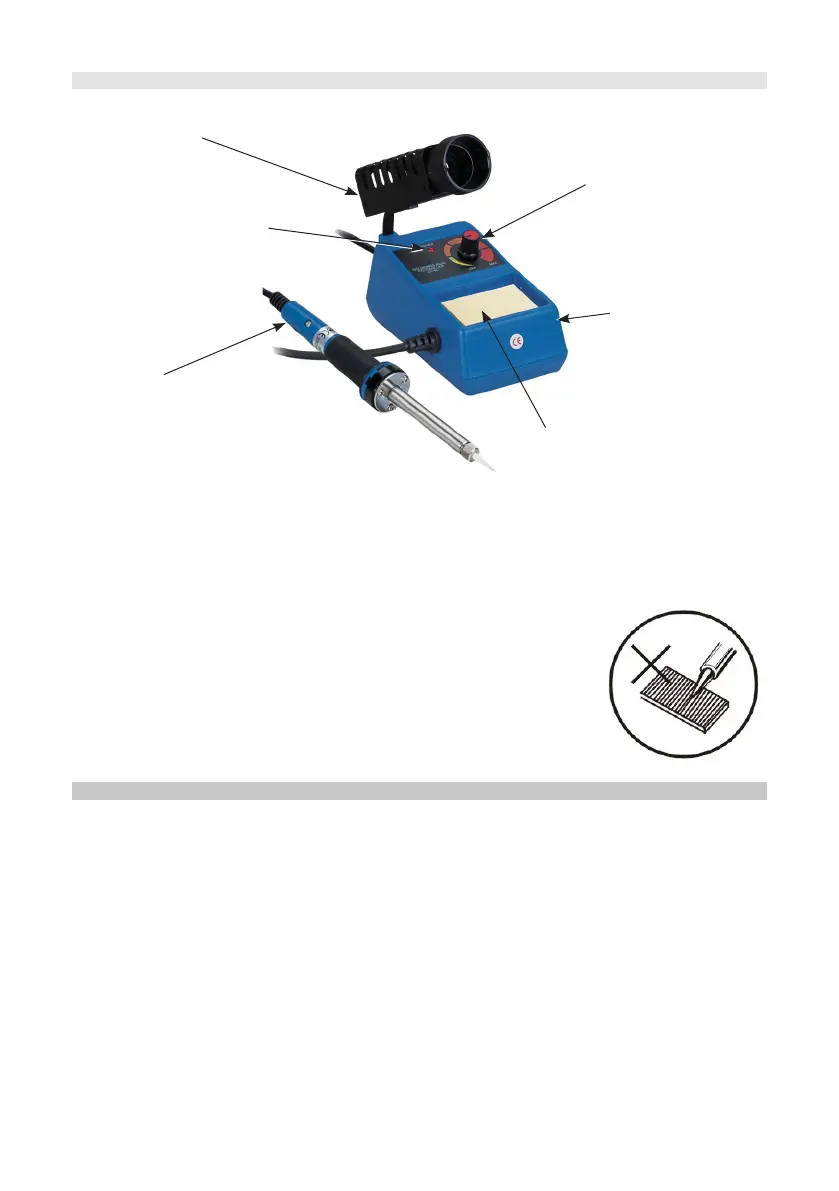
OVERVIEW
Soldering Iron
Temperature Control
Power LED
Sponge
Iron Holder
Soldering Station
• Between use (or during breaks), always put the soldering iron in the holder.
• Lower the temperature during breaks as this extends the life of the tip.
• When the soldering work is done, adjust the temperature to 270
o
C or switch off the
power rst, clean the tip and tin with fresh solder to protect it from oxidation.
• Never le down the tips or attempt to clean using abrasives.
• Replacement tips are available for this iron. See our web
pages or catalogue.
TIP REPLACEMENT
• Replacing the tip should only be done when the iron is switched off and at room
temperature.
• The tip can be changed or replaced by unscrewing the knurled nut barrel.
• It is imperative that the iron is switched off, unplugged and allowed to cool before
and after tip replacement.
Caution: Damage could occur if the iron is left on without the tip inserted.
• After removing the tip, blow out any remaining oxide dust that may have formed in
the tip retaining area of the barrel.
Warning: Care should be taken to avoid getting dust in your eyes.
• Replace the tip and tighten the knurled nut barrel assembly with your ngers.
• Pliers should only be used to tighten the nut if loosening occurs when the iron is
hot.
• Do not over tighten the nut as the element could be damaged.


 To Next Page