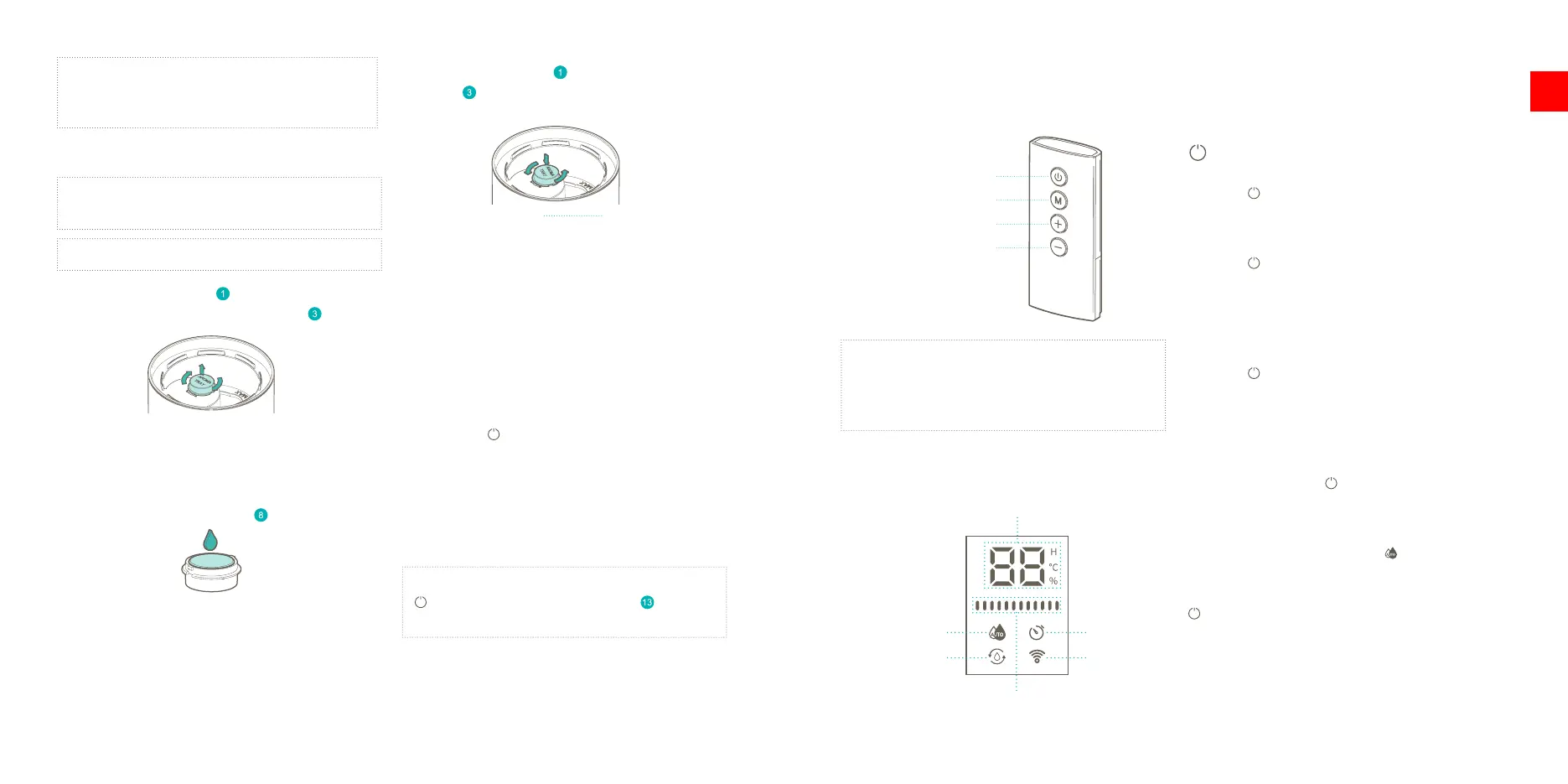
3. Place the aroma tray back in the transparent
cover and rotate it counter clockwise to lock it
in place.
NOTE: The ‘lock open and ‘lock closed icons on the
transparent cover help to position the aroma tray
before locking it in place.
First use
1. Make sure the power cord is plugged in the
power outlet. The device will make a “beep”
sound.
2. Press the button to turn on the device. The
display will light up.
3. The display will switch between the current
temperature and relative humidity, showing each
for 5 seconds.
4. The default mist output is set to medium.
NOTE: You can also turn on the device using the
touch button on the humidier base , located
behind the remote control.
NOTE: We recommend using distilled or clear tap
water to prevent the growth of bacteria and scale
inside the water tank.
Using aroma
WARNING: Never deposit aroma directly into the
water tank.
WARNING: Never use oil based aromas.
1. Rotate the aroma tray clock wise and lift it to
remove it from the transparent cover .
TIP: The ‘lock closed and ‘lock open’ icons on the
transparent cover help to rotate the tray in the right
direction.
2. Flip the aroma tray and add a few drops of Duux
Aroma to the aroma sponge inside the tray.
8
Control panel / remote control
Power button
Mode button
Decrease button
Increase button
NOTE: The remote control is the main control
panel to operate the device. When not in use, we
recommend placing the remote control back in the
holder in the base.
Display
Timer (H) / Temperature (°C) / Humidity (%)
Mist output level indicator
Auto mode
Rell water
Timer
WIFI
Buttons
Power button
Remote
Press the button once to turn on the device. It will
continue operation in the last active mode – manual
or auto.
Press the
again to turn the device o. It will go to
stand-by mode and will remember the last operation
mode – manual or auto. If there is an active timer, it
will be cleared.
Humidier base
Press the
touch button once to turn on the device.
It will continue operation in the last active mode –
manual or auto.
If the is device turned on in manual mode, each
additional press will increase the mist output level by
one step. Pressing the
touch button when the mist
output level is high will turn the device o. If there is
an active timer, it will be cleared.
Else, if the device is turned on in
Auto mode, an
additional press will put the device back to manual
mode with the highest mist output level. Pressing the
touch again will turn the device o. If there is an
active timer, it will be cleared.
3. Functions
9
EN


 To Next Page
 Loading...