7
EN
3. Functions
1 2 3 1 3
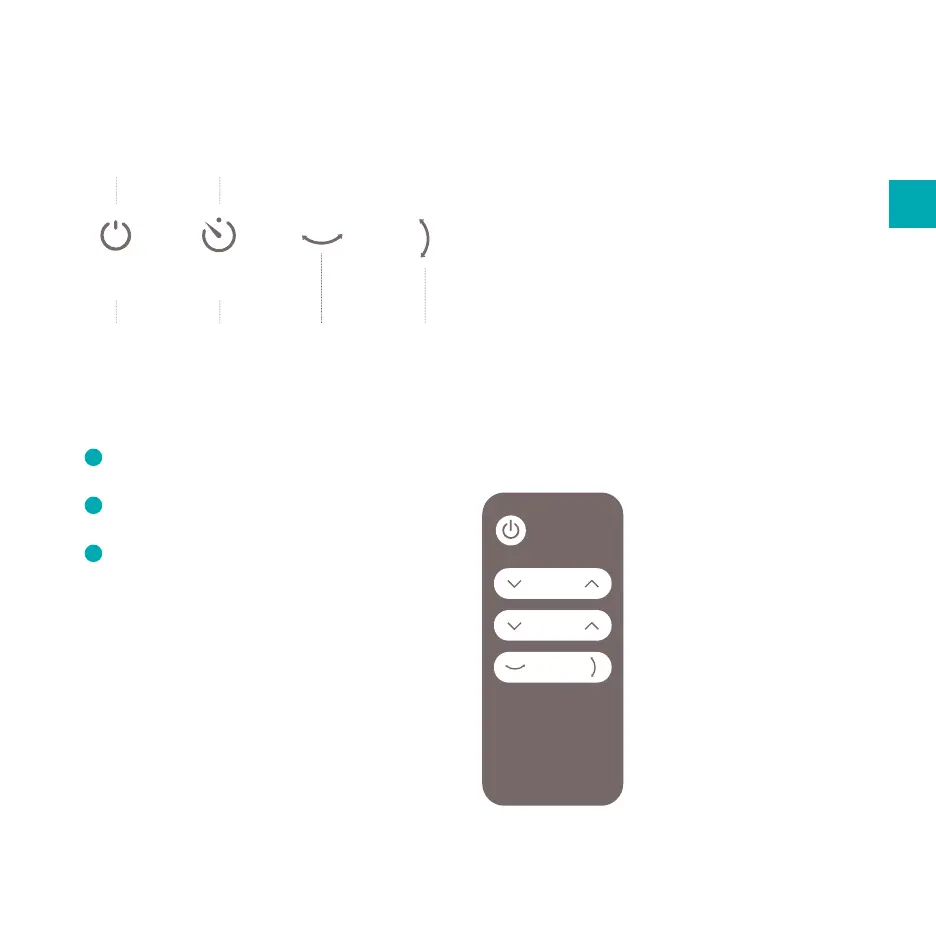
Turning the device On/O
1
Press and hold the ON/OFF button and the
unit will start automatically.
2
Indicators of the functions in progress are
shown simultaneously.
3
To turn the unit o, press ON/OFF button
again.
Setting the timer
Press the TIMER button to switch between 1- or
3-hour time-out. When the set time has been
reached, the device will turn o automatically. The
indicators will show the hour(s) you set as you
press the TIMER button.
Fan speed
indicator
Timer
indicator
Horizontal
oscillation
Vertical
oscillation
On/O Timer
Setting the fan speed
Use the ON/OFF button to switch between various
speed. The indicator of your selected speed (1, 2 or
3) will illuminate.
Using the oscillation mode
Press the HORZONTAL- and/or VERTICAL
OSCILLATION buttons to activate the oscillation
mode(s).
Remote control
All the above functions can
also be performed with the
supplied remote control.
This remote control requires
a cell battery CR2032 to
operate.
power
Fan
Timer
Swing


 To Next Page