WiFi connection indicator: This Indicates whether or
not you are connected to your home WiFi router.
24-hour clock: This is updated via the internet or
where you have no internet connection you are able to
manually adjust.
System settings
Day or Night: Near the top right of the screen is
a small Sun
or Moon icon. There is an ability
in the DVS® to make the system behave dierently
depending on the time of day or night.
Note: Typically, this is not needed as the system
will self-adjust to the changes in day and night
temperature, humidity and CO
2
levels if needed. If you
would like to nd out more about this setting please
call us on 0800 387 387.
Fan: The fan icon near the top right of the screen will
rotate if the system fan(s) is rotating.
Note: if it is not rotating the system has stopped the
fan(s). This could be for a number of control logic
reasons and is nothing to be concerned about.
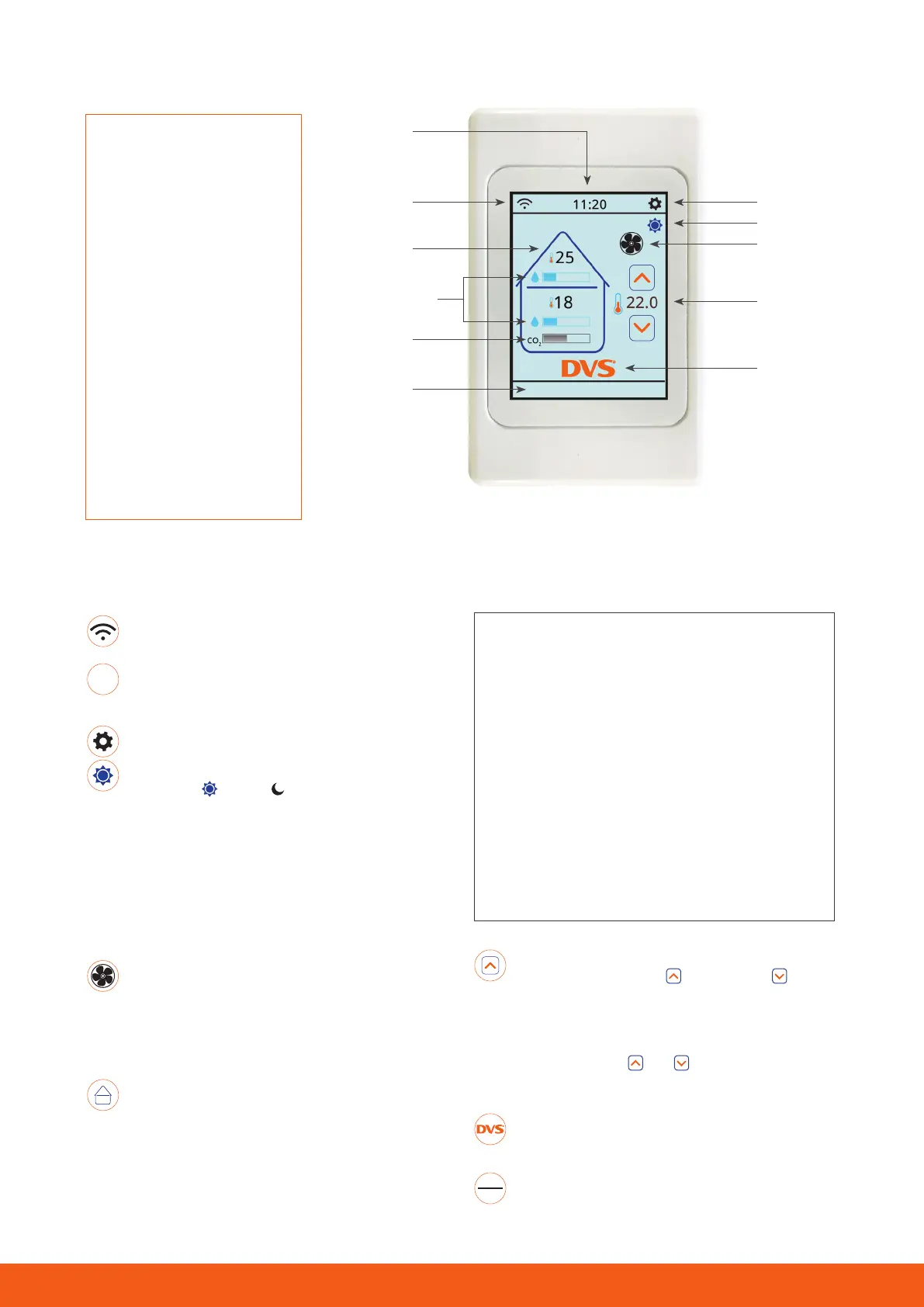
House: In the “roof space” section of the house you
can see the air supply temperature and humidity level
bar indicator. The “inside” section of the house shows
you the temperature and humidity level at the control
panel and also a bar indicating CO
2
levels in the home.
The humidity levels indicated are Absolute Humidity.
Your DVS® Premium
Connect system
represents the latest in
positive pressure home
ventilation technology.
The large easy to read
touch screen allows you
to see what Is happening
with your system and to
make adjustments if you
need to. The system Is
also able to be connected
to your home Internet
to allow trouble free,
automatic downloads of
software Improvements.
On your home screen (top to bottom)
Note: We will expand on the use of the home screen and the icons listed below, later in this user guide.
11:20
CO
2
levels
Note: The system is equipped with one CO
2
sensor. A plug-in device which pairs with your
Connect control panel. If the CO
2
control function
is enabled (using the Settings menu) the system is
programmed to increase the ventilation rate when
the CO
2
level rises above 1000ppm. For specic
CO
2
level information see the graphs section of
the diagnostics menu. The system can be tted
with up to 4 of these remote sensors. When more
than one sensor is tted the system calculates the
average CO
2
concentration across the sensors.
Set Temperature and adjustment: To the right of
the house is an up arrow
, a down arrow and a
temperature. The temperature displayed is the target
temperature the system will try to achieve when
the air supply temperature is able to help achieve it.
You can touch the
and icons to adjust the set
temperature.
DVS®: Touch the DVS® logo briey and our phone
number will appear.
The bottom bar: The bottom bar is where you will
see any system notications appear.
Wi
Connection
Indicator
24-hour
Clock
System Settings
Fan
House
Set
Temperature
& Adjustment
DVS® logo
Bottom Bar
Day/Night
CO
2
Levels
Humidity Levels
Please see below an explanation of what each home screen icon means or is used for.
For further assistance please call DVS
®
on 0800 387 387 2


 To Next Page
 Loading...