PROGRAM TABLE
PROG. PARAMETER MAXIMUM CYCLE
PROCESS
VALUES
MAXIMUM
LOAD
S134
134°C for 5’
3 pre-vacuum phases
drying 10’ (6’ with vacuum + 4’
with ventilation)
Solid,
Porous,
Vases and
Containers,
Type dental
transfer
instruments,
Wrapped
Class S
134-137°C
2.04-2.25 bar
4 kg solid or
1.5kg porous
S121
121°C for 20’
3 pre-vacuum phases
drying 11’ (7’ with vacuum + 4’
with ventilation)
Class S
121-124°C
1.04-1.24 bar
FLASH
134°C for 3’
2 pre-vacuum phases
drying 5’ (3’ with vacuum + 2’
with ventilation)
Unwrapped solid
instruments
Class S
134-137°C
2.04-2.25 bar
4 kg solid
Type
Dental
Transfer
Instruments
(for S class)
Bowie
& Dick
Test
134°C for 3’ 30’’
3 pre-vacuum phases
drying 10’ (6’ with vacuum + 4’
with ventilation)
C-S-BMS
Dental-OCPD
B&D Test
TEST
134-137°C
2.04-2.25 bar
B&D test pack
or
equivalent
Vacuum Test
Temperature below 35°C TEST < 35°C Empty chamber
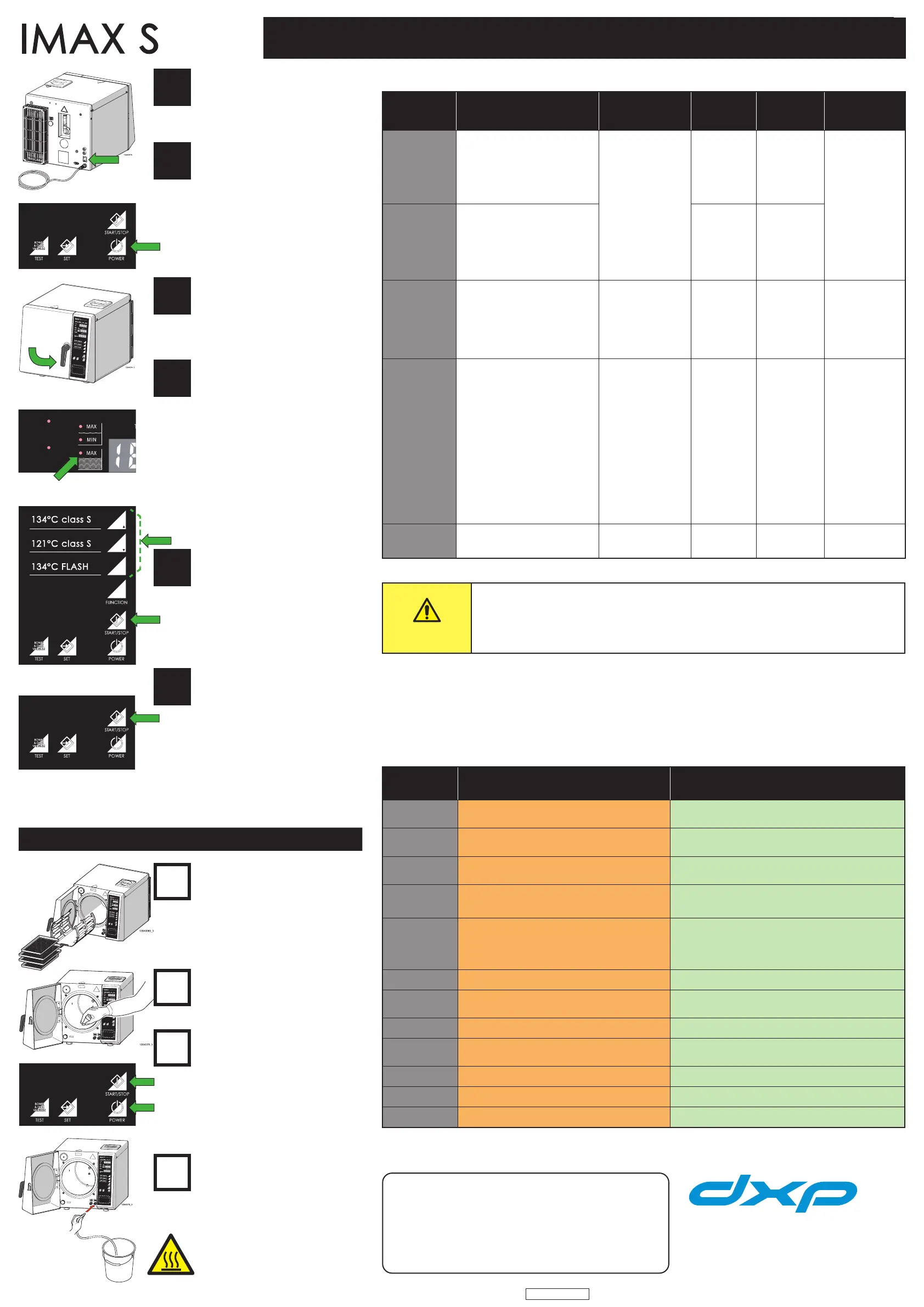
Turn on the main switch
• The top display shows the time.
• The central display indicates the
OFF state.
• The lower display shows the date
and month.
Press the POWER switch
• The device switches on and
performs a self-diagnosis.
• Wait for the beep to indicate the
end of the self-diagnosis.
At the end of self-diagnosis, the
display shows the current time and
the temperature values and pressure
of the chamber.
If the chamber temperature is below
35 °C, the indication LOW appears on
the display.
Load the chamber and close the door
Maximum load:
• Non-porous: 4 kg
• Porous. 1.5 kg
Loads greater than the maximum
can compromise the result of the
sterilisation.
Check the LED indicators for the
tank water levels
Ensure that the following are not lit:
• Minimum level indicator for the
demineralised water tank;
• Indicator for the contaminated
water tank;
Do not use tap water. Poor quality
water leaves deposits and/or
encrustations and compromises the
proper functioning of the autoclave.
If necessary, fill the water tank
until the maximum level LED
indicator comes on. Use only <15 μs
demineralised water.
Program selection
• Press the button for the desired
program.
• Press the START/STOP button
Especially for the S134 FLASH
program, need to press the 134°C
FLASH and START/STOP buttons
at the same time.
End of program
• The READY and STERILIZE LEDs
light up and the device emits the
end of cycle acoustic signal.
• Press the START/STOP button.
• The door can now be opened.
The instruments and the chamber
are hot.
The display shows the temperature,
pressure, and total duration of the
sterilisation cycle.
30 minutes after the end of the
program, if the door has not been
opened or any buttons pressed, the
device switches off automatically.
Automatic cleaning cycle
• Run the automatic cleaning cycle
after 60 sterilisation cycles. NEED
CLEANING appears on the display.
• Remove rack and trays, clean them
with a common neutral detergent
and then dry them well.
Inserting a cleaning pad
Place a cleaning pad in the centre of
the sterilisation chamber and close
the door.
Start the automatic cleaning cycle
• Press the START and the POWER
buttons at the same time.
• The cleaning cycle lasts for about
15 minutes.
• At the end of the click, the READY
LED lights up, open the door
and clean any residues from the
inside of the chamber with a cloth
dampened with demineralised
water.
Putting into service
• Turn on the steriliser.
• Open the door.
• Empty the contaminated water
tank with the drain hose.
• Remove the drain hose.
• Fill the demineralised water tank.
• Clean the chamber with a cloth
dampened with demineralised
water.
BE CAREFUL of hot steriliser parts!
CAUTION
The door has a safety device that prevents it from opening: if the steriliser
is off; during a cycle; when there is pressure in the chamber; or when an
alarm occurs.
DO NOT FORCE THE DOOR TO OPEN
WARNING MESSAGES
MESSAGE
DISPLAYED
CAUSE SOLUTION
OPEN DOOR
The door was not opened at the end of the cycle.
START command with door open.
Open the door. Close the door.
DRY FAIL
Drying not completed due to manual intervention,
although sterilisation has been completed.
Press the STOP button.
It is possible to run a new cycle.
BLACK OUT
Black-out during the cycle
Press the POWER button to exit. Check the electrical
socket. Dry the chamber and restart the cycle.
NEED
CLEANING
60 cycles performed without an automatic
cleaning cycle.
Run the automatic cleaning cycle.
NEED
SERVICE
A year has passed since the installation date or
more than 1500 cycles have been run without
any maintenance by the technical support
service
The warning message disappears as soon as a cycle
is selected, but will appear again at the next switching
on. Call for a complete check-up by a qualified
technical service
cd 1
Clogged drain filter. Clean or replace filter.
cd 4
Blocked water dispenser. Dirty water filter.
Perform filter maintenance routine. Run an automatic
cleaning cycle.
cd 6
Clogged bacteriological filter. Replace the bacteriological filter.
cd 7
Vacuum phase too slow. Dry the chamber and run an automatic cleaning cycle.
AL 6
Initial vacuum phase too long. Run an automatic cleaning cycle.
AL 7
Door not properly locked. Check that the door is properly closed.
AL 8
Air in the chamber. Check the door seal. Clean the gasket.
If the problem persists, contact the technical support service
Technical support service:
MAINTENANCE
NSK Dental Italy S.r.l.
Via dell’Agricoltura, 21
36016 Thiene (VI) - Italy
Tel. +39 0445 820070
QUICK GUIDE FOR USING THE STEAM STERILISER
2
Rev. 04 - Date: February 2021
QI1011EN
1
1
2
3
4
5
6
2
3
4


 To Previous Page
 Loading...