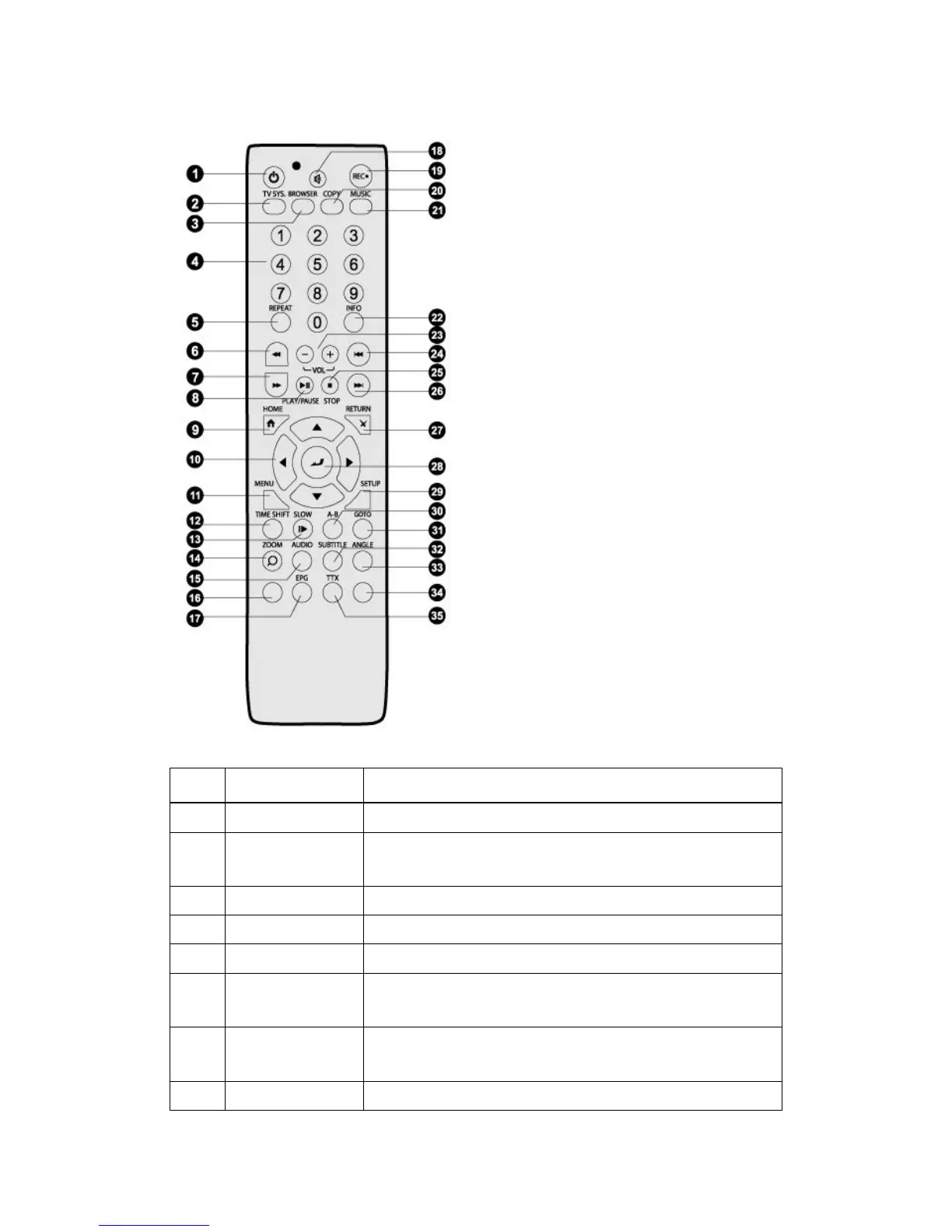
2.3 Remote Control
1. STANDBY 2. TV SYSTEM
3. BROWSER 4. Numeric buttons
5. REPEAT 6. FR
7. FF 8. PLAY / PAUSE
9. HOME
11. MENU 12. TIME SHIFT
13. SLOW 14. ZOOM
15. AUDIO 16. Red
17. EPG(Green) 18. MUTE
19. REC 20. COPY
21. MUSIC 22. INFO
23. VOL-/VOL+ 24. PREV
25. STOP 26. NEXT
27. RETURN 28. ENTER
29. SETUP 30. A-B
31. GOTO 32. SUBTITLE
33. ANGLE 34. Blue
35. TTX(Yellow)
No. Button Function
1
STANDBY
Press to enter standby mode or wake up.
2
TV SYSTEM
Press to switch between NTSC, PAL, 480P, 576P, 720P, 1080I,
and 1080P.
3
BROWSER
Press to enter the file manager.
4
Numeric buttons
Press to enter numeric input when changing settings.
5
REPEAT
Press to set repeat option: One, All, (and Shuffle).
6
FR
Press to fast rewind the current playback. Press repeatedly to
Press to fast forward the current playback. Press repeatedly to
select speeds.
8
PLAY/PAUSE
Press to begin/pause the playback.


 To Next Page