8 Dynatron® ibox™ Operator’s Manual
|
Rev. 2
|
5/14/2019The Dynatron® ibox™ Iontophoresis Device
table of contents symbols & labels limited warrantyprev
< >
nextprev topic
<
< >>
next topic
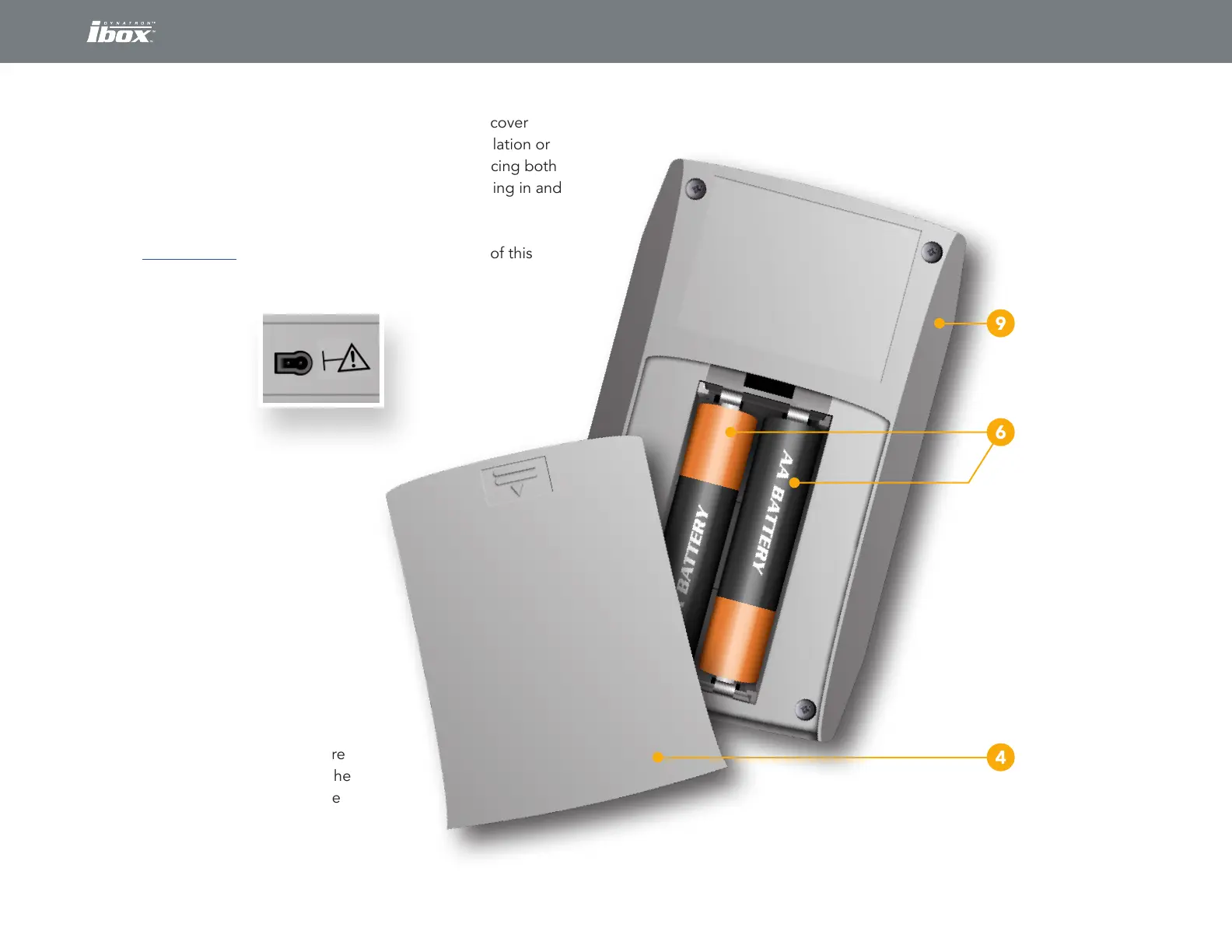
4. BATTERY COMPARTMENT COVER: Removal of this cover
allows access to the two AA Alkaline batteries for installation or
replacement. This cover is most easily removed by placing both
thumbs at the top of the compartment cover and pressing in and
pushing down on the cover at the same time.
See “BATTERIES” in the Technical Information section of this
manual for additional information on the
Dynatron ibox batteries.
5. OUTPUT JACK:
The output
jack allows for
connection of
the electrode
cable. The jack
only accepts an authorized
Dynatron ibox electrode
cable. The electrode
cable plug is “keyed” so
that it must be orientated
properly before insertion
into the jack.
6. BATTERIES: Two 1.5 Volt
AA Alkaline batteries are used
to power the Dynatron ibox.
They must be inserted into the
battery compartment as shown
with the correct orientation. Care
should be used when inserting the
batteries to avoid damage to the
device.
Case
Batteries
Battery Compartment Cover
Back and Battery Compartment Internal Views
The output jack
is located on the
top of the device.


 To Next Page