Setting up the component video selector
7
2 Connect a digital coaxial audio cable to the Digital jack below the video IN jacks on
the back of the component video selector, then connect the other end of the cable to
the digital coaxial audio out jack on the component video device.
Or,
Connect an analog audio cable to the L and R audio jacks below the video IN jacks on
the back of the component video selector, then connect the other end of the cable to
the analog audio out jacks on the component video device.
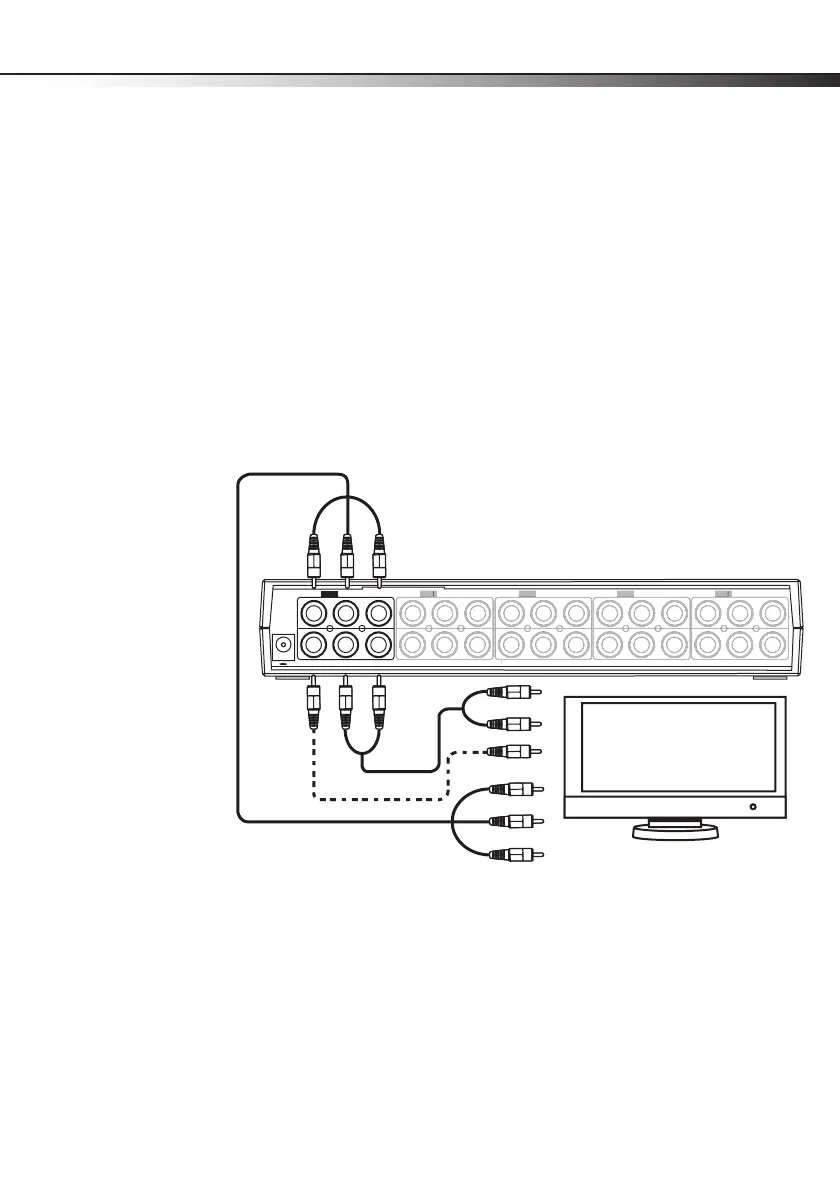
Connecting a TV
To connect a TV:
1 Connect a component video cable to the OUT Pr, Pb, and Y jacks on the back of the
component video selector, then connect the other end of the cable to the component
video in jacks on the TV.
DC 9V
Digital R L
Pr OUT Pb Y
Digital R L
Pr IN4 Pb Y
Digital R L
Pr IN3 Pb Y
Digital R L
Pr IN2 Pb Y
Digital R L
Pr IN1 Pb Y
Di
ital R
P
Y
Di
ital R
IN
P
Y
Di
ital R
P
Di
ital R L
P
Y
OR



 To Next Page