EasyManua.ls Logo

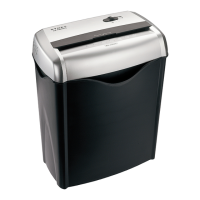
Dynex DX-PS06CC - User Manual

Dynex DX-PS06CC
13 pages
Print Icon
To Next Page IconTo Next Page
Loading...
USER GUIDE
Cross-Cut Paper Shredder
DX-PS06CC
Before using your new product, please read these instructions to prevent any damage.
DX-PS06CC_13-0652 MAN_V2_ENG.fm Page 1 Thursday, June 27, 2013 2:04 PM

Other manuals for Dynex DX-PS06CC

Questions and Answers

  • A
    Amanda RobinsonJul 27, 2025
    How to fix Dynex DX-PS06CC that does not work?
    • A
      Andrew JonesJul 27, 2025
      If your Dynex Paper Shredder isn't working, ensure it's properly plugged into a working outlet. If it has been used for a long time, it may have overheated; turn it off for at least 30 minutes to allow it to cool down. Also, remove any plastic bag lining the wastebasket, as this can interfere with operation. Make sure to feed paper directly into the center of the feed slot.
  • J
    jennifer92Aug 2, 2025
    Why Dynex Paper Shredder runs in Rev mode but not in On/Auto mode?
    • J
      Jennifer AyalaAug 2, 2025
      If your Dynex Paper Shredder runs in Rev mode but not in On/Auto mode, set the unit to On/Auto and insert the paper to be shredded, as the motor starts running only when paper is inserted. The sensor is located directly in the center of the slot, so insert an index card directly in the center of the feed slot, and apply force. The sensor may be blocked with paper. This will usually clear any paper blocking the sensor.
  • W
    Wendy MaysAug 11, 2025
    What to do if my Dynex DX-PS06CC Paper Shredder is jammed?
    • M
      Michelle MorrowAug 11, 2025
      If your Dynex Paper Shredder has a paper jam, switch it to Rev (reverse) mode to try and dislodge the paper. You may need to tug and remove several sheets to effectively clear the machine. For stubborn jams, shredder oil can help loosen the paper. If needed, feed a rigid sheet of cardstock into the shredder to help push the jammed paper through.
  • P
    Peter CamachoAug 17, 2025
    Why my Dynex DX-PS06CC will not stop running?
    • J
      John Green PhDAug 18, 2025
      If your Dynex Paper Shredder won't stop running, it might be due to a blocked sensor. Try inserting a sheet of paper to clear the sensor.

Summary

Important Safety Instructions

Product Features Overview

Package Contents List

Shredder Component Identification

Setting Up Your Paper Shredder

How to Use the Paper Shredder

Shredder Maintenance Guide

Paper Shredder Troubleshooting Guide

Paper Shredder Specifications

Dynex Shredder Limited Warranty

Warranty Period Duration

Defines the warranty length and how it's calculated from the purchase date.

Covered Defects and Warranty Remedies

Details what the warranty covers and the repair or replacement options available.

Procedure for Obtaining Warranty Service

Explains the steps for customers to follow to request warranty assistance.

Geographical Validity of Warranty

Specifies the countries or regions where the product warranty is applicable.

Warranty Exclusions and Limitations

Lists conditions, damages, and uses that are explicitly not covered by the warranty.

Dynex DX-PS06CC Specifications

General IconGeneral
Shredder TypeCross-Cut
Sheet Capacity6 sheets
Shred Size0.2 x 1.6 inches
Throat Width8.7 inches
Can ShredPaper, Credit Cards
Auto Start/StopYes
Overheat ProtectionYes
Security LevelP-4
Power120V AC

Related product manuals