Installation instructions
7
DX-TVM113
STEP 3 - Determine whether your TV has a flat back or an irregular or obstructed back
1 Carefully place your TV screen face-down on a cushioned, clean surface to protect the screen from damages
and scratches.
2 If your TV has a table-top stand attached, remove the stand. See the documentation that came with your TV
for instructions.
3 Temporarily lay the TV brackets (B and C) on the back of your TV.
4 Align the screw holes in the TV brackets with the mounting screw holes on your TV.
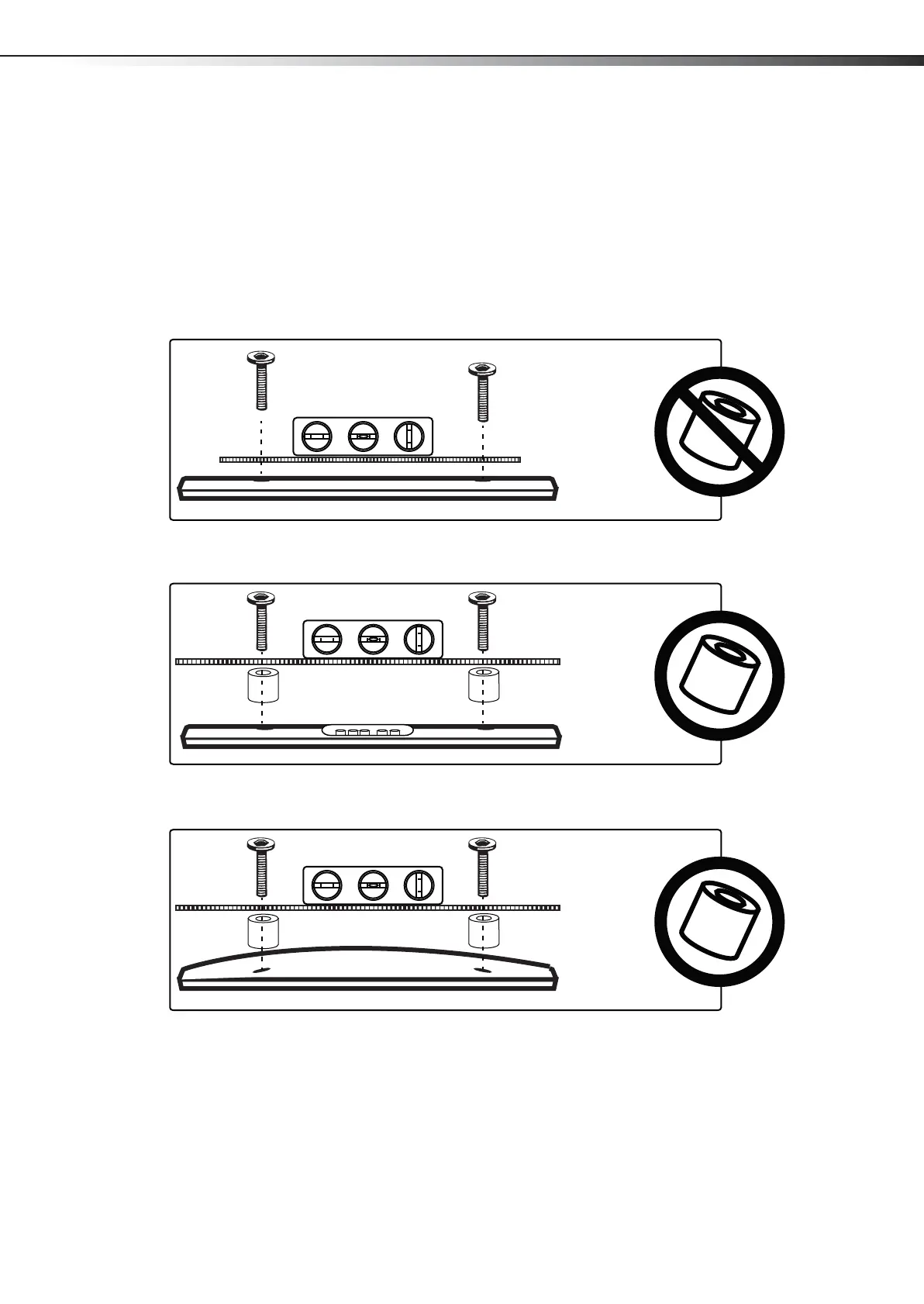
5 Identify which type of back your TV may have:
• Flat back: The brackets lay flush against the back of your TV and do not block any jacks. You do not need spacers when
assembling the wall mount.
• Obstructed back: The brackets block one or more of the jacks on the back of your TV. You will need spacers when
assembling the wall mount.
• Irregularly-shaped back: There is a gap between a bracket and some part of the back of your TV. You will need spacers
when assembling the wall mount.
6 Remove the TV brackets.
DX-TVM113_13-0614_MAN_V2_EN-A4.fm Page 7 Friday, June 7, 2013 7:38 AM


 To Next Page