2. This dehumidifier doesn't have cooling function. It will produce heat during the
operation and may increase the room temperature by 1 to 4 °C.
3. This appleiance best working enviroment is at 30C° and 80% humidity: 20 litre/day.
At different temperatures and relative humidity, it may have different dehumidifying
capacities.
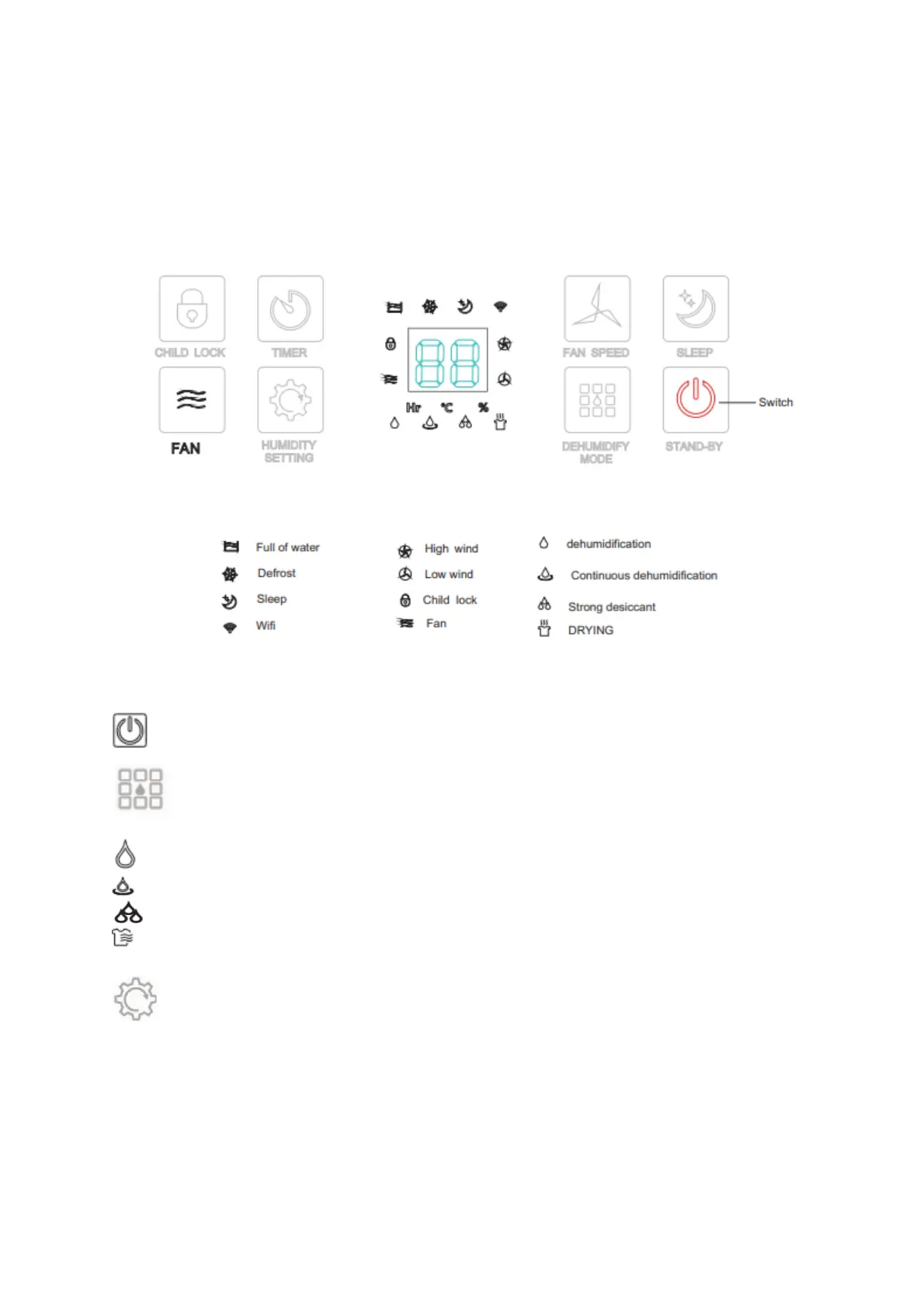
Power button: This button can control the machine on and off
Dehumidification mode: Press to enter the mode selection state and you can
select from the below 4 dehumidification mode.
normal desiccant: adjustable wind speed and humidity
continuous dehumidification: low wind, humidity is not adjustable
strong desiccant: high dehumidification
drying mode: default high wind mode, wind speed and humidity are not adjustable
Humidity settings:
Only in normal mode, the indicator light show the current air humidity.
Blue: below 50% ; Green. 50-70% ; Red: more than 70%.
Humidity can be set between 30% - 80% (5% adjustment factor)
Humidity setting is only valid under normal dehumidification.


 To Next Page